
Automation is the shortcut to growth. When sales, support, and finance all talk to each other, you cut waste and speed up cash flow. In this article you’ll see a short list of platforms that do exactly that, plus a quick guide on picking the right fit for your business.
We’ll walk through eight options, highlight where they shine, and give you a checklist so you can decide fast. By the end you’ll know which tool matches your team’s speed, security, and integration needs.
1. Unified Automation Hub (Our Pick)
The Unified Automation Hub lives on the Donely platform, which means it inherits the same instant‑deploy AI agents and 800+ native connections. The dashboard shows every sales lead, support ticket, and finance invoice in one pane, so managers never switch tabs.
Imagine a lead lands in your web form. The hub pulls the contact, scores it with an AI model, creates a follow‑up task in the CRM, and logs the whole flow for audit. At the same time a support ticket about the same prospect opens, gets auto‑routed, and the finance team sees a pending quote. All of this happens without writing code.
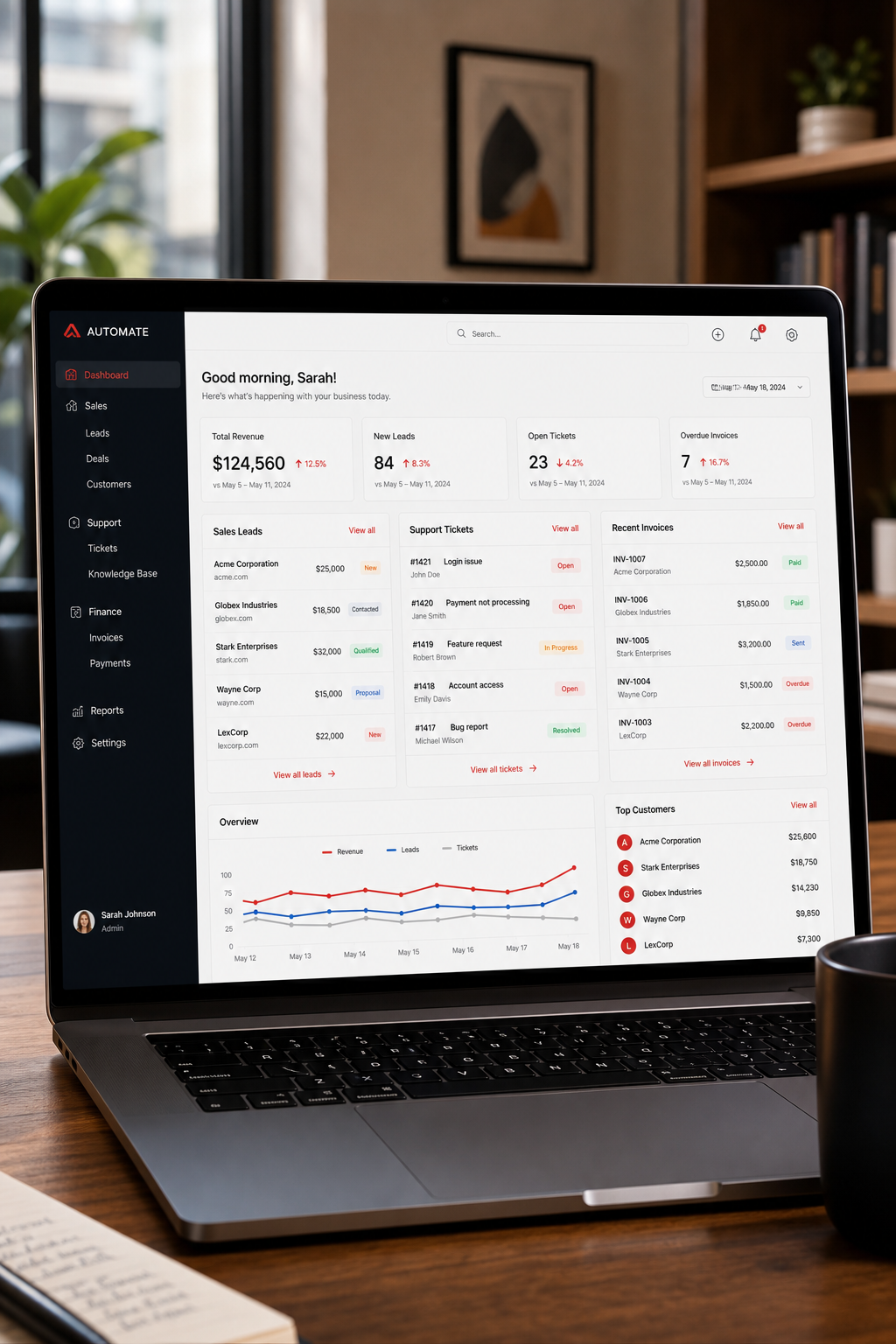
The platform’s RBAC lets you grant the sales bot read‑only access to CRM data while the finance bot can update invoices but not touch customer records. Audit logs capture every API call, giving you a clear compliance trail.
Because Donely hosts the back‑end, you spin up a new instance for each department in under two minutes. Scaling from a solo founder to a midsize team is just a click away.
It also offers pre‑built templates for common workflows: lead‑to‑quote, ticket‑to‑resolution, and invoice‑reconciliation. Load a template, map your fields, and you’re live.
Key takeaway: With a single dashboard, you get end‑to‑end visibility and governance that most single‑purpose tools lack.
2. Donely – AI-Powered Sales, Support & Finance Automation
Donely bundles three key modules that together cover the whole revenue‑to‑cash cycle. The lead‑capture and pipeline‑management module handles deal tracking, the support module adds case routing and knowledge‑base assistance, while the finance module brings billing and compliance data into the same unified dashboard.
The platform’s OpenClaw AI agents score leads, draft outreach emails, and predict churn risk. You can trigger a support case automatically when a high‑value prospect raises a question, then push the case outcome into the finance module for invoicing.
Integration depth is massive – over 800 connectors on the built-in marketplace – but you’ll need to decide which ones you actually use. The interface is designed for small to midsize teams, so start with the core modules you need.
According to Wikipedia’s overview of robotic process automation, automating repetitive tasks can cut processing time by up to 80 %. Donely’s automation builder lets you design such AI agents without code.
Security is strong: the platform provides field‑level encryption, event monitoring, and a robust RBAC model with full audit‑log detail so you get a complete transaction record.
Pricing starts at a flat monthly rate per user, with unlimited multi‑instance AI employees included. For a midsize team the total stays predictable, so you can scale without surprise costs.
Key takeaway: Donely offers a deep, unified ecosystem, but you pay for breadth and must manage integration choices.
3. Unified CRM, Service, and Operations Automation
This platform bundles a free‑tier CRM with service and operations automation modules, giving you a low‑cost path to unified automation. Its visual workflow builder lets you string together sales, support, and finance steps in a single canvas.
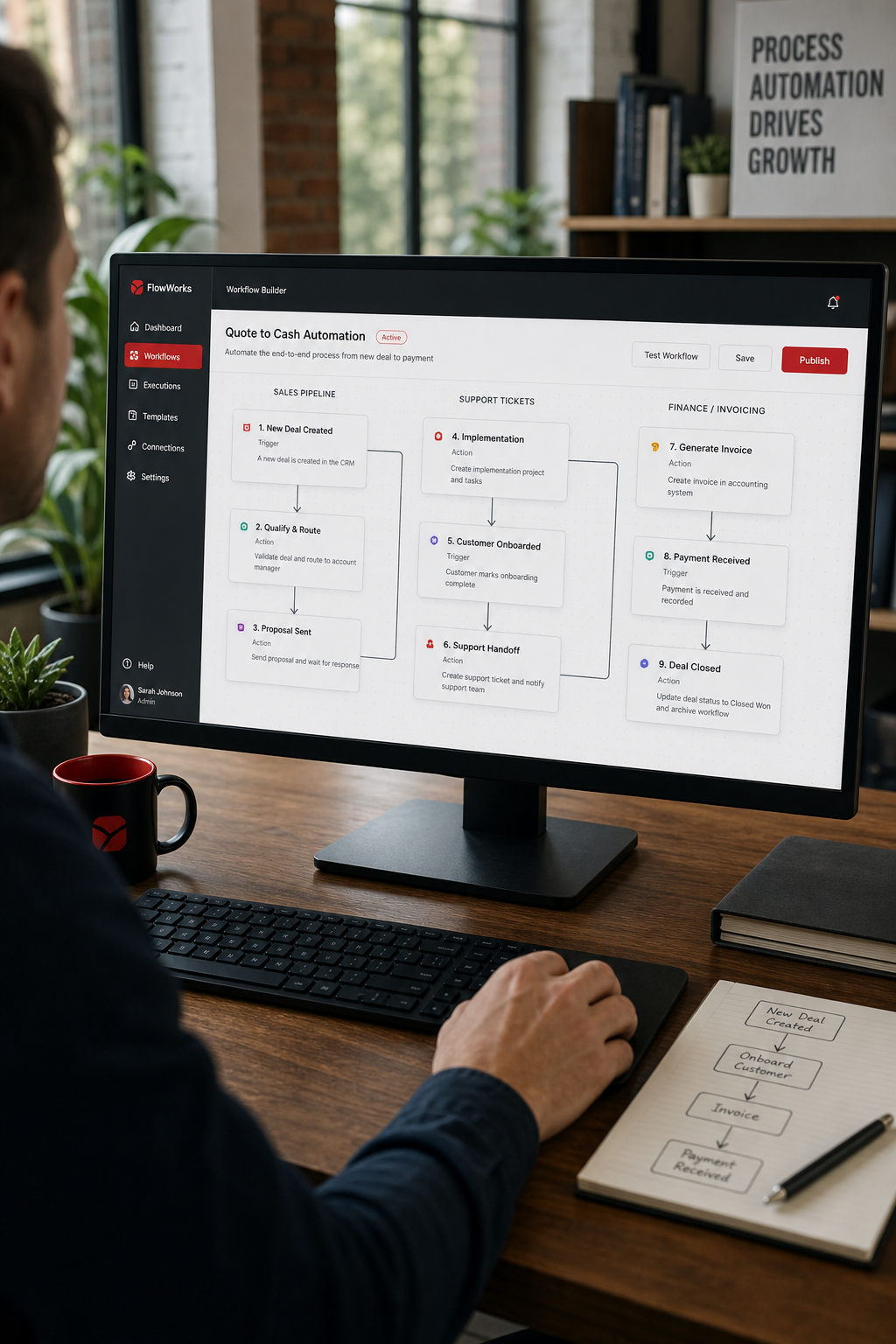
For example, a new contact triggers a lead‑scoring workflow, which then creates a ticket in the service module if the lead shows high support interest. Once the ticket resolves, the operations module can generate an invoice and push it to your accounting system.
The built‑in AI helps write emails, suggest next actions, and clean duplicate records. While not as extensive as some large app marketplaces, this platform’s marketplace still offers 500+ integrations.
Its permission model is role‑based, but the audit log only records high‑level changes. If you need a detailed transaction trail, you may need an add‑on or external logging tool.
Pricing is transparent: the CRM is free, the service module starts at $45 per month per user, and the operations module adds $50 per month per user. This makes it a solid choice for growing teams.
Key takeaway: This platform balances ease of use and cost, ideal for SMBs that want a unified view without enterprise‑level complexity.
4. Modular CRM, Support, and Finance Suite
The suite delivers three separate apps that can be linked together through its native integration layer. The CRM handles lead management, the desk manages support tickets, and the books takes care of invoicing and payments.
The three apps share a common user database, so a contact created in CRM instantly appears in desk and books. You can set up a workflow that, when a deal reaches “Closed‑Won”, creates a draft invoice in the books and notifies the finance team.
The platform’s AI assistant can suggest next steps, auto‑populate fields, and draft email replies. The AI assistant also flags risky deals based on historical patterns.
Integration count sits around 600, covering most popular tools. That catalog is sufficient for most SMB stacks.
RBAC is supported at the module level, and audit logs capture user actions across the suite. However, logs are less granular than Donely’s per‑instance audit trail.
Pricing is tiered per module. The CRM starts at $12 per user, the desk at $14, and the books at $9. Bundling can lower the total cost, but you still pay for each module.
Key takeaway: This modular approach works well if you like keeping sales, support, and finance in separate but linked apps.
5. Unified Suite for Sales, Support, and Finance
A unified suite bundles a CRM for sales, a support desk system, and invoicing tools. Each product shares a common UI language, making it easy for teams to hop between them.
[TOOL_SCREENSHOT]
When a lead becomes a customer, the CRM can push the record to the support desk to open a welcome ticket, then trigger the invoicing tool to generate the first invoice. All steps can be automated with the platform’s automation builder.
The AI‑powered assistant helps with lead scoring, email drafting, and ticket classification. It also offers a “suggested reply” feature that reduces support handling time.
The platform supports about 500 integrations via native connectors and third‑party automation services. While not as extensive as some larger enterprise suites, the list covers the most common business apps.
RBAC is granular, letting you restrict each AI agent to its own domain (sales, support, finance). Audit logs are available but only for enterprise plans.
Pricing starts at $29 per user for the CRM, $15 per agent for the support desk, and $15 per month for invoicing. The combined cost can be competitive for mid‑size teams.
Key takeaway: This type of suite provides a clean, unified experience with decent AI, suitable for teams that want a single vendor for all three pillars.
6. Quick Comparison of Top Unified SaaS Platforms
Donely stands out with a fully unified dashboard, comprehensive RBAC and audit logs, OpenClaw AI agents, and over 800 integrations for $25-$50 per user. Other leading platforms offer a mix of partial dashboards, limited RBAC, built-in AI assistants, and integration counts up to 3,000, with prices ranging from free to $150 per user. However, no other solution matches Donely’s governance depth and per-instance control.
All leading platforms can automate across sales, support, and finance, but they differ in governance depth and integration breadth. If auditability and per‑instance control matter, Donely’s UnifyOps stands out.
Key takeaway: Choose a platform whose governance matches your compliance needs, not just its feature list.
7. How to Choose the Right Unified SaaS Solution
Start with a clear map of your current workflows. List every hand‑off between sales, support, and finance. Then rank each platform on three axes: governance, integration depth, and total cost of ownership.
Governance means looking at RBAC and audit‑log detail. Wikipedia’s role‑based access control article explains why fine‑grained permissions matter for data‑privacy regulations.
Integration depth is about the number of native connectors you actually need. Count the apps you use daily , CRM, email, accounting, chat , and verify each platform lists them.
Finally, calculate TCO. Include subscription fees, any per‑instance costs, and the time your team spends building and maintaining flows. A cheap license can become expensive if you need many custom connectors.
Run a pilot on the top two candidates. Deploy a single lead‑to‑invoice flow, measure latency, error rate, and user satisfaction. Use the pilot results to lock in your final pick.
Key takeaway: A short pilot can reveal hidden friction before you commit to a multi‑year contract.
8. FAQ
What makes a SaaS solution truly unified across sales, support, and finance?
A unified solution ties the three pillars together in one data model and UI. It lets a sales lead flow into a support ticket and then into an invoice without manual export. Look for a shared dashboard, cross‑module triggers, and a single permission set that governs all actions.
Can I run multiple AI agents on the same platform?
Yes. Platforms like Donely let you spin up unlimited OpenClaw agents per instance, each with its own role and integration set. This isolates data while keeping management simple from one dashboard.
How important is RBAC for compliance?
RBAC ensures each AI or user can only see the data needed for its job. For GDPR or CCPA compliance, you must be able to prove that finance bots never accessed raw customer communications. Look for per‑instance RBAC and audit logs that capture every API call.
Do I need a developer to set up these automations?
Most platforms offer no‑code workflow builders. You drag a trigger, add an action, and map fields. For custom logic you might add a small script, but the core lead‑to‑invoice flow can be built in under an hour.
How does pricing typically work for these unified suites?
Pricing can be per‑user, per‑instance, or a combination. Donely starts at $25 per month per instance, while legacy enterprise platforms charge per user per cloud. Factor in hidden costs like extra connectors or premium support when comparing.
What integration count is realistic for my business?
The median integration count in the market sits around 1,000. If you need fewer than 500, most platforms will cover you. If you rely on niche tools, check the marketplace for custom connectors or API access.
Is a free trial enough to evaluate a platform?
A free trial lets you test basic flows, but you should also evaluate audit‑log detail, permission granularity, and scalability. Run a pilot that mimics a real sales‑to‑cash cycle and measure success metrics before deciding.
How do I ensure data security across multiple instances?
Use per‑instance RBAC, encrypt data at rest, and enable TLS for all API calls. Platforms that offer air‑gapped containers, like Donely, add an extra layer of isolation for each client or department.
Conclusion
Automation across sales, support, and finance can turn a fragmented stack into a single revenue engine. Donely’s UnifyOps gives you a true multi‑instance dashboard, full RBAC, and audit logs that many enterprise players miss. Some platform ecosystems bring massive integrations, while other modular providers offer affordable paths.
Pick the tool that matches your team’s size, compliance needs, and integration footprint. Start with a small pilot, measure the impact, and scale with confidence. When you’re ready, sign up for Donely’s free tier and see how quickly an AI employee can take the load off your sales, support, and finance ops.