
If you're asking whether OpenClaw is free, you're probably asking the wrong budgeting question.
The software layer is free. The bill you live with isn't. OpenClaw pricing only looks simple when you stop at the license line item. The true cost sits in hosting, model usage, upkeep, access control, backups, incident response, and the hours your team spends keeping a self-hosted agent stack healthy. That's why teams that start with "it's open source, so it'll be cheap" often end up underestimating the operational side.
For founders, agencies, and ops teams, the useful question is this: what does OpenClaw cost to run reliably over time, not just to install once? That total cost of ownership is what determines whether self-hosting is economical, or whether a managed option like Donely for OpenClaw deployments gives you a cleaner path with more predictable spend.
Table of Contents
- Decoding OpenClaw Pricing What You Actually Pay For
- Self-Hosting OpenClaw vs Donely's Managed Platform
- Donely's OpenClaw Pricing Tiers Explained
- Understanding Per-Instance Billing and Volume Discounts
- How to Estimate Your Monthly Costs on Donely
- Security and Compliance Add-ons for Enterprise Needs
- Which Donely Plan Is Right for You
- Frequently Asked Questions About OpenClaw Pricing
Decoding OpenClaw Pricing What You Actually Pay For
OpenClaw pricing has three layers. Only one of them is obvious.
The first layer is the software itself. OpenClaw is MIT-licensed, so the software fee is $0. That matters, but it's only the entry point. The second layer is infrastructure. The third, and usually more important one, is model usage. If you're running agents that reply often, call tools, or hold long context, the usage line can overtake everything else.
The cost categories buyers miss
Often, budgeting focuses on a server and stops there. In practice, the working cost base usually includes:
- Infrastructure: A VPS, storage, networking, and the overhead of keeping the runtime stable.
- Model spend: Every reply and tool call can hit your current provider.
- Operations: Updates, logs, restarts, prompt debugging, and environment management.
- Security work: Secrets handling, permissions, auditability, and access reviews.
- Scaling work: Capacity planning, instance isolation, and billing control as workloads multiply.
A lot of confusion around OpenClaw pricing comes from mixing up "free to install" with "free to operate." Those aren't the same thing.
Practical rule: If the agent touches paid APIs, external tools, or premium models, your software cost is no longer the decision driver. Your operating model is.
Why TCO matters more than sticker price
In consulting work, the cheapest setup on paper is often the most expensive to own. A self-hosted OpenClaw deployment can be financially sensible when the team already has DevOps depth, accepts variable API billing, and doesn't mind managing security boundaries themselves. It becomes much less attractive when each new agent adds another surface area to monitor, patch, and explain internally.
That TCO lens is what separates hobby setups from production planning. A founder testing one isolated workflow can tolerate some manual work. An agency running multiple client environments usually can't. A company with internal governance requirements definitely can't.
The reliable way to evaluate OpenClaw pricing is to treat the MIT license as the starting point, then add the hidden labor and risk costs that come with running the stack in production.
Self-Hosting OpenClaw vs Donely's Managed Platform
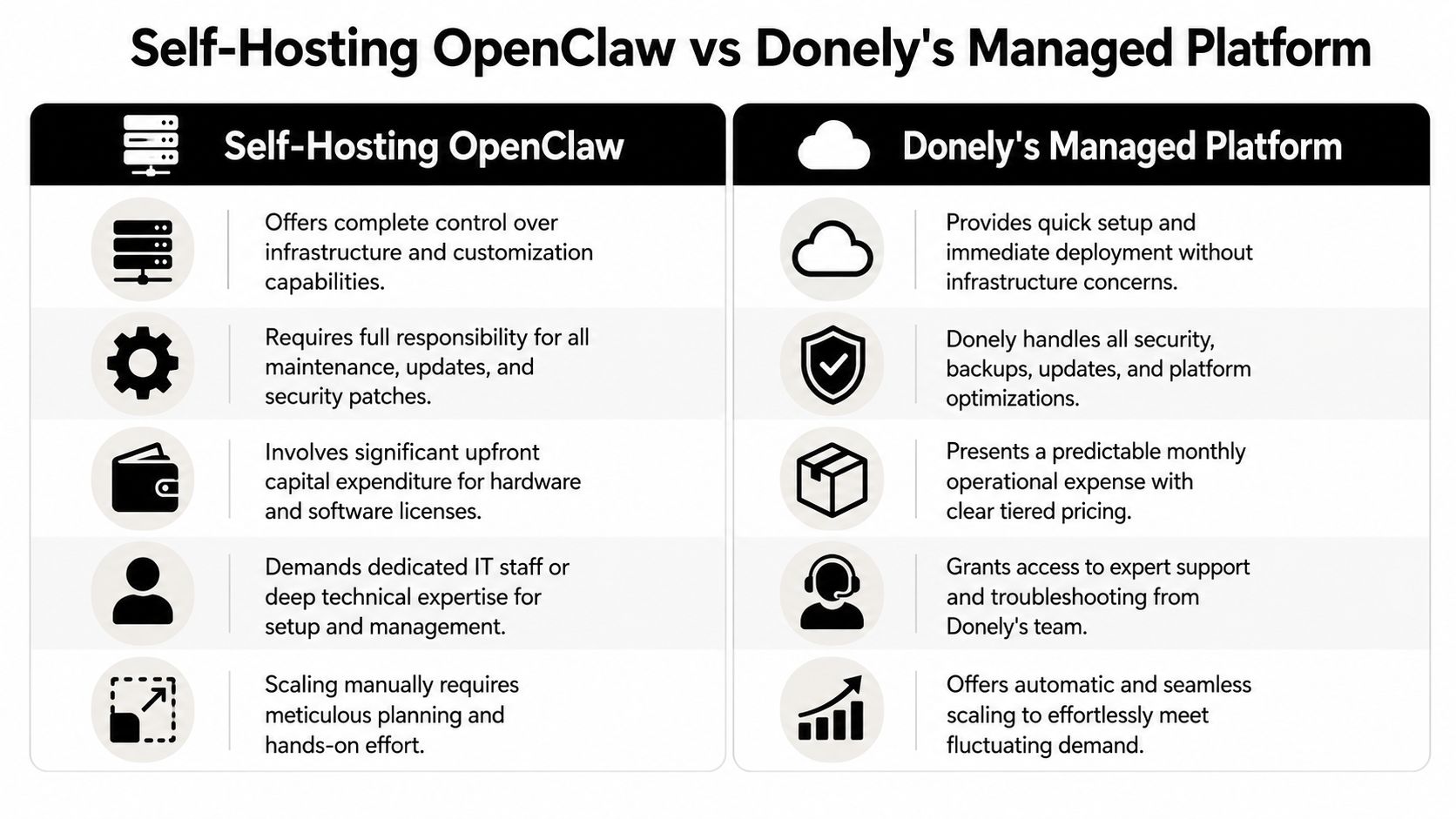
Most OpenClaw cost comparisons are too narrow. They compare software cost to subscription cost, which hides the expensive part. A more encompassing comparison is self-managed operations versus managed operations.
What self-hosting actually includes
The software fee is zero, but the runtime isn't. A pricing breakdown notes that OpenClaw is MIT-licensed at $0, self-hosting infrastructure commonly runs $5 to $50 per month, a production-grade VPS can start at $8.99 per month for 2 vCPU, 8 GB RAM, 100 GB NVMe, and model usage such as Claude Sonnet 4.6 at $3 per million input tokens often becomes the biggest variable cost, according to this OpenClaw pricing breakdown.
Those are only the direct platform expenses. They don't include the time someone spends doing the work.
Here's the part teams feel after deployment:
- Setup burden: Provisioning the host, securing access, configuring environment variables, and validating model-provider credentials.
- Maintenance ownership: You handle updates, dependency drift, backups, restarts, and troubleshooting.
- Security responsibility: Your team owns secrets management, access boundaries, and the consequences of loose operational hygiene.
- Scaling friction: Adding more isolated workloads isn't just another click. It creates more things to monitor, label, bill, and govern.
If you're comfortable running app infrastructure already, that overhead may be acceptable. If you aren't, the "free" software starts charging you in engineering hours.
What a managed platform changes
A managed service changes the unit of work. Instead of paying your team to build and maintain the platform layer, you consume it as an operating expense.
That matters most in multi-instance environments. Agencies need client separation. Internal teams need role boundaries. Operations leads need a single place to see health, logs, and billing. A managed option can package those controls so the cost is easier to forecast and the delivery risk is lower.
One route some teams take is to self-host first and move later. That can work, but it often means doing the migration after you've already accumulated inconsistent configs, uneven naming conventions, and billing sprawl. Teams evaluating that trade-off usually compare self-management with a hosted path such as Donely OpenClaw hosting, where the point isn't just convenience. It's reducing the number of operational jobs your internal team has to own.
Self-hosting gives you maximum control. It also gives you maximum responsibility.
How to think about ROI
The useful ROI question isn't "is a managed platform cheaper than a VPS?" It usually isn't, if you compare only the invoice line.
The right question is whether your engineers should spend time on agent outcomes or platform care. If the business value comes from deploying AI employees quickly, isolating workloads cleanly, and keeping billing readable, managed infrastructure often wins even before you factor in incident risk. If your business value comes from deep infrastructure customization and you already have the team to support it, self-hosting can still make sense.
Donely's OpenClaw Pricing Tiers Explained
OpenClaw cost planning gets easier when you separate two things: platform access and model usage. The platform determines how you deploy and govern instances. The model provider determines much of your variable usage cost.
OpenClaw's documentation says that every reply and tool call uses the current provider, making API usage the primary source of expense, and pricing guides show monthly spend ranging from $0 for local models to over $200 for premium ones, as noted in the OpenClaw API usage cost reference. That means the plan you choose should match your operational needs first, then your model strategy.
Donely Pricing Plans at a Glance 2026
| Feature | Free | Personal | Team | Enterprise |
|---|---|---|---|---|
| Best fit | Learning, testing, early experiments | Solo founders and individual operators | Startups, agencies, collaborative teams | Regulated, high-governance organizations |
| Platform access | Included | Included | Included | Included |
| Instance model | Basic access to get started | Per-instance billing | Multi-instance management | Custom deployment structure |
| Collaboration | Minimal | Individual-focused | Team workflows and shared management | Advanced governance and enterprise controls |
| Security controls | Standard platform defaults | Standard platform defaults | Expanded admin needs | SSO, audit-oriented controls, compliance options |
| Support level | Self-serve | Standard | Team-oriented support path | Dedicated support path |
| Pricing fit | $0 entry point | $25/mo per instance | Team tier | Custom enterprise engagement |
The current pricing page is the place to confirm live packaging and plan details: Donely pricing.
How to choose the right tier
The Free tier is for proving that a workflow is worth automating. If you're still testing prompts, channels, or internal acceptance, paying for governance features too early usually adds noise.
Personal is the practical starting point for someone who already knows the use case and wants a production-ready agent without taking on infrastructure ownership. The per-instance structure suits solo founders well because they can map one workload to one billable unit.
A Team setup makes sense when multiple people need visibility, shared administration, and cleaner separation between workloads. That's where unmanaged self-hosting tends to get messy. Permissions, logs, and instance naming become their own mini-project.
The reason enterprise pricing exists
Enterprise plans aren't just "more of everything." They're for organizations where deployment governance matters as much as feature access.
For those buyers, questions usually sound like this:
- Who can access which instance
- How do we audit actions across teams
- Can identity tie into existing controls
- What support path exists when an internal workflow becomes business-critical
Those aren't hobby questions. They're operating-model questions, and they usually determine whether the platform can survive procurement and internal security review.
Understanding Per-Instance Billing and Volume Discounts
Per-instance billing is one of the more practical ways to make OpenClaw costs understandable at scale. Instead of bundling every workload into one blurry environment, each instance acts as an isolated unit with its own purpose, ownership boundary, and billing footprint.
That structure matters when you're running different AI employees for different clients, departments, or business functions. It gives agencies a clean way to separate client work. It gives internal teams a way to avoid mixing experimental automations with production processes. It also makes permissions less chaotic because access can be scoped to the relevant environment instead of the entire account.
Why instance-based pricing is easier to govern
A lot of teams run into trouble when they treat agents as shared utilities. Costs get blended. Data boundaries get fuzzy. One noisy workflow can distort the bill for everything else.
Per-instance billing fixes that operationally. You can answer simple questions fast:
- Which workload is active
- Which team owns it
- Which client should be billed
- Which environment needs tighter access
That kind of clarity reduces internal argument. It also reduces the chance that a small pilot inadvertently grows into an untracked production dependency.
Billing is easier to control when deployment units match ownership units.
Where volume discounts help
Volume discounts matter less to a solo operator and more to agencies, consultancies, and growing internal platforms. Once you run several isolated instances, centralized billing becomes more useful than ad hoc reimbursement and spreadsheet tracking.
The practical value isn't just lower average cost. It's simpler administration. Finance can review one billing relationship. Operations can monitor multiple workloads from one place. Managers can expand gradually instead of renegotiating structure every time they launch another isolated agent.
What works in practice
The teams that handle multi-instance AI operations well usually do three things:
- Name instances by business role, not by temporary project slang.
- Assign clear owners so alerts and usage questions go to the right person.
- Review idle environments on a schedule so forgotten instances don't linger.
What doesn't work is spinning up agents casually and sorting out ownership later. That creates the same sprawl pattern teams already know from cloud infrastructure. Per-instance billing helps, but only if the organization treats each instance as a managed asset rather than a disposable experiment.
How to Estimate Your Monthly Costs on Donely
Monthly cost estimation gets easier when you stop trying to guess one universal OpenClaw number. There isn't one. The total depends on how many instances you run, how much governance you need, and which model providers sit behind the workflows.
A 2026 analysis shows how wide the model-cost spread can be: lightweight use can land around $2 to $8 per month with cheap models, moderate Claude Sonnet 4.6 usage is estimated around $25 to $60 per month, premium models can reach $1,500 to $5,000+ per month, and some providers offer free-tier usage such as 1,000 requests per day on Gemini 2.0 Flash, according to this OpenClaw API cost analysis. That variance is why platform pricing and model pricing need to be estimated separately.
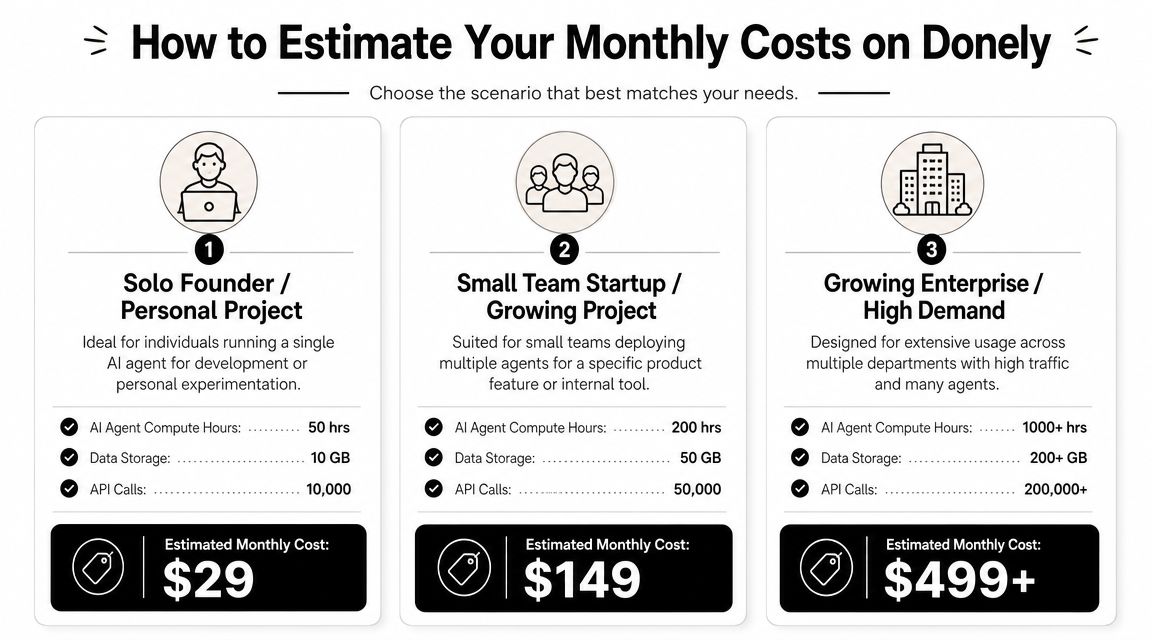
Scenario one, solo founder with one agent
This is the simplest budgeting case. One person runs one production-oriented agent for lead handling, inbox triage, or a small internal workflow.
The fixed platform side is straightforward because there's only one active instance. The variable side depends on whether the founder uses a low-cost model, stays inside a free tier, or defaults to a premium model for every interaction. In practice, this setup is usually affordable when the workflow is narrow and the prompts are disciplined.
A useful estimate model looks like this:
- Platform cost: one paid instance if the workflow is production-facing
- Model cost: low if the task volume is light and the model is economical
- Operational overhead: minimal compared with self-hosting because the founder isn't also acting as the platform admin
Scenario two, agency with five client-specific agents
Agencies shouldn't estimate this as "one system with five bots." They should estimate it as five isolated environments with separate ownership, logs, and client accountability.
That changes the cost conversation. The question isn't only whether the platform fee rises. It does. The more important issue is whether the agency would otherwise spend staff time managing client separation, billing disputes, and access confusion in a self-hosted stack.
Agencies usually feel TCO in account management hours before they feel it in infrastructure spend.
For this scenario, estimate in three buckets:
| Cost area | What to estimate |
|---|---|
| Platform | Number of active client instances |
| Model usage | Expected conversation volume and provider choice by client |
| Admin time | Client onboarding, access changes, troubleshooting, and billing review |
Scenario three, internal team with ten instances
Unmanaged complexity quickly becomes evident. Different departments ask for their own workflows. Developers want test and production separation. Operations wants visibility. Security wants tighter boundaries.
The clean way to budget is to separate baseline platform costs from workload variability. Then add a buffer for instances that may be lightly used but still need to exist for organizational reasons. That's also where a simple cost calculator becomes useful. Count the instances, estimate model mix by workflow class, and identify which ones are always-on versus seasonal or experimental.
What usually breaks cost estimates isn't the published plan price. It's assuming every instance behaves the same. They don't. A low-touch support assistant and a research-heavy internal agent can sit on very different model-cost curves even if they live on the same platform.
Security and Compliance Add-ons for Enterprise Needs
Enterprise buyers usually aren't blocked by the base price. They're blocked by governance questions.
A standard self-hosted OpenClaw setup can be workable for a technical team, but the conversation changes once procurement, security, legal, or compliance stakeholders get involved. They want to know how identity is handled, how access is restricted, where logs live, and what operational guarantees exist when the platform supports customer-facing or regulated workflows.
What the add-ons are really for
SSO matters when companies don't want another standalone login surface floating around outside their identity system. It reduces offboarding risk and gives admins a cleaner way to enforce access policies.
HIPAA-ready architecture matters when teams need an environment designed with healthcare-style controls in mind. Even when a company isn't in healthcare, that level of architectural discipline often helps during vendor review.
A 99.9% uptime SLA matters when the automation isn't just helpful, but connected to support queues, sales responses, or internal business operations that people expect to work consistently.
The operational risk these features reduce
These aren't vanity features. They reduce real failure modes:
- Access drift: Former employees or over-permissioned users keep broader access than they should.
- Audit gaps: Teams can't easily reconstruct who did what across environments.
- Approval friction: Security reviews stall because the platform story is incomplete.
- Support escalation pain: When something breaks, no one knows who owns response obligations.
For teams that need a benchmark during vendor evaluation, it helps to review published material about our security practices as part of a broader checklist around identity, data boundaries, auditability, and platform operations.
When enterprise controls are worth paying for
They're worth it when a deployment serves multiple departments, touches sensitive workflows, or has to survive formal internal review. They're usually not worth it for a single experimental agent run by one technical owner.
That distinction matters because overbuying governance too early wastes budget, but underbuying it later can slow deployment far more than the price difference ever would.
Which Donely Plan Is Right for You
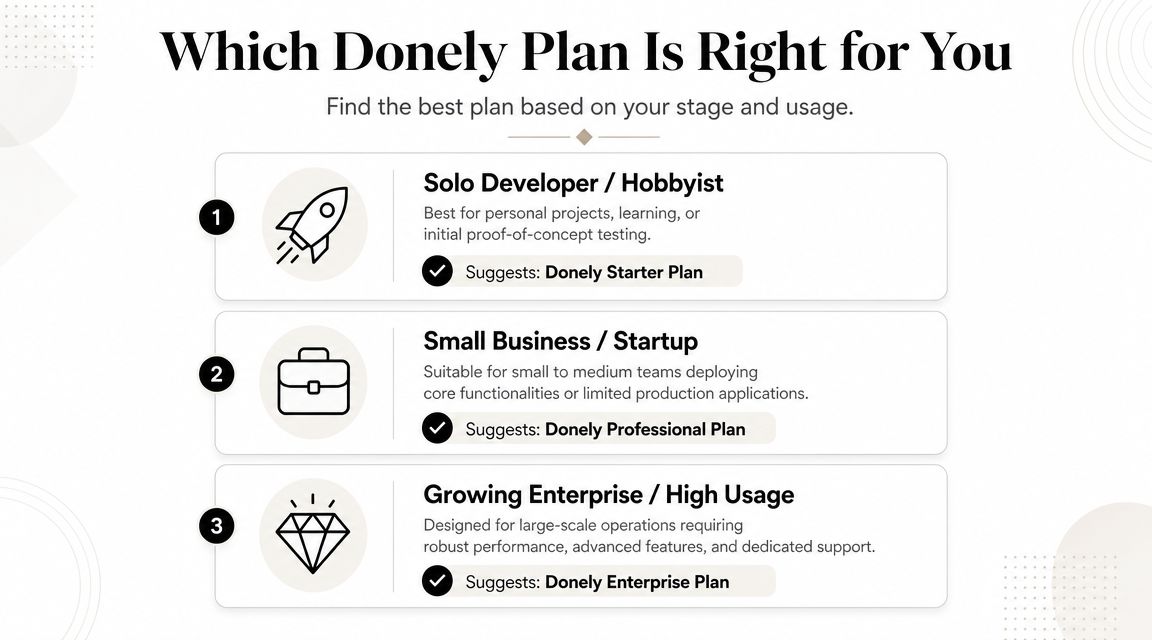
The right plan depends less on company size and more on operating pattern. Two-person teams can need strict isolation. Larger teams can still be in a lightweight experimentation phase. The decision should follow governance needs, number of instances, and how expensive a mistake would be.
A published pricing analysis shows why model architecture belongs in this decision too. Claude 3.5 Sonnet is about $3 per million input tokens and Claude 3 Opus is $15 per million, while routing routine tasks to lower-cost options such as MiniMax M2.5 at roughly $0.30 per million tokens can reduce bills by 60 to 90 percent, according to this OpenClaw pricing analysis focused on model economics. Plan choice and routing policy should be decided together.
Good starting points by user type
- Solo developer or founder: Start with the lowest paid option that gives you a production-ready path for one real workload. Keep the model mix conservative until you understand actual usage.
- Agency or consultancy: Choose the tier that supports clean instance separation and shared oversight. Client isolation usually matters more than shaving a small amount off raw hosting cost.
- Growing company: Prioritize admin structure, access control, and visibility across several workloads. The operational mess from weak boundaries shows up before the invoice does.
- Regulated or security-heavy organization: Start where identity, auditability, and support obligations are already part of the package.
A simple decision filter
Ask three questions:
- How many isolated workloads do you need right now
- Who needs access to each one
- Can you control model costs with routing discipline
If the answer to the first two questions is "several people across several environments," cheap self-hosting tends to lose its appeal fast. If the answer to the third is "probably not yet," choose a setup that makes monitoring and governance easier from day one.
Frequently Asked Questions About OpenClaw Pricing
Is OpenClaw really free to use
The software has no license fee, but that doesn't mean operating it is free. Independent analysis says recurring costs from hosting and model APIs range from $0 on local or free-tier setups to $200+ monthly for heavier workloads, and it notes that token spend, not infrastructure, is usually the biggest variable line item in this OpenClaw monthly cost analysis.
What usually drives the monthly bill up fastest
Model choice, long context, frequent tool calls, and idle behavior that still consumes paid provider usage. Teams often focus on the host first, but that usually isn't where budget drift shows up.
Is self-hosting cheaper
Sometimes, yes. That's most true when you already have the technical skill, the time to maintain the stack, and a reason to own the infrastructure layer directly. It becomes less compelling when operational overhead starts taking time away from building workflows that matter.
How should I budget if I don't know usage yet
Start with a narrow workflow, estimate platform cost separately from model cost, and keep premium models limited to tasks that need them. The fastest way to lose control of OpenClaw pricing is to put every request through an expensive model before you've measured what the workflow needs.
If you want a simpler way to evaluate OpenClaw without turning the platform layer into an internal DevOps project, Donely is built for that operating model: isolated instances, centralized billing, and a path from one agent to many without rebuilding your deployment approach each time.