
One tiny slip can let a rogue tenant see another client’s data. That mistake can end a SaaS business in minutes. In this post we walk through a battle‑tested checklist that locks down client isolation, hardens your pipeline, and keeps compliance headaches at bay.
We’ll cover 18 concrete controls, show how they fit together, and point out where most platforms fall short. By the end you’ll know exactly what to ask for, what to test, and how to prioritize the pieces that matter most for a secure, scalable SaaS rollout.
1. Virtual Private Clouds (VPCs) Per Tenant , Foundation of Network Isolation
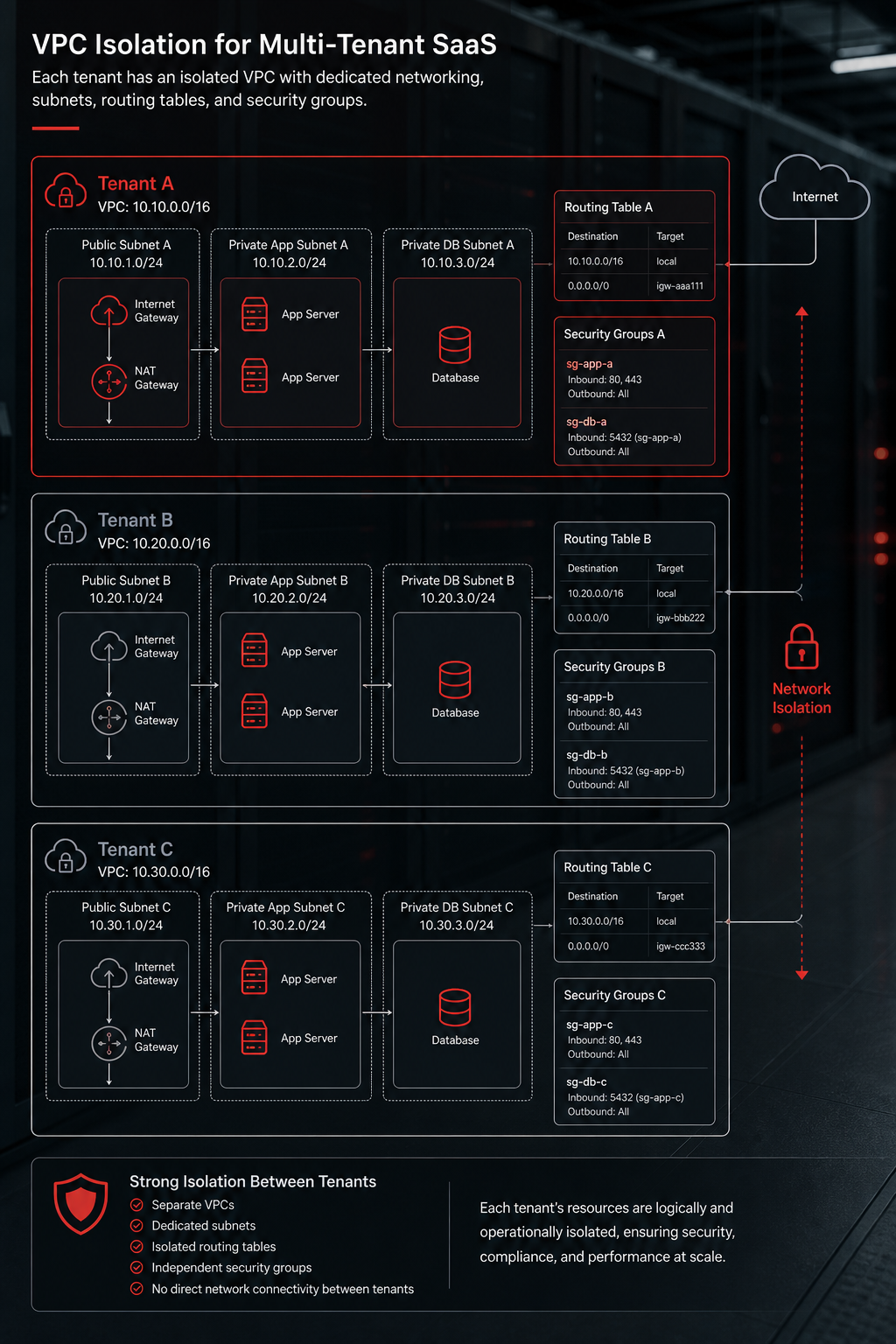
Every tenant gets its own VPC. The VPC creates a private network boundary that the public internet never touches. Resources inside the VPC can talk to each other, but they stay invisible to other tenants.
Why this matters: a mis‑configured security group in one tenant’s VPC can’t reach the database of another tenant because the routing tables are isolated. The cloud provider whitepaper on full‑stack isolation explains how VPCs act as a natural silo and how tags help you track costs
Usable steps:
- Create a VPC template that includes subnets in at least two AZs for high‑availability.
- Apply a naming convention like
vpc‑{tenantId}so you can audit later. - Use VPC flow logs to capture every packet that enters or leaves the VPC.
Real‑world example: A fintech SaaS spun up a VPC for each enterprise client. When a new compliance audit asked for network diagrams, the team could pull the flow‑log archive for the specific tenant in seconds, proving isolation without digging through shared logs.
When you need to scale, you can script VPC creation with infrastructure-as-code templates. That way the onboarding flow stays fast and error‑free.
2. Kubernetes Namespaces with Network Policies , Container‑Level Isolation
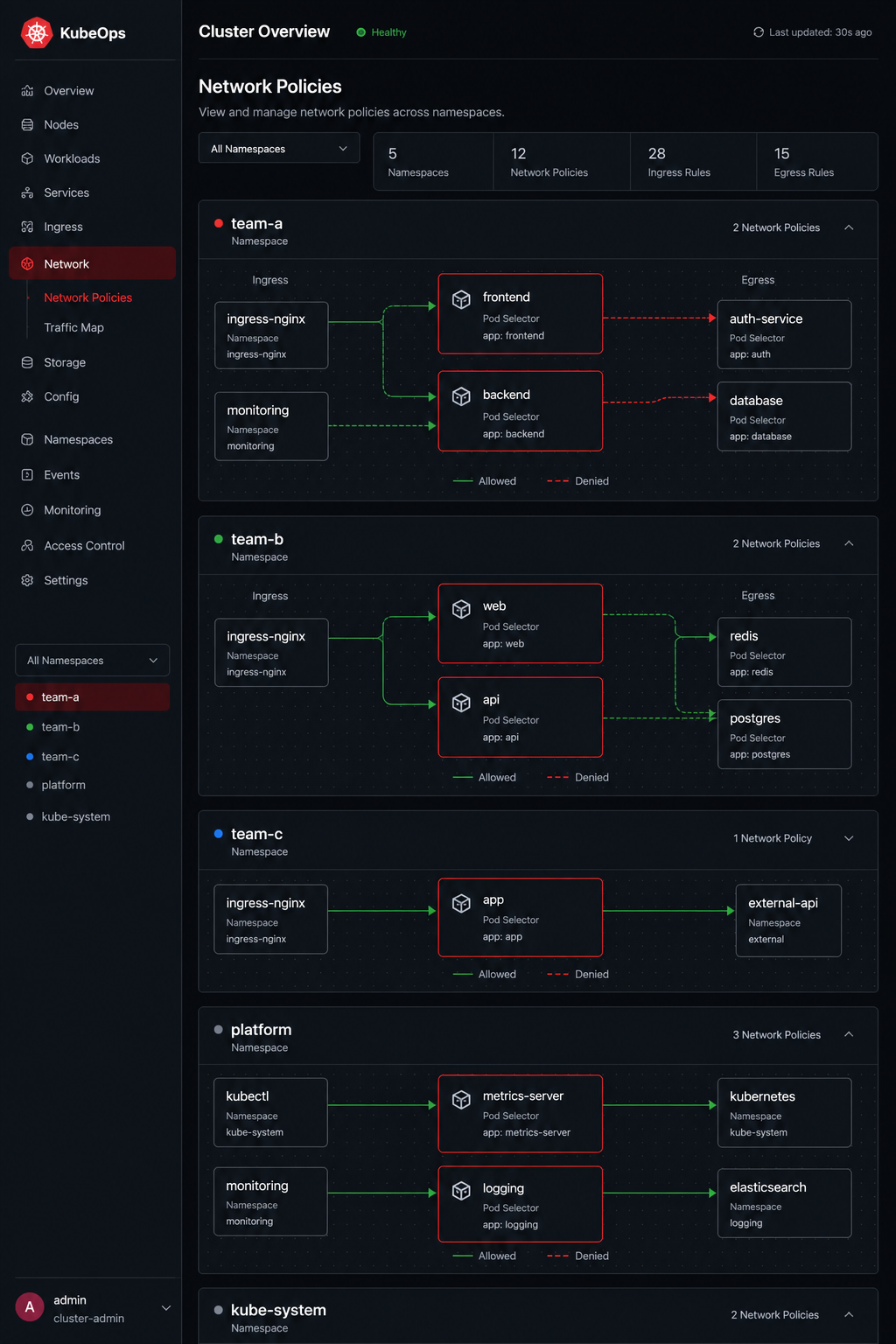
Kubernetes lets you slice a cluster into namespaces. Each namespace gets its own set of resources and can be locked down with a network policy that blocks traffic to other namespaces.
Why it works: Even if two tenants share the same node pool, the network policy ensures that a pod in tenant A cannot reach a pod in tenant B. The policy is enforced by the CNI plugin, so the isolation is at the kernel level.
Steps to implement:
- Define a namespace per tenant (e.g.,
tenant‑123). - Create a default deny policy that blocks all ingress and egress.
- Add explicit allow rules for the services that need to talk to each other within the same tenant.
Example: An agency runs separate namespaces for each client’s AI agents. When a bug caused a pod to crash, the failure stayed inside that client’s namespace and never leaked logs to other clients.
Watch for “no‑cross‑namespace” pitfalls. A mis‑typed label selector can open a backdoor for traffic. Use automated linting tools that validate every new policy against a baseline.
3. Identity and Access Management (IAM) with Least‑Privilege Roles , Access Control
IAM is the gatekeeper for who can do what. The goal is to give each tenant only the permissions it needs and nothing more.
A cloud provider’s guide to ABAC shows how tags can drive permissions across thousands of tenants with a single role. By tagging resources withTenantIDand passing that tag in the session, you avoid a role explosion.cloud provider IAM ABAC blog
Key actions:
- Define a base role that can read its own tags.
- When a user logs in, issue a short‑lived session token that includes the
TenantIDtag. - Scope all resource policies to
cloud:ResourceTag/TenantID= session tag.
Case study: A digital agency used IAM tags to isolate each client’s client connector. When a junior developer accidentally granted admin rights to a connector, the tag check blocked access to other clients’ data, preventing a data leak.
4. Secrets Management for Secure Credential Storage
Secrets (API keys, DB passwords) must never sit in code repos. A dedicated secrets vault stores them encrypted and hands out short‑lived tokens.
Why a dedicated vault beats env files: it can generate dynamic credentials that expire after a few minutes. When a tenant’s instance is torn down, the dynamic secrets disappear automatically.
Implementation checklist:
- Run the secrets vault in HA mode behind a private load balancer.
- Enable the KV‑v2 secrets engine for static secrets.
- Enable the database secrets engine for on‑the‑fly DB users per tenant.
- Configure an IAM auth method so each tenant’s service account can request a token.
Example: Donely uses the secrets vault to issue a unique PostgreSQL user for each AI‑agent instance. The user lives only as long as the agent runs, so a compromised container can’t reuse old credentials.
5. Infrastructure as Code for Repeatable Deployments and Automation
An IaC tool lets you codify the whole stack, VPC, subnets, IAM roles, secrets management, and spin up a new tenant with a single command.
Why code matters: manual steps are error‑prone. With an IaC module you get the same VPC CIDR, the same IAM tags, and the same secrets policies for every tenant.
Usable workflow:
- Store the IaC code in a private Git repo.
- Use a cloud-based IaC service or a CI pipeline to run
applyafter a sign‑up webhook. - Pass the new tenant’s ID as a variable so the module creates
vpc‑{id},namespace‑{id}, and tags everywhere. - Enable
destroyon account deletion to clean up all resources.
Official documentation covers best practices for state locking and secret handling. IaC documentation
Real‑world tip: Pair the IaC tool withpre‑commithooks that lint the infrastructure code files. That catches a missing tag before it lands in production.
6. CI/CD Pipeline Security Gates , Preventing Vulnerable Code
A CI/CD pipeline that pushes code straight to production is a recipe for disaster. Insert security gates that scan containers, check dependencies, and verify IAM policies before a deploy proceeds.
Key gates to add:
- Static code analysis (e.g., automated code scanners) to catch insecure patterns.
- Container image scanning (e.g., vulnerability scanners) for known CVEs.
- Dependency‑check step that flags outdated libraries.
- Policy‑as‑code check that ensures no hard‑coded credentials make it into the image.
When a scan fails, the pipeline aborts and alerts the dev team. This keeps a broken or vulnerable build from ever reaching a tenant’s VPC.
Tip: Keep the gate rules versioned in the same repo as the pipeline config. That way you can roll back a gate change just like code.
7. Zero Trust Network Access (ZTNA) , Eliminating Implicit Trust
Zero Trust means every request is verified, no matter where it comes from. For SaaS this means users must authenticate, devices must be vetted, and each API call is checked against policy.
A popular SASE guide shows how a ZTNA service can sit in front of your API gateway, inject identity context, and enforce MFA or device posture checks before traffic hits the tenant’s VPC. (ZTNA vendor guide)
Implementation steps:
- Integrate your identity provider (IdP) with a ZTNA access gateway.
- Define a policy per tenant that maps groups to allowed applications.
- Enable device posture checks for high‑risk actions (e.g., deleting data).
- Log every access decision to a central SIEM.
Scenario: A sales rep tries to pull a report from a competitor’s tenant. The ZTNA layer sees the tenant tag in the JWT, finds no matching policy, and blocks the request before it reaches the database.
8. SaaS Security Posture Management (SSPM) , Continuous Compliance Scoring
SSPM tools continuously audit your cloud resources against standards like SOC 2 and ISO 27001. They give you a score for each tenant so you can spot drift.
How it helps: If a security group is opened accidentally, the SSPM engine flags the change, reduces the tenant’s compliance score, and triggers an alert.
Steps to adopt:
- Select a vendor that supports multi‑tenant tagging.
- Map each control (encryption, logging, network) to a tag that identifies the tenant.
- Schedule daily scans and integrate findings into your ticketing system.
- Build a dashboard that shows compliance per tenant at a glance.
Donely’s own dashboard pulls SSPM data into a single view, letting admins see which client instances need remediation.
9. Blue‑Green Deployment Strategy , Minimizing Downtime and Risk
Blue‑Green keeps two identical environments live. Traffic runs on the “blue” stack while you update the “green” stack. Once tests pass, you flip the load balancer.
Why it matters for isolation: If a new release accidentally leaks tenant data, you can roll back instantly by switching back to the blue environment. No partial rollout that mixes data.
Usable guide:
- Provision a duplicate set of VPCs, subnets, and databases for the green stack.
- Run automated integration tests that include tenant‑specific data checks.
- Use DNS or ALB target groups to shift 100 % traffic at once.
- Keep the blue stack warm for quick rollback.
Real‑world tip: Tag the green resources withenv=greenso your monitoring tools can separate metrics.
10. Canary Deployments with Feature Flags , Gradual Rollouts
Canary releases push new code to a small subset of tenants first. Feature flags let you turn the new behavior on or off per tenant.
Steps:
- Identify a low‑risk tenant group (e.g., internal pilots).
- Deploy the new version to those tenants only.
- Monitor error rates, latency, and audit logs.
- Gradually expand the flag to more tenants once confidence grows.
Example: Donely released a new AI‑agent routing algorithm behind a flag callednew‑router. After two weeks of stable metrics in pilot tenants, they enabled it for all customers.
Pro tip: Store flag state in a fast KV store (e.g., a fast key‑value store) and cache it per request for minimal latency.
11. Automated Backup and Disaster Recovery , Data Resilience
Backups must be tenant‑aware. A single backup file that mixes multiple clients defeats isolation.
Design:
- Enable point‑in‑time snapshots for each tenant’s database instance.
- Store snapshots in a separate bucket with a tenant‑specific prefix (e.g.,
s3://backups/tenant‑123/). - Encrypt each bucket with a KMS key that only the tenant’s service role can decrypt.
- Test restore procedures quarterly for a random tenant.
Case: An Indian fintech platform suffered a region outage. Because each tenant’s backup lived in its own encrypted bucket, the team could restore the affected client without touching anyone else’s data.
12. Encryption at Rest and in Transit with KMS , Data Protection
All data must be encrypted both while stored and while moving between services. Use a managed KMS so you don’t handle raw keys.
Implementation checklist:
- Enable envelope encryption for every storage service (S3, EFS, RDS).
- Tag KMS keys with
TenantIDand enforce IAM policies that only the tenant’s role can use its key. - Force TLS 1.2+ on every API endpoint.
- Require mutual TLS for internal service‑to‑service calls.
Why it helps: Even if a malicious actor gains read access to a storage bucket, without the tenant‑specific KMS key the data remains gibberish.
13. Role‑Based Access Control (RBAC) for Tenant Admins , Granular Permissions
RBAC lets you give each tenant admin the exact rights they need , no more, no less.
Industry guidance on single‑tenant RBAC shows how to use directory roles, security groups, and administrative units to carve out permissions. Apply the same ideas inside your SaaS platform: create a role for “Billing admin”, another for “Data analyst”, and map them to enterprise directory groups if you integrate with an identity provider.Enterprise identity provider RBAC guide
Steps:
- Define a role matrix that lists actions (read, write, delete) per resource type.
- When a tenant creates a new user, assign the appropriate role based on job function.
- Log every role change to an immutable audit trail.
- Periodically review unused roles and prune them.
Example: An agency gave its client’s marketing lead read‑only access to campaign data, while the finance lead got write access to billing tables. The separation prevented accidental budget changes.
14. API Gateway with Rate Limiting and Authentication , Secure API Exposure
All external traffic should go through an API gateway that authenticates callers and throttles request rates.
A recent cloud provider added a tenant‑isolation mode for serverless functions that couples with API Gateway. The gateway injects an X‑Tenant‑Id header, letting the function reuse warm containers only for the same tenant. This prevents data bleed between invocations. Refer to the provider’s documentation for details.
Configuration checklist:
- Enable JWT authorizers that validate tokens from your IdP.
- Set per‑tenant throttling limits (e.g., 1000 req/min).
- Log request IDs and tenant IDs to your logging system.
- Apply WAF rules to block common attacks.
Result: A rogue script that floods the API can only affect the tenant that owns the token, protecting other clients.
15. Security Information and Event Management (SIEM) Integration , Threat Detection
Collect logs from VPC flow, IAM, secrets management, and the API gateway into a SIEM. Correlate events to spot suspicious cross‑tenant activity.
Best practices:
- Standardize log format (JSON) with a
tenant_idfield. - Set alerts for impossible actions, such as a tenant admin trying to access another tenant’s DB.
- Retain logs for at least 90 days for audit purposes.
- Use built‑in threat‑intel feeds to enrich alerts.
When a mis‑configured IAM policy let a service read all buckets, the SIEM flagged a spike in cross‑tenant reads within minutes, allowing the team to shut it down before data exfiltration.
16. Compliance Mapping to NIST, SOC 2, ISO 27001 , Framework Alignment
Regulators expect you to map each control to a recognized framework. This mapping makes audits smoother and shows customers you take security seriously.
How to build the matrix:
- List every checklist item (VPC, IAM, secrets management, etc.).
- For each item, note the corresponding NIST SP 800‑53 control, the SOC 2 Trust Service Criteria, and the ISO 27001 Annex A clause.
- Assign an evidence type (e.g., screenshot, log file).
- Store the matrix in a version‑controlled repo so changes are tracked.
Example entry: “VPC isolation per tenant” maps to NIST AC‑4 (Information Flow Enforcement), SOC 2 CC6.1 (Logical Access Controls), and ISO 27001 A.13.1 (Network Security Management).
Reference the official NIST website for the latest SP 800‑53 catalog. NIST SP 800‑53
17. Audit Logging and Monitoring for Tenant Activities , Accountability
Every action a tenant user takes must be logged with a timestamp, user ID, and tenant ID. Logs are the only way to prove who did what when a dispute arises.
Key steps:
- Instrument all services (API, database, worker) to emit structured logs.
- Ship logs to a central log store (e.g., a dedicated log management solution).
- Tag each log entry with
tenant_idandrequest_id. - Enable immutable storage for audit logs (WORM).
Real‑world tip: Use a log‑aggregation sidecar container in each Kubernetes pod so you never miss a line.
When a client asked why a record was deleted, the audit trail showed that a service account with limited scope performed the delete, satisfying the compliance review.
18. Penetration Testing and Vulnerability Scanning , Proactive Security
Automation can catch known CVEs, but a human‑led pentest finds business‑logic flaws that scanners miss.
Best practice flow:
- Schedule quarterly external pen tests that include multi‑tenant scenarios.
- Run authenticated scans that log in as a tenant user and try to access another tenant’s data.
- Combine results with your SSPM dashboard for a unified risk view.
- Prioritize findings that affect isolation (e.g., broken object‑level authorization).
Case study: A penetration test revealed that a missing tenant ID check in a reporting endpoint let an attacker enumerate other tenants’ IDs. The fix added a strict ABAC check, closing the gap.
How to Prioritize These Controls for Your SaaS
Not every startup can implement all 18 controls on day one. Use the table below to rank controls by impact, effort, and compliance relevance.
Start with the high‑impact, low‑effort items: VPC isolation, IAM tagging, and API gateway. Those give you a strong security foundation without massive engineering effort.
Next, add encryption, backup, and audit logging to meet most compliance regimes.
Finally, layer advanced controls like ZTNA, SSPM, and blue‑green deployments as you grow.
Ready to lock down your SaaS platform? Check out our guide on secure air‑gapped containers for the next step.
FAQ
What is the difference between a VPC and a Kubernetes namespace for isolation?
A VPC isolates at the network level , it creates separate IP ranges and routing tables. A Kubernetes namespace isolates at the container orchestration layer, using network policies to block pod‑to‑pod traffic across tenants. Together they give defense in depth: the VPC stops traffic before it reaches the cluster, while the namespace stops any stray packets that somehow get inside.
Can I use a single database instance for all tenants and still meet isolation requirements?
Shared databases can work if you enforce row‑level security and tag every row with a tenant ID. However, a mis‑configured query can expose another tenant’s rows. For high‑risk data, many teams prefer separate schemas or even separate DB instances per tenant, which eliminates that class of bugs.
How often should I rotate IAM credentials for each tenant?
Rotate short‑lived tokens every few minutes. For static secrets stored in a secrets management tool, set a rotation schedule of 30‑60 days. Automated rotation reduces the window an attacker has if a credential is leaked.
Do I need a separate KMS key for every tenant?
Not always. You can use a single KMS key with IAM policies that limit usage to the tenant’s role. If you have strict compliance needs (e.g., data residency), generating a dedicated key per tenant adds an extra layer of assurance.
Is Zero Trust required for every SaaS product?
Zero Trust is most valuable when you expose APIs to the public internet or when users work from many devices. If your platform is internal‑only, you may get away with traditional perimeter defenses, but most modern SaaS apps benefit from ZTNA because it removes implicit trust.
How do I prove to auditors that tenant isolation is truly enforced?
Provide VPC flow logs, IAM policy simulations, and audit‑log samples that show each request is tagged with a tenant ID. A compliance matrix that maps each control to NIST, SOC 2, and ISO 27001 clauses also helps demonstrate coverage.
What’s the quickest way to add a new tenant to the system?
Trigger a webhook from your sign‑up form that runs an infrastructure-as-code plan. The plan creates the VPC, namespace, IAM role, security policies, and database schema in one go. Because everything is code, you can spin up a fresh tenant in under two minutes.
How can I monitor for accidental cross‑tenant data exposure?
Set up SIEM alerts that look for API calls where thetenant_idin the request does not match thetenant_idon the resource. Pair that with anomaly detection on data access patterns to catch outliers quickly.
Conclusion
Secure client isolation isn’t a single checkbox , it’s a layered checklist that spans networking, identity, secrets, automation, and compliance. The 18 controls above cover the full spectrum from the first VPC you spin up to the final penetration test you run each quarter.
When you stitch them together, you get a SaaS platform that can promise each customer that their data lives in its own sandbox, that every action is logged, and that you can prove compliance on demand. That promise is what separates a trusted provider from a risky one.
Donely builds all of these controls into its core offering. You get per‑tenant VPCs, built‑in RBAC, full audit logs, and over 800 integrations right out of the box. That means you can focus on the AI features that drive value instead of wiring up isolation yourself.
Ready to see the controls in action? Start your free trial of Donely today and get a demo tenant set up in seconds. Secure isolation, zero‑trust access, and complete auditability , all on a single dashboard.