
You've probably already done the fun part. The OpenClaw agent works, the prompts are decent, and the first useful workflow is taking shape. Then you try to put it on Telegram so people can use it, and the friction starts: BotFather, tokens, pairing, restarts, webhook reachability, local tunnels, group permissions, and the classic question of whether this should live on your laptop or on a server.
That's where most OpenClaw Telegram bot setup guides get thin. They get you to the first reply, but they don't spend enough time on what breaks after that. The practical work starts when you want the bot to stay reachable, behave correctly in team chats, and avoid turning your gateway into a public attack surface.
This guide takes the path most builders follow. First, get the Telegram bot created the standard way. Then make it work locally so you can validate the channel. After that, treat production as a separate engineering problem, because it is.
Table of Contents
- Connecting Your OpenClaw Agent to the World
- Generating Your Telegram Bot Token
- Running Your Bot Locally with Docker and Ngrok
- Choosing a Production Deployment Strategy
- The Zero-DevOps Path Using the Donely Platform
- Advanced Configuration and Troubleshooting Tips
Connecting Your OpenClaw Agent to the World
An OpenClaw agent becomes useful when it stops being a terminal-bound tool and starts living where your team already communicates. For a lot of builders, that means Telegram. It's fast to test, easy to reach from any device, and flexible enough for direct messages, shared groups, and lightweight operational workflows.
That's why OpenClaw Telegram bot setup matters more than it seems at first glance. You're not just adding a chat channel. You're deciding how your agent will be accessed, how authorization will be enforced, and what kind of operational burden you're willing to carry.
There are really two paths.
The first is the manual path. You create the Telegram bot, wire the token into OpenClaw, run the gateway locally, expose it through a tunnel, approve pairing, and then move the whole thing onto a VPS or another host when the local test works. This is the right path if you want to understand every moving piece.
The second path is to skip most of the infrastructure work and use a platform that already handles hosting, channel connectivity, process management, and operational controls. If you're comparing where OpenClaw can sit inside a broader automation stack, the available AI employee integrations on Donely show the kind of environment that removes a lot of the channel plumbing from your to-do list.
Practical rule: Treat Telegram setup and production deployment as two different jobs. The first proves the channel works. The second proves your agent will still work tomorrow.
What doesn't work well is mixing those jobs together. Builders lose time when they debug Telegram, Docker, public exposure, restart behavior, and authorization all at once. Keep the first pass small. Get the bot talking. Then decide how much infrastructure ownership you want.
Generating Your Telegram Bot Token
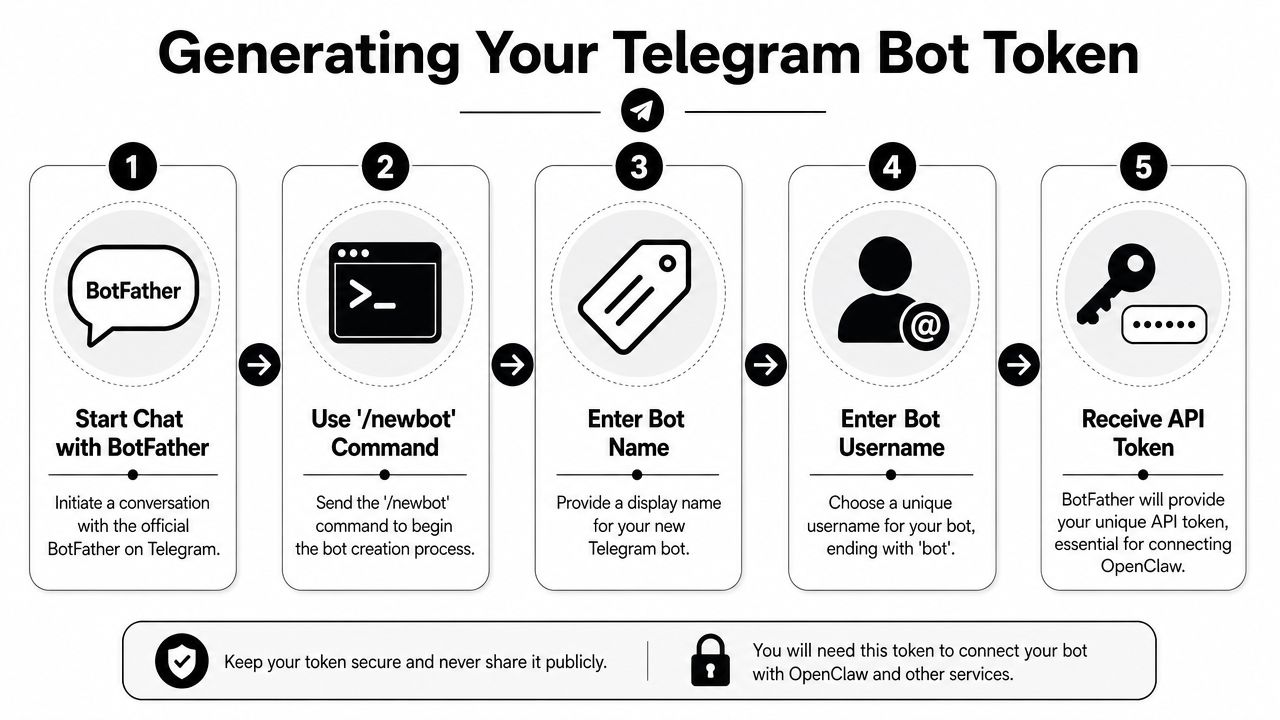
Telegram starts with BotFather. OpenClaw's Telegram integration is built around that official flow: create a bot with /newbot, save the token, and add that token to OpenClaw's channel configuration instead of using a separate login command, as documented in the OpenClaw Telegram channel docs.
The BotFather flow
Open Telegram and start a chat with @BotFather. Then run /newbot. Telegram will ask for two things:
- A display name for the bot.
- A username that ends with
bot.
Once that's done, BotFather returns the HTTP API token. Save it immediately and store it like a credential. Don't leave it in screenshots, random notes, or shell history if you can avoid it.
The part many people miss is how OpenClaw expects that token to be used. Telegram doesn't use openclaw channels login telegram. The token must be placed in config or environment before the gateway starts, which is explicitly called out in the OpenClaw documentation for Telegram setup.
The IDs you need besides the token
A valid token is only part of the configuration. OpenClaw also separates bot identity from authorization.
You'll need these identifiers:
- Your Telegram user ID for
allowFromorgroupAllowFrom - A Telegram group chat ID if the bot will operate in a shared group
- The bot token for the Telegram channel configuration
That separation matters. The bot token tells Telegram which bot exists. The user ID and group ID tell OpenClaw who is allowed to interact with it and where group behavior should apply.
The cleanest way to think about Telegram in OpenClaw is this: the token identifies the bot, but the IDs define trust boundaries.
What to do before you continue
Before you move to Docker, tunnels, or server hosting, have this checklist complete:
- Token saved securely: Keep the BotFather token in your secrets manager,
.env, or another controlled config path. - User ID identified: You'll need it for sender authorization.
- Group ID captured if relevant: Don't wait until group testing to discover you never recorded it.
- Naming cleaned up: Give the bot a username that your team can recognize later in group chats.
If you're creating Telegram accounts or testing workflows across multiple environments, account setup itself can become its own operational snag. In those cases, this guide on expert advice on Telegram verification is a useful reference for understanding the verification side before you get blocked on environment prep.
Running Your Bot Locally with Docker and Ngrok
Local setup is where you prove the Telegram side works before you touch production. This is the right place to test the token, pairing flow, reply behavior, and basic channel wiring. It's also where you learn quickly whether your issue is in OpenClaw config or in network reachability.
A minimal local stack
A simple local pattern is Docker Compose for the OpenClaw gateway plus Ngrok for webhook reachability. The exact image and config layout can vary by your installation method, but the structure is usually the same: one service for OpenClaw, one environment file, and one public tunnel endpoint.
A typical docker-compose.yml layout includes:
- An OpenClaw container
- A mounted config directory
- Environment values for the Telegram token
- A local port mapping for the gateway
Your OpenClaw configuration then references the Telegram channel and the authorization IDs you collected earlier. The important detail is placement. Put the token in environment or config before the gateway starts. Don't expect a post-start interactive Telegram login step to fix an empty config.
A practical local checklist looks like this:
- Keep config explicit: Put Telegram settings in one place, not half in env and half in ad hoc edits.
- Restart after changes: If you edit token or channel settings, restart the gateway cleanly.
- Test direct message first: Don't begin with group behavior.
- Watch logs while messaging: A silent Telegram bot often means the gateway never received the webhook.
Why Ngrok matters
Telegram needs to reach your gateway from the public internet. Your laptop usually isn't directly reachable, so local testing needs a tunnel. Ngrok solves that by giving you a public URL that forwards requests into your local OpenClaw process.
This is the part that makes the first successful message feel almost magical. Telegram sends to the public URL. Ngrok forwards that traffic. OpenClaw receives it locally and can continue through pairing or response handling.
The tunnel also gives you a debugging surface. You can inspect incoming webhook traffic and quickly tell whether the problem is upstream or inside the app.
A good walkthrough is often easier to follow visually than by reading snippets alone. This demo is a useful companion while you wire the local pieces together.
What usually breaks in local testing
The fragile part of the manual path isn't creating the bot. It's everything around the webhook lifecycle.
Here's what fails most often:
- Expired tunnel URL: Ngrok sessions can rotate or expire, which leaves Telegram pointing at an old endpoint.
- Gateway not listening: The container may be up while the app inside it failed startup.
- Wrong token source: The token exists in your shell, but not inside the container environment.
- Pairing confusion: You sent a message, got a pairing code, then restarted before approving it.
- Mixed local state: Old config, old container volumes, or a stale environment file can produce misleading behavior.
If Telegram never reaches your local gateway, don't debug prompts, tools, or memory. Debug reachability first.
When I troubleshoot this stack, I work from the edge inward. Confirm the tunnel is live. Confirm webhook requests arrive. Confirm the container is healthy. Then inspect OpenClaw logs for pairing or authorization failures. That order avoids a lot of wasted time.
For local development, that's enough. You've proven the bot can connect and answer. What you haven't proven is that it will survive restarts, remote hosting quirks, or team usage patterns.
Choosing a Production Deployment Strategy
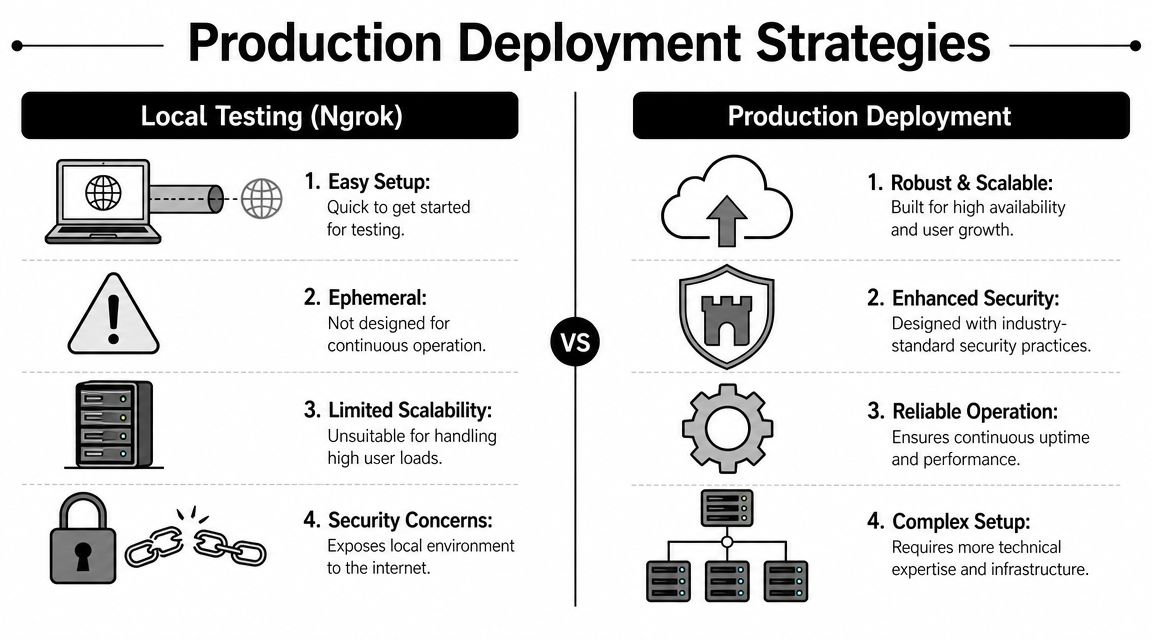
The local Docker plus Ngrok setup is good for learning. It is not a production design. It depends on your workstation, your session staying alive, your tunnel staying valid, and your machine being available whenever Telegram sends traffic.
Why local success is not production readiness
Production adds different requirements. You need stable public reachability, restart behavior, logs you can inspect after failure, and a safer networking model than “open something until Telegram can reach it.”
One practical warning shows up in real-world OpenClaw setup guidance: VPS users are explicitly warned not to expose port 18789 publicly and to use localhost or forwarding instead, which highlights a security concern many beginner guides skip, as noted in this Lumadock OpenClaw Telegram tutorial.
That warning matters because the easy fix in a hurry is often the risky one. A bot doesn't respond, someone opens the wrong port broadly, and now an internal control plane is reachable from places it shouldn't be.
Two common DIY paths
When a manual approach is maintained, one typically chooses between a VPS deployment and a serverless or managed cloud assembly.
VPS with reverse proxy
This is the most familiar route for many engineers. You run OpenClaw on a virtual server, put a reverse proxy in front of it, handle TLS, and run the gateway as a managed service.
The upside is control. You can inspect everything, tune the host, manage files directly, and keep the runtime simple.
The downside is that you now own:
- OS patching
- Process restarts
- Firewall policy
- Secret handling
- Proxy configuration
- Persistent logs
- Alerting and health checks
If you enjoy operating hosts, that's acceptable. If you only wanted a Telegram bot, it's a lot of surface area.
Serverless and cloud-native assembly
Some teams try to break the problem into cloud functions, managed containers, event endpoints, and external secret stores. That can work well for certain webhook-heavy architectures, but OpenClaw is still an application runtime with state, channel config, and operational commands that need a coherent home.
This path usually reduces host maintenance but increases architectural complexity. You spend less time patching a VM and more time stitching together execution, ingress, logging, and environment management.
Production work is rarely blocked by the Telegram bot itself. It's blocked by everything required to keep the bot reachable and recoverable.
A practical decision table
| Approach | Works well for | Main burden |
|---|---|---|
| Laptop plus Ngrok | Fast testing and first-message validation | Session fragility and no real operational safety |
| VPS | Teams comfortable owning a host | Security posture, updates, logs, restarts |
| Serverless assembly | Teams with cloud-native experience | More moving pieces and integration overhead |
If you want the manual route and are comfortable running infrastructure, a VPS is usually the straighter line. If you want to remove host ownership entirely, it makes sense to look at a managed OpenClaw option instead of half-building one yourself. For teams evaluating that path, OpenClaw hosting on Donely is one example of a platform model that avoids the exposed-port and process-supervision problems common in DIY setups.
The Zero-DevOps Path Using the Donely Platform
There's a point where manual deployment stops being educational and starts being repetitive. Once you know how OpenClaw Telegram bot setup works, the remaining question is whether you want to keep owning Docker, public ingress, restarts, instance isolation, and access control.
What the managed path changes
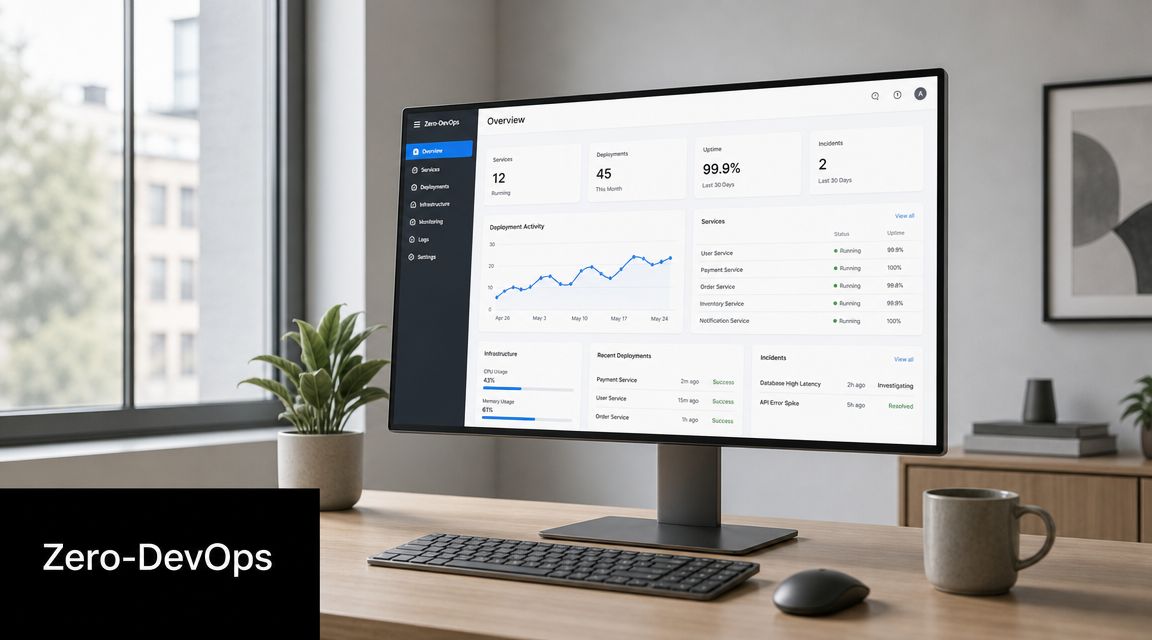
A managed platform changes the job from infrastructure assembly to configuration. Instead of building the runtime around OpenClaw, you create an instance, open the channels area, and connect Telegram using the bot token. The platform handles the surrounding concerns such as public endpoint management, process uptime, and centralized administration.
That's the appeal of Donely. It provides a hosted environment for OpenClaw-based AI employees with isolated instances, centralized monitoring, unified billing, and operational controls that would otherwise require separate infrastructure work.
The practical difference shows up in the tasks you no longer have to own:
- No local tunnel dependency: You're not relying on Ngrok sessions for availability.
- No hand-built process management: You don't need to wire your own restart strategy.
- No ad hoc multi-instance sprawl: Separate workloads can stay isolated without separate accounts or improvised host layouts.
- No scattered access rules: Per-instance RBAC and audit visibility are built into the operating model.
That doesn't mean manual deployment is wrong. It means manual deployment is a conscious infrastructure choice, not a requirement.
Who this path fits
This route makes the most sense when Telegram is only one channel in a broader operational setup.
Examples include:
- Agencies managing client agents: They usually need isolated environments and clear billing boundaries.
- Founders moving from personal use to team use: The problem shifts from “can this bot answer” to “who can access what.”
- Operations teams standardizing deployment: Repeating one-off VPS builds doesn't scale cleanly across multiple agents.
- Compliance-minded teams: Audit logs and scoped access become part of the baseline, not an afterthought.
A managed platform also helps with the less visible production work. You don't have to remember which box runs which gateway, which environment file contains which token, or which reverse proxy tweak fixed the last webhook issue.
The trade-off is straightforward. You give up some low-level host control in exchange for a cleaner operating model. For many organizations putting an OpenClaw agent in front of real users, that's usually a sensible exchange.
Advanced Configuration and Troubleshooting Tips
The first direct message proves the bot exists. It doesn't prove the setup is ready for shared use. The rough edges usually appear when you move the bot into Telegram groups and topics, or when a restart breaks a pairing flow you thought was already done.
Getting groups and topics to work
This is one of the most under-documented parts of OpenClaw Telegram bot setup. Many guides stop after a direct message works, but group and topic behavior often needs extra Telegram-side changes such as enabling group access in BotFather or adding the bot as a group admin, and missing those steps can lead to silent failures in shared channels, as highlighted in this Stack Junkie guide on OpenClaw Telegram setup gaps.
Use this checklist when the bot works in DM but not in a group:
- Enable group support in BotFather: Don't assume the bot can participate in groups by default.
- Add the bot with the right role: In many group setups, admin-level access is what lets the bot receive the messages you expect.
- Capture the correct group chat ID: OpenClaw uses the group chat ID under
channels.telegram.groups. - Separate sender authorization from channel config: If the bot is present but ignored, check allow lists before blaming Telegram.
Shared Telegram channels fail quietly when permissions and authorization don't line up. That's why group testing should always be explicit.
Troubleshooting the failures that waste the most time
When the setup turns unreliable, stick to operational checks before changing prompts or agent logic.
A disciplined sequence looks like this:
- Verify the gateway is listening: Don't assume a restart succeeded just because the process exists.
- Check pairing state: Expired or unapproved pairing is easy to mistake for a channel bug.
- Inspect logs immediately after sending a Telegram message: That tells you whether the webhook hit the gateway at all.
- Run health-oriented commands: Status, doctor, and pairing-list style checks are much more useful than random restarts.
If you're also tuning app behavior around responsiveness, retries, or mobile-facing performance expectations, this reference on RapidNative app performance help is useful for sharpening your troubleshooting habits even outside Telegram-specific issues.
If you want OpenClaw on Telegram without carrying the hosting and operations layer yourself, Donely is the simplest place to start. Create an instance, connect the bot token, keep environments isolated, and let the platform handle the infrastructure work that usually turns a quick bot setup into an ongoing DevOps task.