
You've got an event source ready. Stripe closes a payment, GitHub opens an issue, HubSpot creates a contact, Slack sends a slash command. The easy part is pointing that event at a URL. The hard part starts when that URL becomes a production entry point into your agent system.
That's where OpenClaw webhook automation gets interesting. A webhook isn't just a trigger. It's the handoff between an external system you don't control and an agent runtime that can take real action. If that handoff is sloppy, you get spoofed requests, duplicate execution, broken routing, and support tickets that start with “why did this run twice?”
Most guides stop at “create an endpoint and verify the signature.” That's not enough. Production systems need clear endpoint choices, strict signature handling, replay protection, idempotency, routing, logging, and failure behavior that won't corrupt state under retries. They also need a sane operating model when one account turns into many instances, teams, or clients.
If you're running OpenClaw in a managed environment, platforms like Donely for OpenClaw reduce the infrastructure overhead. That matters once you stop building toy handlers and start wiring webhooks into real business workflows. The application logic is still your responsibility, though, and that's where most mistakes happen.
Table of Contents
- Introduction From Event to Action with OpenClaw
- Webhook Fundamentals The Anatomy of an Event
- Securing Your Webhook Endpoints: A Critical Step
- Building Resilient Handlers Idempotency and Retries
- Practical Integration with Donely Instances
- Monitoring Logging and Production Best Practices
Introduction From Event to Action with OpenClaw
OpenClaw webhook automation is the mechanism that lets outside systems wake up an agent workflow the moment something important happens. That can be a support ticket, a payment event, a new CRM record, or an operational alert. The value isn't in receiving the POST request. The value is in turning that event into the right action without opening a hole in your system.
Teams usually start with the same assumption. “We'll just expose an endpoint, parse some JSON, and trigger the agent.” That works for a demo. It breaks in production because external systems retry, payloads change, signatures get mishandled, and one generic webhook endpoint ends up serving several workflows with different risk profiles.
What works is treating the webhook layer as its own subsystem. It needs a clean boundary, strict validation, and a deliberate choice about what kind of execution should happen after the event lands. Some events should only send a lightweight signal. Others need a full agent turn with its own session and output handling.
Practical rule: If a webhook can cause customer-visible or finance-related actions, treat the inbound request path like an authentication boundary, not a convenience feature.
That mindset changes the implementation. You preserve the raw body for signature checks. You verify before parsing. You reject stale requests. You record event identity before running state-changing logic. You log enough to reconstruct failures without dumping secrets into logs.
There's also an architectural question that gets missed early. Are you triggering a cheap notification path, or are you starting a full agent run? OpenClaw separates those paths for a reason. Picking the wrong one leads to unnecessary cost, latency, and operational complexity.
Webhook Fundamentals The Anatomy of an Event
A webhook usually fails before your business logic runs.
The request reaches your endpoint, your framework helpfully parses JSON, a proxy lowercases or rewrites headers, the sender retries because your handler took too long, and now you are debugging duplicates or broken verification with very little evidence. That is the typical anatomy of an event in production. The event itself is simple. The request path around it is where systems break.
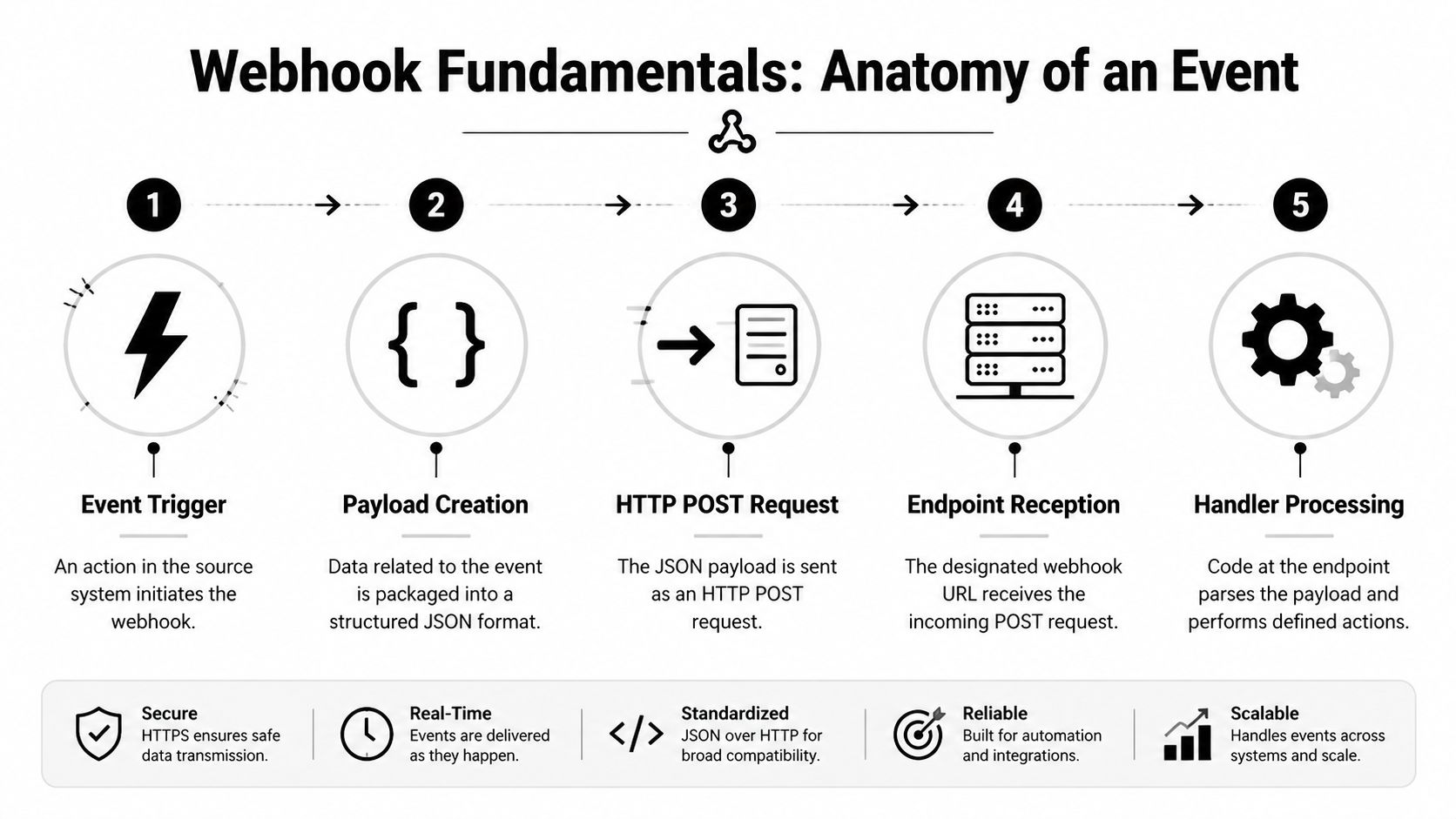
What actually arrives at your endpoint
Every webhook request has three parts you need to treat separately.
| Part | What it contains | Why it matters |
|---|---|---|
| Request body | Usually a JSON payload | Contains the event data your system will act on |
| Headers | Content type, signature, timestamp, delivery ID, user agent | Used for validation, routing, replay checks, and diagnostics |
| HTTP method | Usually POST | Anything else should be rejected early |
The body is not just input data. It is also the byte sequence many providers sign. If your stack parses and reserializes JSON before verification, the payload may still look identical in logs while the signature check fails. Field order, whitespace, character encoding, and newline handling are enough to break a correct HMAC comparison.
Headers deserve the same level of attention. Signature and timestamp headers affect trust decisions. Delivery IDs affect duplicate handling. User-Agent does not prove authenticity, but it helps during incident review when you need to separate provider traffic from scanners, test tools, or misrouted internal calls.
A practical request flow looks like this:
- Accept only the expected method and content type.
- Read the raw body exactly as received.
- Collect validation headers such as signature, timestamp, and delivery ID.
- Verify the request before parsing JSON.
- Parse the payload and map it to an event type.
- Store the event identity, return a fast acknowledgment, and hand off heavier work.
That order matters. Change it, and small implementation mistakes turn into hard-to-reproduce failures.
The event is more than a payload
Teams often model a webhook as “some JSON we POST into our app.” That misses the fields that make the event safe to process repeatedly and easy to audit later.
A production-ready event model usually needs:
- An event type to decide which handler should run
- A delivery or event ID to detect retries and duplicates
- A creation timestamp to reason about freshness and ordering
- A raw payload for verification and forensic review
- Provider metadata such as account, workspace, or environment identifiers
If the sender does not provide all of those fields, add your own normalized envelope after validation. This keeps downstream handlers from depending on provider-specific quirks and gives you one place to enforce consistency.
When to use wake versus agent
OpenClaw exposes two webhook execution paths. They are not interchangeable.
Use /hooks/wake for low-cost event signals. This path fits updates that should notify an existing workflow, enqueue a job, or flip state that another worker consumes. It keeps the inbound request cheap and predictable.
Use /hooks/agent when the event should start a self-contained agent run with its own context, tools, and output path. That is the right choice when the webhook payload contains enough information to justify a full turn and produce a result for a destination such as Slack or Telegram.
The trade-off is straightforward:
- Choose
/hooks/wakefor simple triggers, queue handoff, or state changes - Choose
/hooks/agentfor isolated reasoning runs and channel-facing outcomes - Do not default to
/hooks/agentfor every event, because it adds latency, cost, and more failure points - Do not force
/hooks/waketo handle work that needs a clear execution boundary and result delivery
I have seen teams collapse both paths into one generic endpoint because it feels simpler at first. It usually creates harder routing logic, weaker observability, and too many events running through the most expensive path. Keeping the distinction clear makes failure handling, cost control, and access control much easier later.
Securing Your Webhook Endpoints: A Critical Step
A webhook endpoint that accepts unsigned traffic is just an exposed API route. If that route can wake a workflow or start an agent run, an attacker does not need much. They only need your URL and a payload shape that passes basic validation.

I have seen teams protect these endpoints with a static header token and call it done. That works until a request body gets changed in transit, a secret leaks into logs, or someone replays a valid request from yesterday. Webhook security has to verify who sent the request, whether the body was modified, and whether the event is still fresh enough to trust.
Why basic secret checks fail
A shared token in a header only answers one question. It tells you whether the caller knows the token. It does not prove the payload was signed. It does not stop replay attacks. It also gets implemented badly more often than people expect, especially with plain string comparison and no control over raw request bytes.
The common failure is subtle. A team adds signature verification after reading the provider docs, but the framework has already parsed and normalized the JSON body. The signature was calculated over the original bytes, not the re-serialized object sitting in memory. Verification fails intermittently, someone adds a workaround, and the endpoint drifts into a state where it looks protected but is not.
The production pattern is straightforward:
- Sign the raw payload with HMAC-SHA256
- Compare digests in constant time
- Reject stale timestamps
- Fail closed when required headers are missing
- Keep verification separate from business logic so it can be tested on its own
Node.js implementation for HMAC verification
This is the pattern I trust in production because the risky parts are explicit and easy to test.
import crypto from "crypto";

function verifyHmacSha256({
  rawBody,
  secret,
  signatureHeader,
  timestampHeader
}) {
  if (!rawBody || !secret || !signatureHeader || !timestampHeader) {
    return { ok: false, reason: "missing_required_input" };
  }

  const timestamp = Number(timestampHeader);
  if (!Number.isFinite(timestamp)) {
    return { ok: false, reason: "invalid_timestamp" };
  }

  const ageMs = Math.abs(Date.now() - timestamp);
  const fiveMinutesMs = 5 * 60 * 1000;
  if (ageMs > fiveMinutesMs) {
    return { ok: false, reason: "stale_event" };
  }

  const signedPayload = `${timestamp}.${rawBody}`;
  const expectedHex = crypto
    .createHmac("sha256", secret)
    .update(signedPayload, "utf8")
    .digest("hex");

  const provided = Buffer.from(signatureHeader, "hex");
  const expected = Buffer.from(expectedHex, "hex");

  if (provided.length !== expected.length) {
    return { ok: false, reason: "signature_length_mismatch" };
  }

  const ok = crypto.timingSafeEqual(provided, expected);
  return ok ? { ok: true } : { ok: false, reason: "signature_mismatch" };
}
A minimal Express-style handler looks like this:
app.post("/webhook", express.raw({ type: "*/*" }), async (req, res) => {
  const rawBody = req.body.toString("utf8");
  const signature = req.header("x-signature");
  const timestamp = req.header("x-timestamp");

  const result = verifyHmacSha256({
    rawBody,
    secret: process.env.WEBHOOK_SECRET,
    signatureHeader: signature,
    timestampHeader: timestamp
  });

  if (!result.ok) {
    return res.status(401).json({ error: result.reason });
  }

  const payload = JSON.parse(rawBody);

  return res.status(202).json({ accepted: true });
});
Two details matter more than they look.
Use a raw body parser on this route. Compare bytes, not strings. If middleware parses JSON before verification, or if your code compares hex strings directly, the security check is weaker and harder to reason about.
Python implementation for HMAC verification
Python gives you the same protection with hmac.compare_digest.
import hmac
import hashlib
import time
import json

def verify_hmac_sha256(raw_body, secret, signature_header, timestamp_header):
    if not raw_body or not secret or not signature_header or not timestamp_header:
        return False, "missing_required_input"

    try:
        timestamp = int(timestamp_header)
    except ValueError:
        return False, "invalid_timestamp"

    age_ms = abs(int(time.time() * 1000) - timestamp)
    five_minutes_ms = 5 * 60 * 1000
    if age_ms > five_minutes_ms:
        return False, "stale_event"

    signed_payload = f"{timestamp}.{raw_body}"
    expected_hex = hmac.new(
        secret.encode("utf-8"),
        signed_payload.encode("utf-8"),
        hashlib.sha256
    ).hexdigest()

    if not hmac.compare_digest(expected_hex, signature_header):
        return False, "signature_mismatch"

    return True, None
The framework wrapper can change. The rule does not. Verify against the exact bytes the sender signed, before your application touches the payload.
A useful test catches a lot of bad implementations. Capture one real webhook request in a staging environment, including headers and raw body, and replay it through your verifier in an automated test. If that test is hard to write, the verification layer is probably too tangled with application code.
Later in the workflow, this walkthrough is worth keeping nearby:
Replay protection and secret hygiene
Signature verification is only part of the job. A valid request can still be replayed if you do not enforce a timestamp window. Five minutes is a practical default for many webhook systems. Tight enough to reduce replay risk, loose enough to tolerate minor clock drift and queue delays.
Secret handling also breaks in ordinary ways. Secrets end up in CI logs, copied .env files, shell history, support screenshots, and stale developer machines. That is why rotation matters. Good implementations support the current secret and the previous secret for a short overlap window, then remove the old one cleanly.
These rules hold up in production:
- Reject requests with missing or invalid timestamps
- Keep webhook secrets out of source code
- Support dual-secret verification during rotation
- Never log raw signatures, raw bodies containing sensitive fields, or shared secrets
- Return a generic auth failure to the caller, but log the precise failure reason internally
Security on webhook routes is implementation work. The difference between a safe endpoint and a vulnerable one is usually a few lines around raw body handling, constant-time comparison, and replay checks. Those lines deserve review as carefully as any code that touches payments, auth, or customer data.
Building Resilient Handlers Idempotency and Retries
Security gets the attention. Idempotency saves you from the quieter failures that damage data.
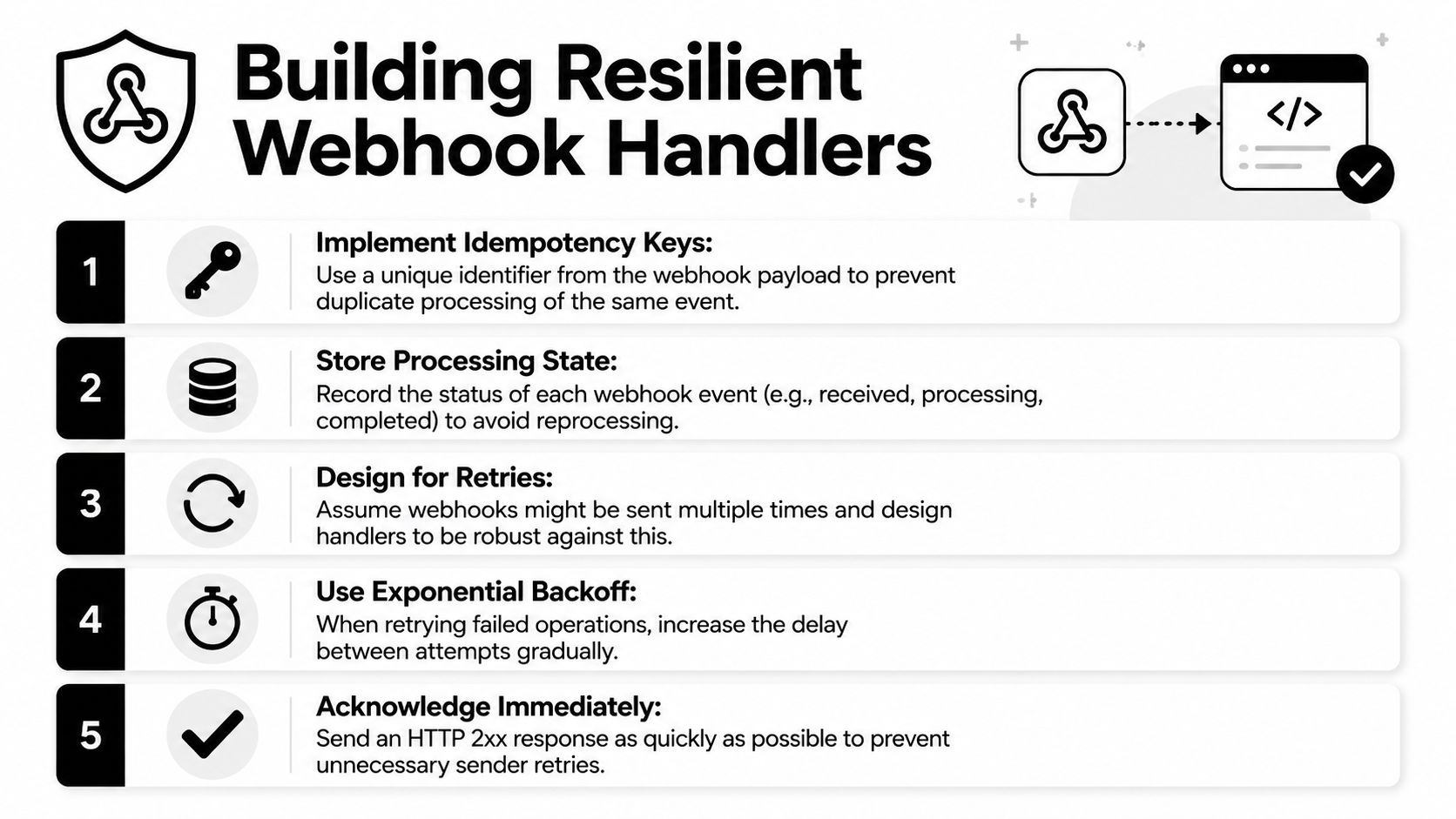
A provider times out waiting for your response. It retries. Your handler runs twice. Without protection, you create duplicate CRM notes, issue duplicate refunds, send duplicate Slack messages, or trigger the same agent workflow multiple times. None of that looks dramatic in code. It looks dramatic in production.
The duplicate delivery problem
Providers retry because networks fail, handlers crash, and acknowledgments get lost. That's normal. Your code has to assume duplicate delivery is part of the protocol, even when the sender doesn't document it clearly.
The safest model is simple. Every inbound event needs a stable identity. If the provider gives you an event ID, use it. If not, derive an idempotency key from fields that define the event uniquely for your workflow.
Good candidates include:
- Provider event ID: Best option when present.
- Composite business key: Useful when the sender doesn't expose event IDs.
- Hash of stable fields: Better than nothing, but only if the fields won't change across retries.
A practical idempotency pattern
The pattern I use is receipt, claim, execute, finalize.
async function handleWebhookEvent(event) {
  const key = event.id; // Prefer provider event ID

  const existing = await db.idempotency.findUnique({ where: { key } });
  if (existing?.status === "completed") {
    return { duplicate: true };
  }

  if (!existing) {
    await db.idempotency.create({
      data: {
        key,
        status: "processing",
        receivedAt: new Date()
      }
    });
  }

  try {
    await runBusinessLogic(event);

    await db.idempotency.update({
      where: { key },
      data: {
        status: "completed",
        completedAt: new Date()
      }
    });

    return { duplicate: false };
  } catch (err) {
    await db.idempotency.update({
      where: { key },
      data: {
        status: "failed",
        lastError: String(err)
      }
    });
    throw err;
  }
}
This works because the idempotency store becomes the source of truth for processing state. You're not guessing whether the event ran. You know.
A short state model helps:
| Status | Meaning | Handler behavior |
|---|---|---|
| received | Event recorded, not yet claimed | Safe to enqueue |
| processing | A worker is handling it | Prevent parallel duplicate execution |
| completed | Logic finished successfully | Return success for duplicates |
| failed | Previous attempt failed | Retry with care |
Don't put idempotency after the side effect. By then it's bookkeeping, not protection.
Retry behavior that won't hurt you
Your side also needs retry logic, especially when the webhook triggers downstream APIs or agent tool calls. The trick is to retry only operations that are safe to retry.
Use these rules:
- Acknowledge early: Return a success response once the event is verified and durably recorded.
- Push long work to a queue or background job: Don't make the sender wait for your entire workflow.
- Retry transient failures: Network errors and temporary upstream issues are fair game.
- Avoid blind retries for unknown state-changing operations: If you can't prove safety, reconcile first.
The earlier security model supports resilience. When the request is authenticated and timestamp-checked before storage, and the event is recorded before execution, your retry path stays clean.
Practical Integration with Donely Instances
The awkward real-world problem isn't receiving one webhook. It's receiving one generic webhook and deciding which agent instance should handle it.
That shows up quickly in agency and multi-tenant setups. A CRM sends a “new contact created” webhook. Which client instance owns that contact? A Slack command comes in. Which workspace, policy set, and agent session should respond? If you get routing wrong, you don't just break automation. You cross data boundaries.
Routing one webhook to the right instance
The clean pattern is to separate ingress, resolution, and execution.
Ingress is your single webhook handler. Resolution maps the event to the correct tenant or instance. Execution triggers the downstream OpenClaw behavior only after that mapping succeeds.
A routing table might look like this:
const tenantMap = {
  "acme.com": "instance_acme",
  "beta.io": "instance_beta"
};

function resolveInstanceFromEmail(email) {
  const domain = email.split("@")[1]?.toLowerCase();
  return tenantMap[domain] || null;
}
In a managed multi-instance setup, the key controls are isolation and scoped permissions. Donely exposes integration support for OpenClaw instances in a way that fits this model, where external tools feed events into separate instances rather than one shared runtime trying to impersonate many tenants at once.
That matters because routing is only half the problem. The other half is containment after routing succeeds.
Example with HubSpot style contact routing
Say your webhook payload includes a contact email and company metadata. The flow should look like this:
- Verify signature and freshness.
- Parse payload.
- Extract tenant identifier.
- Resolve instance.
- Store idempotency record.
- Dispatch to that instance's workflow.
A simple handler sketch:
async function processContactCreated(payload) {
  const email = payload?.contact?.email;
  const instanceId = resolveInstanceFromEmail(email);

  if (!instanceId) {
    throw new Error("unmapped_tenant");
  }

  await enqueueAgentRun({
    instanceId,
    eventType: "contact_created",
    payload
  });
}
What breaks in practice is fallback behavior. Developers often route unknown tenants to a default instance so the event “doesn't get lost.” That's a bad trade. Unmapped should fail visibly and land in an operations queue, not leak into the wrong environment.
Route by explicit ownership. Never by best guess.
Example with Slack commands
Slack-style commands introduce a different routing shape. Instead of customer identity, the tenant key often comes from workspace or channel metadata. The same structure still applies, but the lookup source changes.
For example:
function resolveInstanceFromSlack(teamId) {
  return slackWorkspaceMap[teamId] || null;
}

async function processSlashCommand(payload) {
  const instanceId = resolveInstanceFromSlack(payload.team_id);

  if (!instanceId) {
    throw new Error("unknown_slack_workspace");
  }

  await enqueueAgentRun({
    instanceId,
    eventType: "slack_command",
    payload
  });
}
The practical lesson is that generic webhook infrastructure should stay generic. Tenant logic belongs in a dedicated resolution layer. Business actions belong after resolution. Once you mix those together, maintenance gets ugly fast.
Monitoring Logging and Production Best Practices
A webhook system is only “done” on the day you deploy it if you never plan to debug it. Real systems need logs that tell you what happened without exposing data you shouldn't keep.
What to log and what to avoid
For each request, log the lifecycle, not the secrets.
Useful fields include:
- Request identity: Provider event ID, your internal correlation ID, request path
- Verification result: Passed, failed, stale, malformed
- Routing result: Resolved instance or unmapped
- Idempotency result: New, duplicate, in-progress, failed
- Execution outcome: Accepted, queued, completed, errored
Avoid logging raw payloads by default when they may contain customer data. If you need payload inspection for debugging, use redaction and make that access deliberate.
For teams running their own automation stack, operational patterns from adjacent systems are still useful. The guide on n8n self-hosting for agencies is a good example of how quickly multi-client automation gets messy when logging, isolation, and hosting discipline aren't designed up front.
Common failures and fast diagnosis
A few failures show up again and again:
| Failure | Likely cause | First check |
|---|---|---|
| Signature mismatch | Parsed body changed before verification | Confirm raw body handling |
| Stale event rejection | Clock drift or delayed delivery | Inspect timestamp and server time |
| Duplicate processing | Missing idempotency guard | Check event key storage and state transitions |
| Wrong tenant execution | Weak routing logic | Audit instance resolution inputs |
| Provider retries keep happening | Slow acknowledgment path | Confirm fast 2xx after durable receipt |
If you're hosting OpenClaw in an environment that centralizes status, logs, and instance operations, OpenClaw hosting on Donely fits the production model better than ad hoc containers and handwritten scripts spread across client environments.
A short production checklist
Before pushing to production, verify these:
- Verification first: Signature and timestamp checks happen before parsing and business logic.
- Replay controls in place: Old requests are rejected.
- Idempotency stored durably: Duplicate delivery can't produce duplicate side effects.
- Routing is explicit: Unknown tenants fail safely.
- Acknowledgment is fast: Long work runs asynchronously.
- Logs are structured: You can trace failures without exposing secrets.
If you're deploying OpenClaw across personal, business, or client workloads, Donely provides a managed way to run separate instances with isolated containers, scoped access, and centralized operations so you can spend your time on webhook logic instead of platform plumbing.