
Most advice on how to set up AI agents starts in the wrong place. It jumps straight to prompts, model choice, or a flashy demo, then acts surprised when the agent falls apart the moment a tool changes, a user gives incomplete input, or someone asks it to do something irreversible.
Production setups fail for a simpler reason: they're treated like experiments instead of systems. The work is bounding autonomy, defining what the agent can see and touch, and instrumenting the workflow so you can tell whether it's reliable. That shift is why modern guidance now leans toward context engineering, staged rollouts, and measurable operations rather than one-off prompt tuning, as reflected in practical agent development guidance like agent development best practices and internal security controls such as Donely's security policy.
Table of Contents
- Why Most AI Agent Setups Fail in Production
- Scoping Your First Agent with Tight Boundaries
- Connecting Business Tools and Enforcing Permission Boundaries
- Designing Multi-Instance Architecture and Access Control
- Testing and Rolling Out Agents Safely
- Monitoring Performance and Scaling Operations
Why Most AI Agent Setups Fail in Production
The biggest mistake is assuming a working demo means a production-ready agent. A demo can succeed with narrow inputs, perfect timing, and a forgiving reviewer. Production adds messy requests, stale data, tool failures, and users who expect the agent to keep behaving the same way tomorrow.
Prompting is not the system
A prompt can define intent, but it can't carry the whole operating model. In production, the useful pattern is context engineering, persistent instructions, role definitions, tool preferences, and business rules loaded at the start of every session. That's the difference between an assistant that improvises and an agent that stays inside policy when a workflow gets ugly.
Practical rule: If a rule matters after the first response, it shouldn't live only in a prompt someone might edit later.
The operational view changes the setup process. Strong agent programs start with a small set of measurable KPIs, usually 2 to 3 primary metrics, instead of a long wish list of “helpfulness” or “efficiency” goals. Industry guidance in the brief points to core targets like task completion rate, accuracy, and cost per task, because those are the signals that tell you whether the agent is doing work or just sounding confident.
Tool sprawl breaks reliability fast
The most common failure mode I see is over-expanding tool access too early. Once an agent can both read and write across too many systems, debugging gets harder, failure modes multiply, and nobody can confidently answer what it's allowed to do. The result is usually an agent that touches a lot of systems and completes very little.
That's why production-oriented guidance now recommends staging the rollout like software, with baselines, logging, dashboards, and continuous monitoring. One monitoring guide in the brief recommends starting with baselines before launch, logging in week 3, dashboards in week 4, then continuous monitoring in month 2. The exact timing matters less than the discipline behind it, because setup is no longer just model selection, it's production governance.
If the agent can't explain its own actions through logs and traceable decisions, you don't have an automation system. You have a liability wrapped in a UI.
Scoping Your First Agent with Tight Boundaries
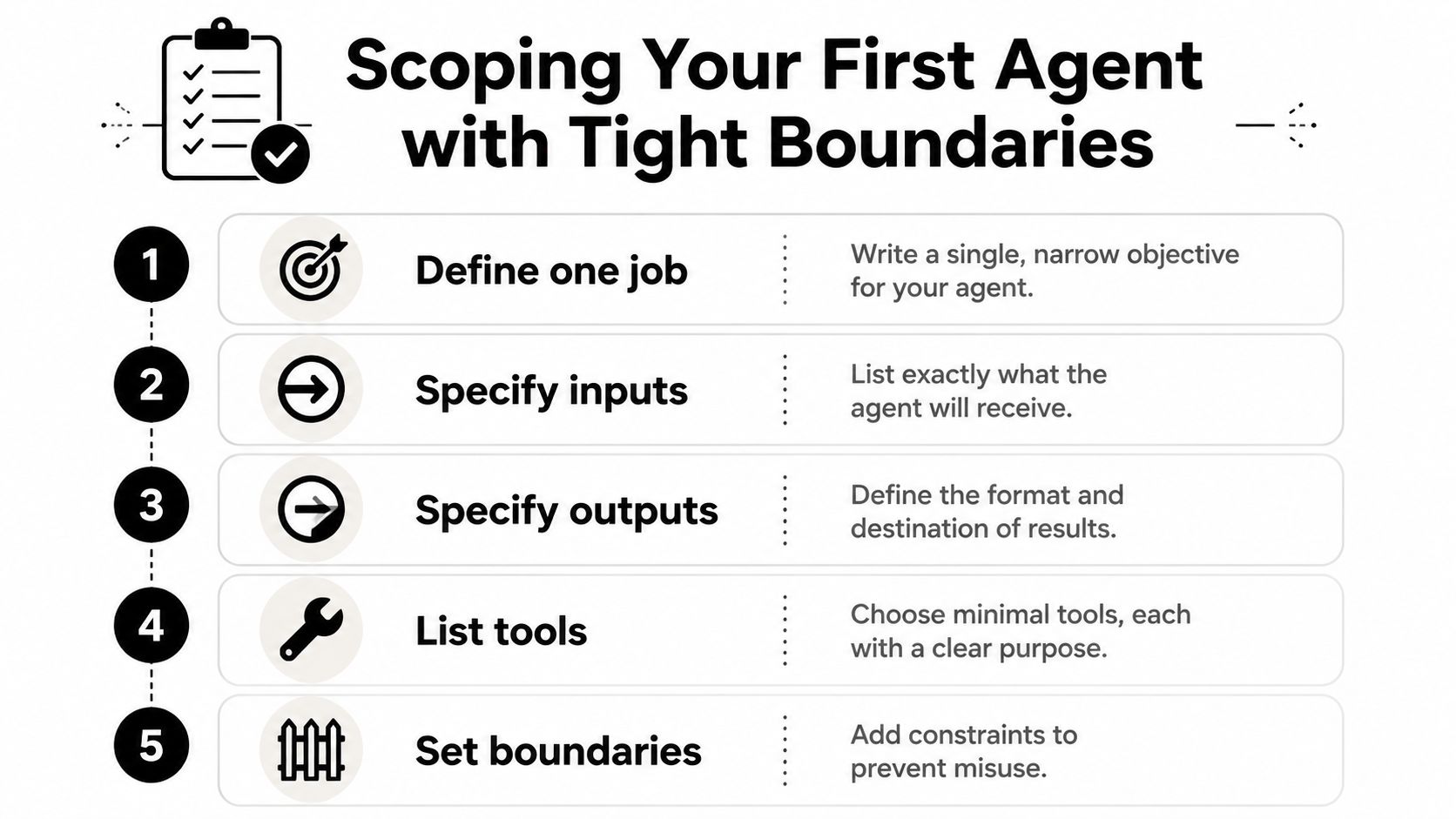
Start with one job, not a platform. The best early agents solve a single workflow with clear inputs and outputs, and they do it with a deliberately small tool surface. That means choosing the narrowest use case that still creates value, then refusing to widen it until the core loop is dependable.
Define the job before the tools
Write the objective in one sentence. If the sentence contains “and” more than once, it's probably too broad. A good first agent might classify inbound requests, draft replies from approved material, or summarize support threads, but it shouldn't also update records, issue refunds, and notify a team unless those actions are tightly controlled.
Then define exactly what the agent receives and what it must return. Inputs should be predictable, outputs should have a required format, and the agent should not be guessing where results go. In practice, a lot of “smart” setups turn into brittle ones, because the team defines behavior after the integration is already live.
Keep the toolset small and directional
For a first deployment, keep the tools to 2 to 4. Separate read actions from write actions, because those are different risk levels and they should be handled differently from day one. If a tool can change a database, send a message, or trigger spend, that action needs a higher bar than a read-only lookup.
Your first evaluation set should be built before code, not after. Gather the scenarios the agent is expected to handle, include edge cases, and test the agent against them repeatedly before it ever sees production data. One practical workflow in the brief recommends running each agent 3 to 5 times through scenario tests, then keeping human review in place for the first 30 days before loosening oversight.
A sandbox is the safest place to see whether the agent can stay inside its lane. Start with mock or read-only tools, then move to internal users with full logging, then limited production with capped volume. That staged path reduces the blast radius when the agent gets confused, and it usually reveals bad assumptions long before customers do.
Build the eval set first, then make the code prove it can survive the tests.
This is also where a lot of teams learn that “more capability” isn't the same as “more reliability.” Adding memory, broader permissions, or extra tools before the core loop is stable usually creates more debugging than value.
Connecting Business Tools and Enforcing Permission Boundaries
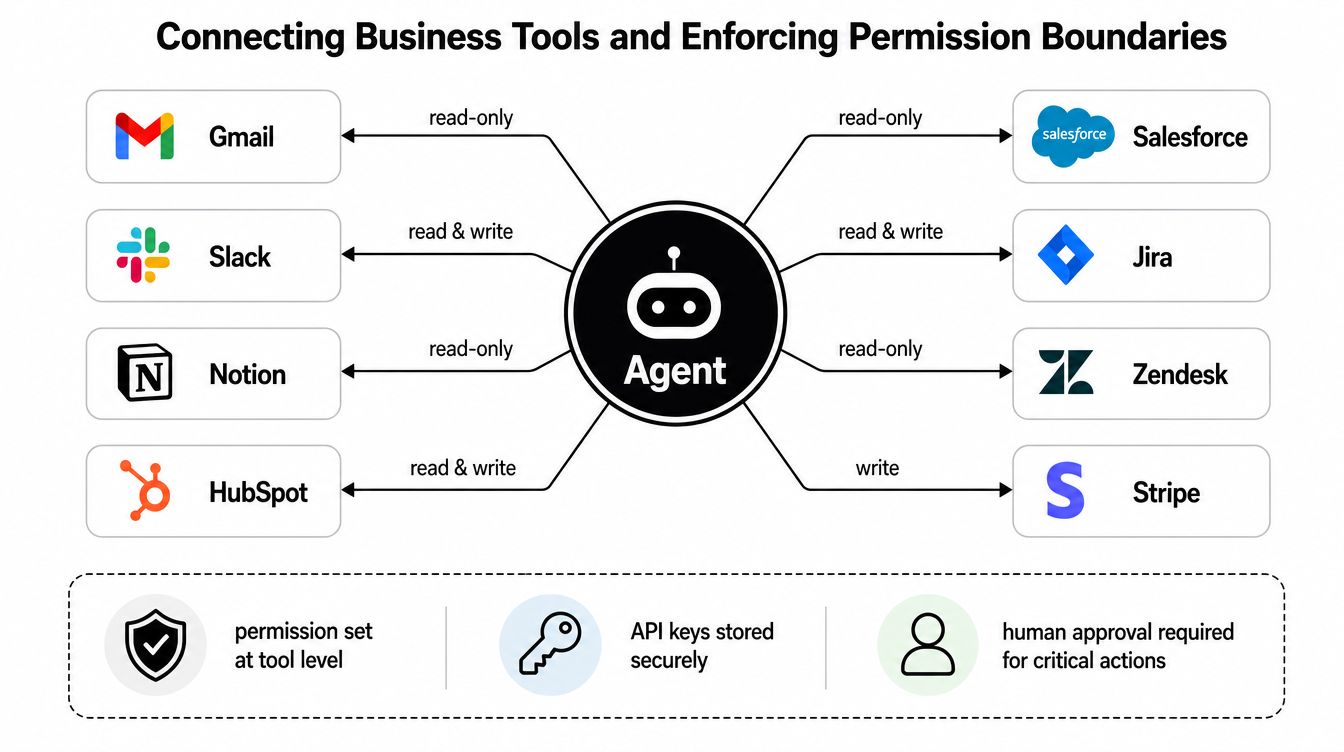
Once the scope is clear, the next decision is which systems the agent can touch. This means business tools like Gmail, Slack, Notion, HubSpot, Salesforce, Jira, Zendesk, and Stripe, but the important part is not the logo list. It's the permission model behind each connection.
Connect data sources before you grant action rights
The safest setup starts with read access. Connect the data sources the agent needs first, then document the inputs and outputs for each integration so there's no ambiguity about what the agent is allowed to inspect or change. When the information is incomplete, the agent should escalate the edge case instead of guessing.
That pattern matters because agents become more useful only when they can see enough context to act responsibly. But visibility without guardrails is just a faster path to mistakes, so each connector should be designed with a specific purpose, not a general “access everything” policy.
Use approval gates for irreversible actions
Anything external or irreversible needs a human checkpoint. That includes approve-before-send for customer email, spend, and similar actions, along with read-before-write whenever the tool can change live business records. If an action can affect revenue, customer trust, or client data, it shouldn't happen without explicit confirmation.
The operational habit I recommend is simple, every tool call gets logged. That gives you traceability when a workflow fails, and it makes permission boundaries auditable instead of theoretical. It also helps teams review the exact sequence of calls that led to a bad outcome, which is far more useful than a generic “the agent failed” report.
For teams looking at integration-heavy setups, Donely's integrations is one example of how this can be packaged in practice. In that kind of model, the value is not the number of connectors, it's whether each connector can be assigned the right level of access and reviewed cleanly when something breaks.
Treat multi-client access like a separate problem
Agencies and service teams need even tighter isolation. A client agent shouldn't be able to see another client's data just because both workflows use the same app. Scoped access, narrow permissions, and isolated logs are operational requirements, not extras, when multiple accounts or business units share the same operating team.
If you can't answer who can send what, to whom, and under which approval rule, the integration isn't ready.
Designing Multi-Instance Architecture and Access Control
At scale, the question stops being “Can we run an agent?” and becomes “Can we run many agents without turning the whole stack into a permissions mess?” That's where multi-instance architecture matters. You want a design where personal work, business work, and client work can live separately without forcing separate accounts or migrations every time a team grows.
Isolate workloads before they become a compliance problem
The cleanest pattern is a separate instance per workload, with isolated containers and scoped data access around each one. That keeps one agent's mistakes from leaking into another team's workflows, and it makes it easier to reason about data ownership when a customer or client asks where something happened. In compliance-focused environments, that separation is not a nice-to-have, it's how you keep the audit trail usable.
Granular per-instance RBAC is the other half of the picture. If an agent can manage support tickets but not billing, or draft outreach but not send it, those boundaries need to be enforced at the instance level, not just in a document nobody checks. Unified audit logs matter for the same reason, because once you have multiple agents acting across multiple units, visibility has to be centralized or the system becomes impossible to review.
Centralize operations without centralizing risk
A good multi-instance setup lets a team monitor status, logs, usage, and invoicing from one place while keeping the actual workloads separated. That's the operational sweet spot, centralized control without shared exposure. It lets founders, agencies, and enterprise operators manage growth without rebuilding the architecture every time a new client or internal group comes online.
For teams evaluating hosted infrastructure, Donely's hosting for Hermes agents is one example of a multi-instance path built around managed deployment rather than custom DevOps. The important design idea is broader than any one platform, though, separate runtime boundaries, shared oversight, and a clear access model for every instance.
If the architecture starts as a single-agent experiment, it should still be able to expand into multiple isolated agents later. The mistake is building a “one-off” setup that works only as long as there's one owner, one client, and one permission set.
Testing and Rolling Out Agents Safely
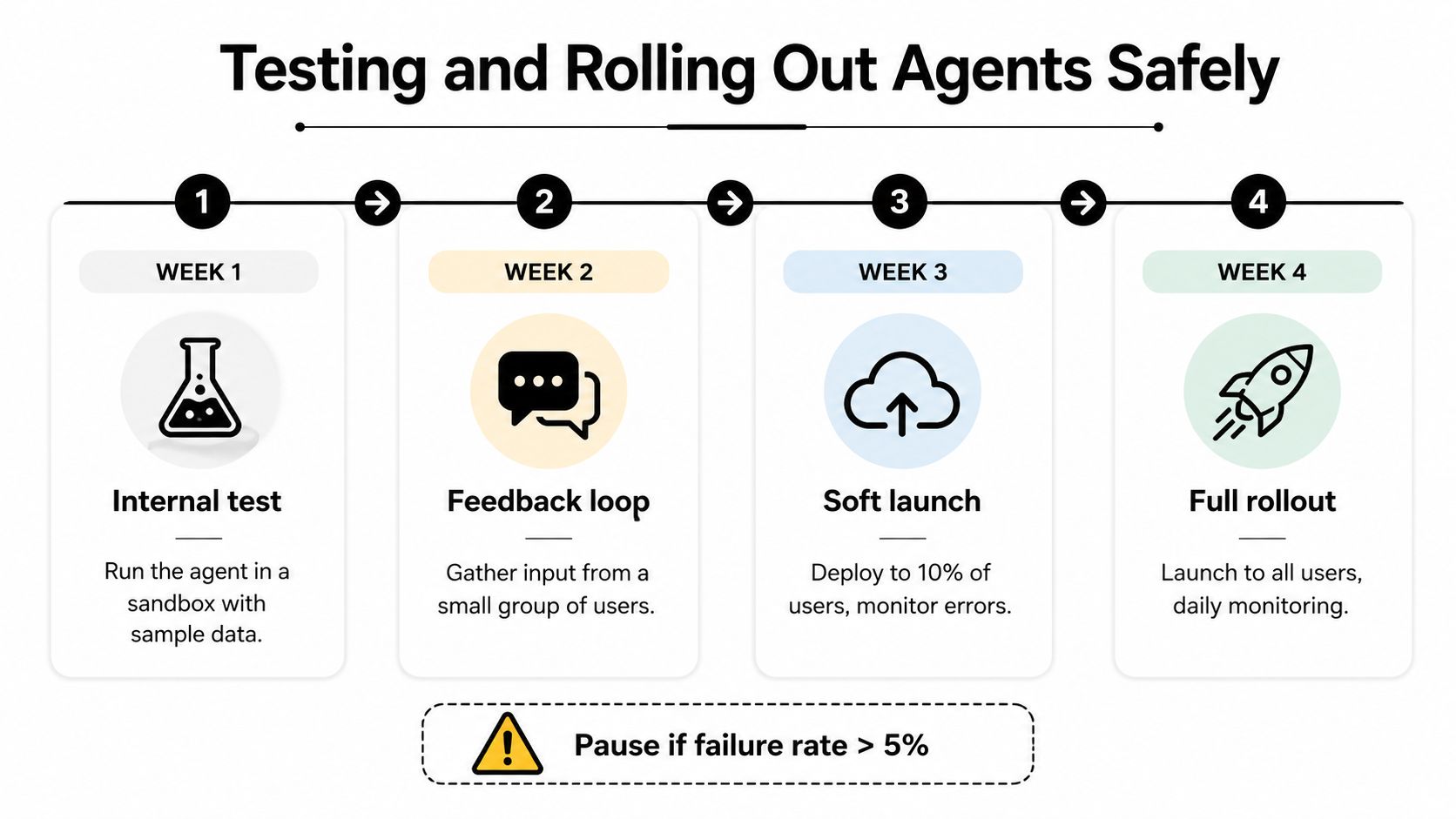
A safe rollout looks more like a software release than a configuration change. The agent should earn trust through repeatable tests, controlled exposure, and clear criteria for when humans stay in the loop. When teams skip that discipline, they usually discover edge cases in live traffic, which is the most expensive place to learn them.
Run scenario tests before real users touch it
Start by testing the agent against realistic scenarios multiple times. The brief recommends 3 to 5 runs per agent, which is enough to reveal unstable behavior without pretending one successful pass proves anything. Track success rate, average iterations, cost per task, and latency, because those numbers tell you whether the workflow is serviceable.
A staged release reduces the chance of a bad surprise. First run the agent in a sandbox with mock data or read-only tools, then expose it to internal users with full logging, then move to limited production with capped volumes. That sequence keeps the blast radius small while you watch for regressions.
Keep human review in place until the behavior settles
For the first 30 days, human-in-the-loop review is the safer default. The review step should be explicit, not assumed, because unattended approvals are how agents drift into actions nobody intended. If a workflow involves spend, customer communication, or record changes, the review should stay until the team has enough evidence that the behavior is stable.
The rollout logic is the same whether the agent is answering tickets or updating CRM records. Canary deployments, version-tagged logs, and behavioral tests catch problems before a full rollout makes them expensive. In a real production environment, the goal isn't zero mistakes, it's catching them in a controlled lane before they become customer-facing incidents.
Don't widen access because the demo looked good. Widen access because the logs, tests, and review process have already proved the workflow is stable.
AI Agent Production KPI Targets
| Metric | Target | Measurement Frequency |
|---|---|---|
| Accuracy | At least 95% for simple workflows, per the monitoring guidance in the brief | Daily during rollout, then ongoing |
| Task completion rate | At least 90% early target, per the monitoring guidance in the brief | Daily during rollout, then ongoing |
| Failure rate | Less than 5% for simple workflows, per the monitoring guidance in the brief | Daily during rollout, then ongoing |
| Response speed | Under 500 ms for simple workflows, per the monitoring guidance in the brief | Continuous in production |
| Success rate | Track as a core operational KPI, especially during scenario testing | Per test run and after changes |
| Average iterations | Track to see whether the agent is looping or converging | Per test run and after changes |
| Cost per task | Track to understand operational efficiency | Daily or weekly, depending on volume |
| Latency | Track to spot slow tools or excessive tool calls | Continuous in production |
Monitoring Performance and Scaling Operations
Monitoring is not the final step, it's the operating system. Once the agent is live, you need a way to tell whether it's getting better, drifting, or accumulating failures behind a smooth interface. That's why the most useful setups treat agents like software products with observability, not like chat experiments with a billing account attached.
Track the metrics that actually tell you something
The practical KPI set is small and focused, task completion rate, accuracy, cost per task, response speed, escalation rate, and error recovery. The brief's monitoring guidance recommends starting with 2 to 3 primary metrics, and one source suggests basic targets of at least 95% accuracy, at least 90% task completion, less than 5% failure, and response speed under 500 ms for simple workflows. Those targets are useful because they force teams to decide what “good enough” means before complaints start.
The sequencing matters too. Define baselines before launch, implement logging in the first weeks, create dashboards next, then move to continuous monitoring by month two. That's a better setup sequence than trying to interpret production behavior after the fact, because once volume rises, silent failure patterns are harder to reconstruct.
Use traces to understand why the agent behaved the way it did
A metric dashboard tells you what happened. A trace tells you why. If you want a clear view of reasoning steps, tool usage, and handoffs, an Agent Run Trace page like the one at DOM Studio's Agent Run Trace page is the kind of observability pattern worth studying, because it surfaces the sequence of actions instead of hiding it behind a single result.
That matters more as agents scale across teams and instances. Centralized monitoring gives operators a way to compare failure patterns, spot noisy workflows, and identify which automations are costing more than they save. It also keeps billing and usage tied to the actual workloads, so growth doesn't turn into a bookkeeping problem.
The long-term advantage of this approach is architectural. If each new agent follows the same boundary rules, logging model, and KPI discipline, you can add instances without rewriting the stack. That's how a single useful agent becomes a managed fleet instead of a maintenance burden.
If you want to move from prototype to production without rebuilding your workflow each time you add a new team or client, Donely gives you a way to host, deploy, and govern agents from one dashboard with isolated instances and audit-friendly controls. Visit Donely to see how it fits your setup and start planning a safer rollout path.