
Your day probably already has too many tabs open.
You answer email between meetings. You promise yourself you'll follow up with leads after lunch. You save articles to read later, then forget them. By evening, the actual work you wanted to do has been squeezed out by coordination, reminders, scheduling, and tiny repetitive decisions.
That's the setting where a personal AI agent starts to make sense. Not as a sci-fi companion, and not as a smarter chatbot, but as software that can remember context, use tools, and take action on routine tasks you'd rather not keep carrying in your head.
The timing matters. Gartner projects that by 2028, 33% of enterprise software applications will include agentic AI, up from less than 1% in 2024, which implies a 33-fold increase in four years, according to DataGrid's summary of Gartner agentic AI forecasts. That tells you this isn't a side experiment anymore. It's becoming part of how software works.
For founders, solo builders, agencies, and operators, the interesting question isn't “What is an agent?” It's “How do I start with one useful personal agent, then grow into a reliable AI workforce without creating a security mess?”
Table of Contents
- What Is a Personal AI Agent and Why It Matters Now
- Beyond Chatbots The Core Capabilities of AI Agents
- Real World Use Cases for Your Personal AI Agent
- How Personal AI Agents Work Architecture and Security
- How to Deploy Your Personal AI Agent DIY vs Managed Platforms
- Launch Your First Agent in Minutes with Donely
- Frequently Asked Questions About Personal AI
What Is a Personal AI Agent and Why It Matters Now
By 10:30 a.m., many knowledge workers have already switched between email, chat, calendar invites, notes, and internal tools dozens of times. The hard part is often not strategy or judgment. It is the constant coordination work that breaks attention into small pieces.
A personal AI agent is software designed to carry some of that coordination for you. You give it a job, limited access to the right tools, and clear rules for what it can and cannot do. Then it helps complete recurring work instead of only generating text on command.
A good way to picture it is as a junior operator sitting beside your apps. It does not replace your judgment. It handles the repeatable steps around that judgment, such as drafting replies, organizing follow-ups, preparing summaries, and surfacing what needs a decision.
Personal agents matter most when they reduce switching and coordination work, not when they produce a single impressive answer.
That is why the category matters now. As noted earlier, analysts expect agentic AI to become part of standard business software over the next few years. The shift is bigger than a new chat window. It points to software that can take a goal, work inside approved systems, and keep work moving with less manual supervision.
A practical definition
A personal AI agent usually does three things well:
- Remembers context: your preferences, recurring tasks, past decisions, and the state of ongoing work
- Uses approved tools: email, chat, documents, calendars, CRMs, and other systems you already rely on
- Acts within guardrails: drafts, routes, schedules, summarizes, and escalates based on rules you define
That last part causes a lot of confusion. People often assume an agent must have broad access to be useful. In practice, the opposite is usually true. The safest starting point is narrow scope, limited permissions, and clear approval steps.
That approach also makes deployment easier. A single agent that handles one job well is easier to test, monitor, and trust than a general-purpose assistant connected to everything.
Why it matters beyond personal productivity
A personal AI agent often starts as an individual tool and quickly becomes an operating model. One person uses an agent for inbox triage. Then a team wants one for research monitoring, another for customer follow-up, and another for internal operations. The challenge shifts from building one helpful assistant to managing a small workforce of software workers.
That is where adoption often stalls. The blocker is rarely raw model quality. It is security, reliability, and governance. Who approved the action? What systems can the agent access? What happens when it is wrong? How do you roll out a second and third agent without creating operational chaos?
Those questions matter early, not later. If you want a practical picture of what that progression looks like, AI employees for modern teams shows how organizations move from one narrowly scoped agent to a governed group of agents with clearer roles and controls.
Start with one agent. Give it one repeatable job. Set boundaries before scale. That path is slower for a week and much faster over a year.
Beyond Chatbots The Core Capabilities of AI Agents
A chatbot is like a calculator. You ask for an answer, and it returns one.
An agent is more like an accountant. You give it a goal, and it can figure out the steps, use the right tools, and help move the task to completion.
A chatbot answers and an agent carries work forward
If you ask a chatbot, “Can you write a reply to this customer?” it may produce a good draft.
If you ask an agent to handle customer follow-up, it can do more. It can check the conversation history, look up account notes, prepare a reply in the right tone, suggest next steps, and place the draft where you already work. If configured properly, it might also create a task for a teammate or update a record in another app.
That's the practical difference. Chat stays in the conversation. Agents extend into the workflow.
For teams designing those workflows, clear instructions matter more than people expect. If the agent's role, boundaries, and expected outputs are vague, it will behave vaguely too. That's why strong operational documentation helps. A useful reference is GitDocAI insights on writing docs, which shows how better instructions improve agent behavior in real work settings.
The three capabilities that make the difference
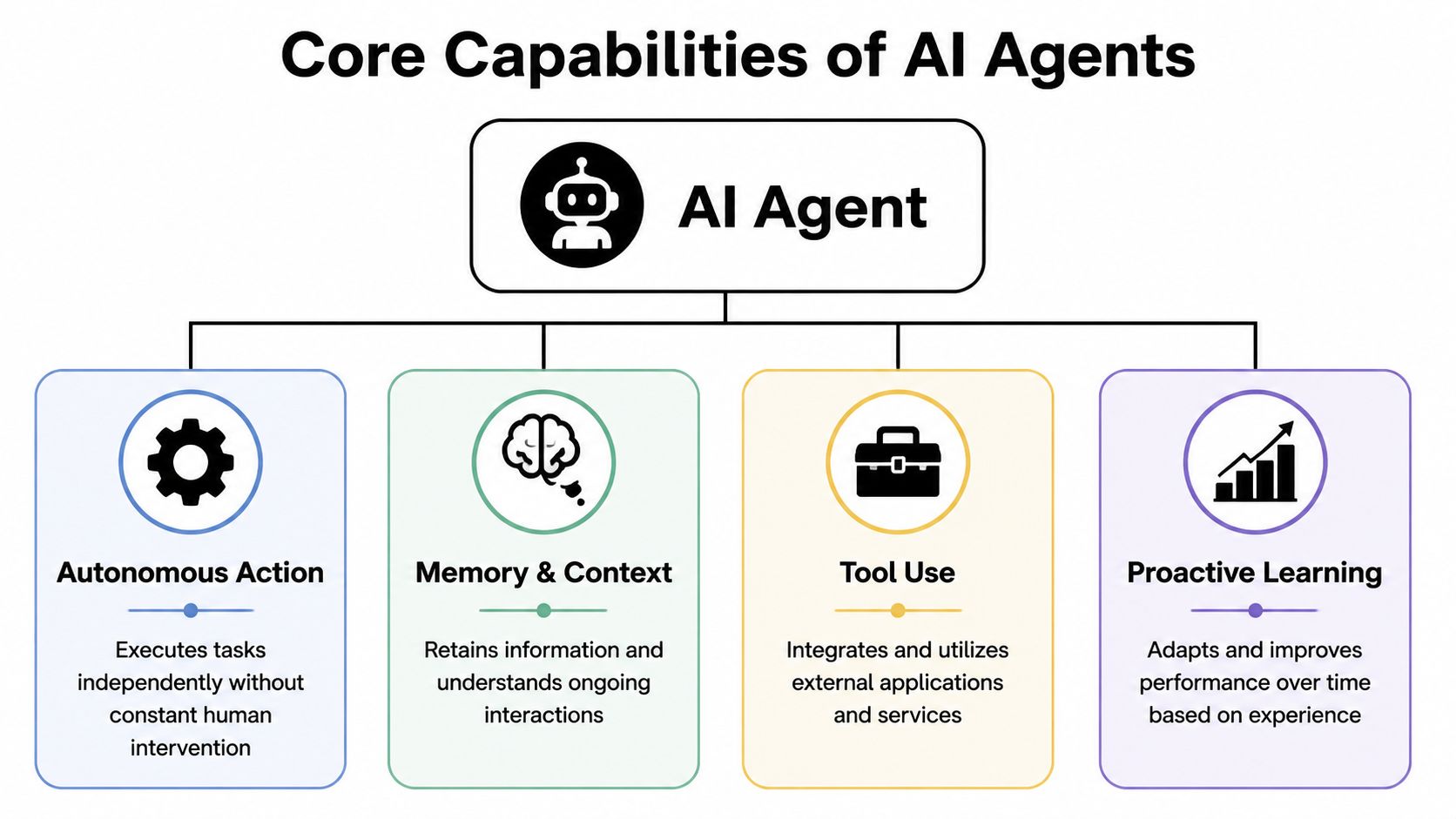
The most important technical distinction is simple. A fully functional personal AI agent needs persistent memory and tool access, because memory carries preferences and context across sessions, while tools make the agent's suggestions executable. Without both, it behaves more like chat than autonomy, as explained in this guide to how personal AI agents work.
Here's the mental model I'd use.
Persistent memory
This is the agent's working relationship with you. It remembers that you prefer short emails, that vendor invoices should be flagged, that calendar holds need confirmation, or that product feedback from enterprise customers deserves extra attention.
Without memory, every conversation starts cold.
Tool use
This is the difference between advice and action. Tool access lets an agent interact with Gmail, Slack, Notion, HubSpot, Salesforce, Jira, Stripe, or whatever else you use.
Without tools, an agent can tell you what to do. It can't help do it.
Planning and execution
This is the bridge between one request and several steps. Instead of just replying to “Set up a call with this lead,” the agent can identify the lead, draft outreach, check availability, and prepare a summary before the meeting.
Practical rule: If your setup has no memory, no tool access, or no execution path, you don't have a real agent yet. You have a helpful interface.
You'll also hear people talk about “proactive” behavior. That usually means the agent can monitor triggers and act when conditions are met, not only when you send a prompt. But proactivity should come after the basics. First get one agent to remember, use tools, and complete bounded tasks consistently.
Real World Use Cases for Your Personal AI Agent
The best use cases aren't the most futuristic ones. They're the tasks you repeat often, the tasks with clear inputs, and the tasks where a mistake is visible before it becomes costly.

A lot of public demos still focus on impressive one-offs. The more useful question is what a personal AI agent can handle reliably in daily work. That gap matters because many tutorials showcase scheduling or writing help, while public guidance on production limits, accuracy, and safe deployment in personal workflows is still catching up, as discussed in this analysis of building a personal AI agent.
An inbox assistant that reduces coordination work
Start with email because it's where many people lose time in small chunks.
An inbox assistant can:
- Prioritize messages: separate urgent replies from newsletters, receipts, and routine updates
- Draft responses: prepare replies that match your preferred tone and level of detail
- Coordinate scheduling: spot meeting requests, propose times, and summarize the purpose of the call
- Create follow-ups: turn unresolved threads into tasks so they don't disappear
This kind of agent works best when you define narrow rules first. For example, it can draft but not send. Or it can schedule only inside certain hours. Those boundaries reduce risk and make review easier.
A researcher that watches and summarizes
A second strong use case is an automated researcher.
Maybe you track competitors, customer feedback, policy changes, or industry news. Instead of checking ten places manually, your agent can watch selected sources, collect updates, and prepare a morning briefing. It can also group findings by topic so you see patterns instead of isolated notes.
That's especially useful for solo operators who need awareness without spending half the day gathering material.
For teams that want to go beyond one-off summaries and into persistent role-based agents across business functions, platforms that support AI employees for repeated workflows show what that operating model looks like in practice.
Here's a quick walkthrough that makes the category more concrete:
A sales support agent that keeps momentum alive
Sales is full of lightweight tasks that still matter: lead qualification, enrichment, handoff notes, follow-up reminders, and first-draft outreach.
A personal sales support agent can review incoming leads from a CRM, prepare context for outreach, and flag who needs human review before any message goes out. It's not replacing judgment. It's reducing the clerical work around judgment.
Reliable use cases usually share one trait. The agent works inside a clear lane with visible outputs and human review at the points that matter.
That principle applies beyond sales. Support teams can use it for triage. Agencies can use it for client communication prep. Operators can use it for invoice review and recurring reporting.
How Personal AI Agents Work Architecture and Security
When people hear “always-on agent,” they immediately think, “So this thing can see everything?”
That concern is healthy. A personal AI agent becomes valuable by handling context-rich work, which means privacy and governance can't be an afterthought.
The basic loop behind agent behavior
Under the hood, most agents follow a simple pattern:
- Observe: gather the current request, prior context, and relevant data
- Plan: decide what steps are needed
- Act: use approved tools to do the work
- Review: check results, log what happened, and wait for the next trigger
That loop sounds straightforward because it is. The complexity comes from permissions and trust. An agent that can read your email, touch your files, or update a CRM needs clear boundaries for every action.
Security controls that make personal use realistic
A major gap in public discussion is governance. Personal agents are often described as digital shadows that know your calendar, messages, finances, health, or location, but secure use requires transparent decision logic, auditability, and a human pause button, as argued in this essay on personal agents and governance.
For practical deployment, that usually means four controls.
Isolated runtime environments
If you run separate agents for personal tasks, company operations, and client work, they shouldn't all share the same data boundary. Isolation reduces accidental crossover and makes policy easier to enforce.
Scoped permissions
The agent should only access the apps, folders, and actions required for its job. If it only needs to draft support replies, it shouldn't also be able to modify financial records.
Audit logs
You need a readable history of what the agent saw, decided, and changed. That's not just for compliance-focused teams. It's how you debug mistakes.
Human approval and pause controls
Some actions should always require sign-off. Others may be safe to automate fully. You want both options.
Trust doesn't come from the agent sounding confident. It comes from being able to inspect, limit, and stop its behavior.
If you're thinking about shared knowledge across teams, a governed internal knowledge layer matters too. A company-wide memory system only becomes useful when access boundaries are clear. That's the idea behind a company brain for managed agent knowledge, where internal information can support agent work without turning every instance into a free-for-all.
Security is what separates a personal experiment from something you can live with.
How to Deploy Your Personal AI Agent DIY vs Managed Platforms
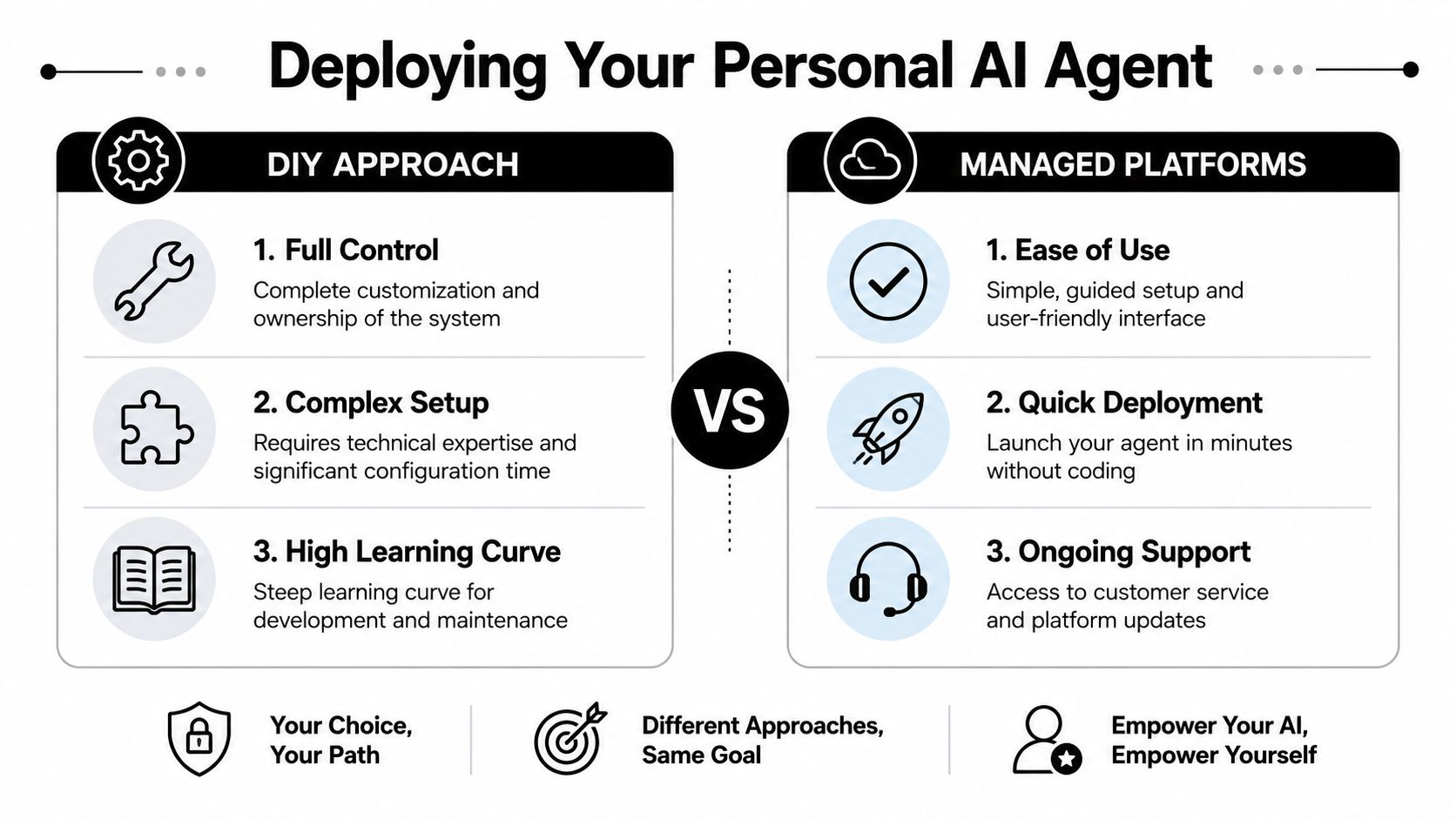
There are two common ways to deploy a personal AI agent. You can build and run it yourself, or you can use a managed platform.
Neither path is universally right. The better choice depends on how much control you need, how much maintenance you can absorb, and whether this is a side experiment or the start of a larger operational system.
McKinsey found that less than 10% of organizations had successfully scaled AI agents in any function, as reported in Tenet's summary of AI agent adoption statistics. That gap between interest and scaled deployment tells you where most projects get stuck. Not on demos. On infrastructure, reliability, permissions, and operations.
When DIY makes sense
DIY is attractive if you're technical and want full control over architecture, models, orchestration, prompts, and hosting.
You may prefer self-hosting if you want to:
- Customize thoroughly: tune workflows around unusual systems or specialized processes
- Own the stack: choose every component yourself
- Experiment quickly in code: test ideas without waiting for platform support
But DIY also means you own the boring parts. Authentication flows. environment management. monitoring. error handling. access control. upgrades. logging. rollback plans.
Why managed platforms appeal to operating teams
Managed platforms reduce the setup burden. Instead of assembling the entire stack, you connect tools, define roles, set boundaries, and launch.
That matters most when your goal is reliable use, not engineering exploration.
| Factor | DIY (Self-Hosted) | Managed Platform (like Donely) |
|---|---|---|
| Setup | You configure infrastructure, integrations, and security yourself | You start from a ready environment with guided setup |
| Control | Highest level of customization | Structured customization within platform limits |
| Maintenance | You handle updates, failures, and logs | Platform handles core operations and maintenance |
| Security implementation | You design isolation, permissions, and auditability | Built-in controls usually cover common deployment needs |
| Scaling to more agents | Adds operational overhead quickly | Easier to replicate across teams or client environments |
| Best fit | Developers who want maximum flexibility | Founders, agencies, and ops teams that want speed and governance |
A practical filter is simple. If you want to learn how agents work, DIY can be a strong path. If you want to deploy agents into real workflows across tools like Gmail, Slack, Notion, Salesforce, HubSpot, Jira, Zendesk, or Stripe, a managed setup is often easier to sustain. For that reason, many teams start by reviewing available agent integration options across common business tools before they decide how much to build themselves.
Launch Your First Agent in Minutes with Donely
If you want a low-friction way to move from concept to working system, a managed platform removes a lot of operational drag.

A simple rollout path
A sensible rollout starts with one role and one workflow.
For example, you might create a personal AI agent for inbox triage. You connect Gmail and Slack, define what “important” means, specify when the agent should draft versus escalate, and choose whether actions require approval. From there, you review outputs for a while before expanding scope.
That approach is easier to manage than trying to create an all-purpose agent on day one.
Here's what the first pass often looks like:
- Choose a single job: inbox assistant, research watcher, support triage, or meeting coordinator
- Connect only the required tools: don't give broad app access if narrow access will do
- Set approval boundaries: drafts may be automatic, sends may require review
- Monitor behavior: check logs, outputs, and failure patterns before widening permissions
From one agent to a governed fleet
This is the one place where platform design starts to matter a lot. Donely offers a unified platform to host and manage multiple agent instances from one dashboard, with isolated instances for personal, business, and client workloads, built-in integrations, granular RBAC, isolated containers, and unified audit logs. That makes it relevant for people who don't want to manage DevOps while they scale from one personal agent to several operational ones.
The broader lesson is bigger than any one tool. Your first personal AI agent is rarely your last. Once it works, you'll want another for a different role, another for a new team, and another for a client environment. If the deployment model doesn't support separation, permissions, and monitoring from the start, growth becomes messy fast.
Start small, but choose an operating model that won't force a rebuild when one agent becomes many.
That's how a personal assistant becomes an AI workforce. Not through hype. Through repeatable deployment, clear boundaries, and steady trust-building.
Frequently Asked Questions About Personal AI
What's the real difference between a personal AI agent and an advanced chatbot
A chatbot mainly responds to prompts. A personal AI agent can remember context, use connected tools, and carry out multi-step tasks within defined permissions. If it can't act or retain working context, it's closer to chat than agency.
Can you trust a personal AI agent with sensitive data
You can trust the setup more than the label. What matters is whether the system supports isolated instances, scoped permissions, audit logs, and human approval for sensitive actions. If you can't see what it did or limit what it can access, trust will stay low no matter how polished the interface looks.
What does it cost to get started
There isn't one universal cost because it depends on whether you build it yourself or use a platform. DIY can look inexpensive at first but still consume a lot of time and maintenance. Managed tools vary by plan, and some offer free or lower-cost entry options for personal use, which can be useful if you want to test a narrow workflow before committing to a larger rollout.
If you want to go from scattered experiments to a governed setup, Donely gives you a practical starting point for launching a personal AI agent, connecting tools, and growing into multiple isolated agents without taking on the full infrastructure burden yourself.