
You probably have an agent working in a notebook, a chat playground, or a local script right now. It can answer questions, maybe call one API, and it looks promising until you ask the harder production questions: who can it access, how do you isolate customer data, what happens when a tool call fails, and how much will this cost if it runs all day.
That's the primary shift in how to build AI agents. The interesting problem isn't getting a model to do something clever once. It's getting a system to do bounded work reliably, securely, and repeatedly under business constraints.
A lot of teams are already past the curiosity stage. PwC reports that 79% of organizations say AI agents are already being adopted in their companies, and among those adopters 66% report increased productivity, 57% report cost savings, 55% faster decision-making, and 54% improved customer experience, according to PwC's AI agent survey. That's why production discipline matters. Once an agent touches inboxes, CRM records, support queues, or finance workflows, it becomes software infrastructure.
Table of Contents
- Blueprint for a Production-Ready AI Agent
- Core Architecture and Essential Tooling
- The Development Workflow and API Integration
- Hardening Your Agent for Production Environments
- Deployment Monitoring and Cost Control
- Scaling From a Single Agent to an AI Workforce
Blueprint for a Production-Ready AI Agent
The fastest way to fail is to start with “we need an autonomous agent.” That's not a task. It's a category error.
Most successful first deployments look much smaller. They triage inbound support requests, draft replies for review, classify leads, summarize account activity, or pull structured facts from a bundle of internal systems. These are narrow jobs with repeatable inputs, visible outputs, and clear handoffs to humans or downstream systems.
Start with the job, not the model
A good first agent owns one bounded workflow. It should have a trigger, a decision path, a small set of tools, and a completion condition.
Use this filter before you write any code:
- Repetitive work: The task shows up often enough that automation compounds.
- Clear success condition: A reviewer can tell whether the agent completed the job correctly.
- Limited action surface: The agent only needs a handful of API calls or internal actions.
- Recoverable failure: If it gets something wrong, a person can fix it without business damage.
- Stable policy: The rules don't change every day.
Recent expert guidance recommends starting with deterministic workflows and tight problem scoping before adding autonomy, rather than jumping straight into complex agent patterns, as discussed in this developer talk on deterministic workflows.
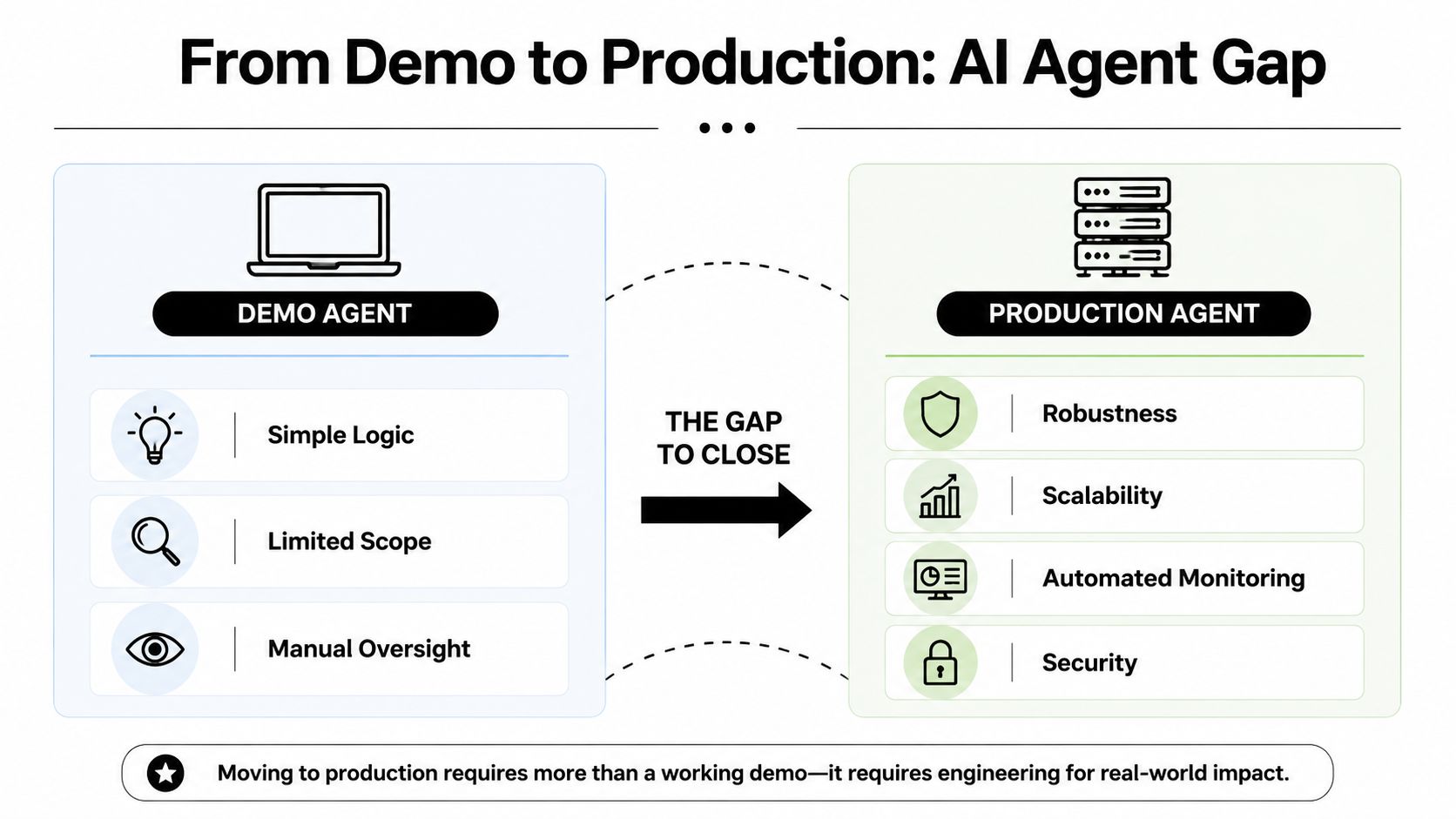
A demo agent can survive on intuition and manual rescue. A production agent can't. It needs explicit constraints.
Practical rule: If a normal workflow engine plus a few rules solves the problem, build that first. Add model judgment only where deterministic logic breaks down.
Define boundaries before capability
Teams often spend too much time on prompt wording and too little time on operational boundaries. In production, boundaries matter more.
Write down the agent's role in one sentence. Then specify what it may read, what it may write, and what it must never do without approval. For a support triage agent, that might mean reading new tickets, retrieving account context, proposing priority and category, and drafting a response. It should not issue refunds, close accounts, or modify billing data.
A useful operating spec usually includes:
| Area | What to define |
|---|---|
| Role | The business function the agent performs |
| Inputs | Events, documents, or messages it can consume |
| Tools | Exact APIs, actions, and systems it can call |
| Guardrails | Restricted actions, approval gates, escalation rules |
| Tenancy | Which workspace, customer, or environment context applies |
| Fallbacks | What happens on ambiguity, timeout, or policy conflict |
This is also where security starts. The agent should never inherit a broad service account “just to get moving.” Give it the smallest set of permissions that still lets it finish the task.
Measure what the agent must earn
A production agent needs metrics before it needs polish. If you don't define the win condition early, you'll end up shipping a system that looks smart and implicitly creates rework.
Good operational metrics are usually closer to process engineering than AI hype:
- Completion quality: Did the agent finish the intended workflow correctly?
- Tool selection: Did it choose the right action path for the case?
- Latency: How long did the full task take, not just the model response?
- Human intervention: When did a person have to step in?
- Rework: How often did downstream teams correct the agent's output?
- Unit cost: What did each completed interaction cost in model and infrastructure usage?
The discipline here matches what production teams already do. They define the task tightly, instrument the workflow, and optimize based on observed failure patterns instead of vibes.
Core Architecture and Essential Tooling
The architecture behind modern agents is less mysterious than it sounds. The pattern is old. What changed is that large language models made planning, memory, and tool use practical enough to wire into business systems.
BCG frames today's agents as a combination of a profile module, a planning module, and an action module, which maps neatly to the classic perceive-plan-act model in this BCG overview of AI agents.
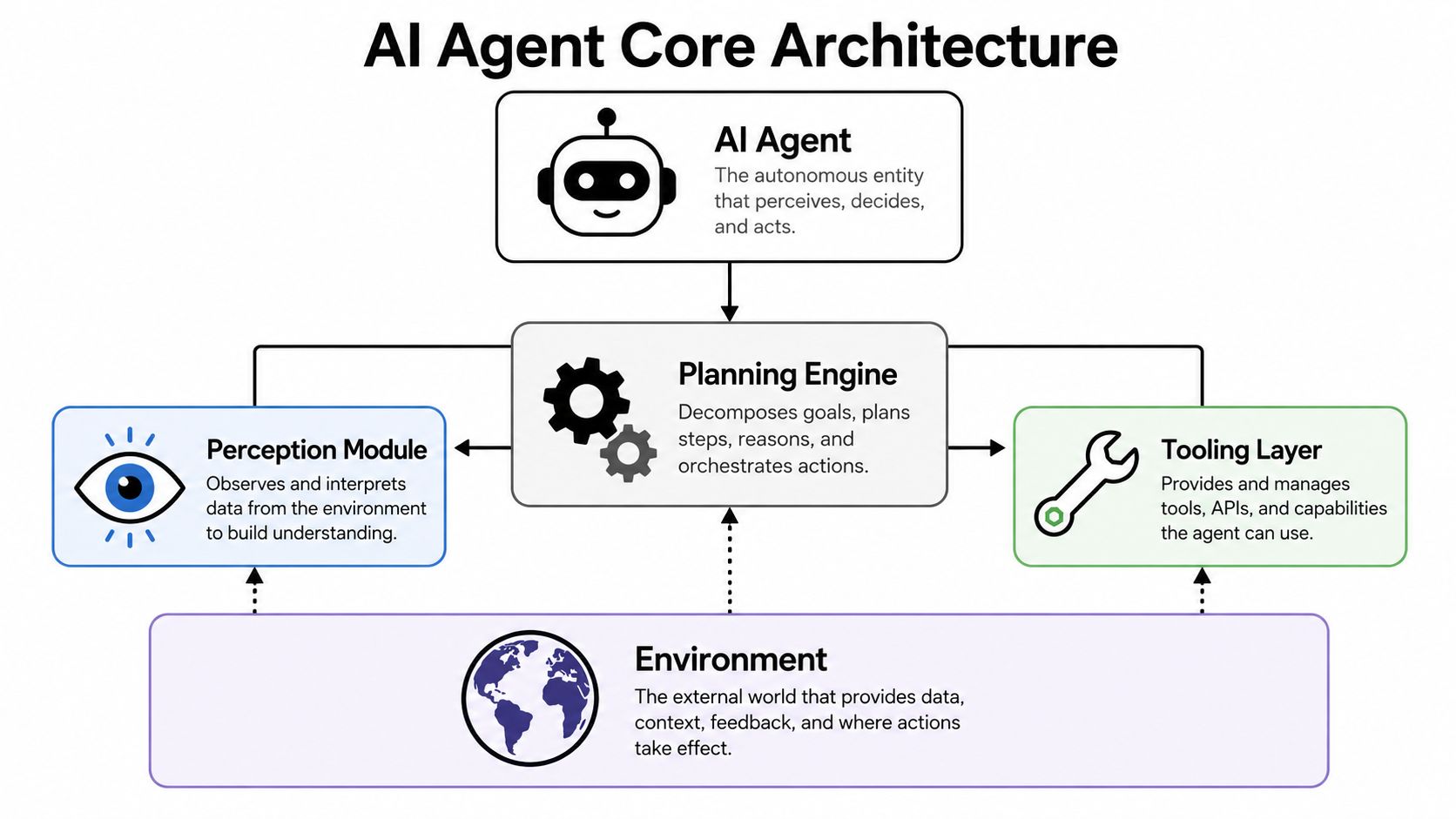
Use a modular agent shape
That modular framing is useful because it prevents a common mistake. Teams try to hide everything inside one giant prompt. That usually collapses once the agent needs multiple tools, memory policies, or environment-specific permissions.
A cleaner stack looks like this:
- Profile module: The role, instructions, policies, and operating context.
- Planning module: The step that decides what to do next.
- Action module: The tool layer that executes calls to Slack, Salesforce, Gmail, Jira, Zendesk, internal APIs, or databases.
- Memory and retrieval layer: Structured context, document retrieval, and state storage.
- Observability layer: Logs, traces, tool-call records, and evaluation hooks.
The model is only one component in that stack. It isn't the whole architecture.
For teams assembling these pieces, a practical reference is the PeerPush AI toolkit, especially if you want templates for implementation planning rather than another theory-heavy overview.
Begin with a single-agent baseline
The most reliable advice for first deployments is boring in the best possible way. Start with one agent, one task, and explicit tool mappings.
Anthropic advises starting simple and adding orchestration only when necessary in its guidance on building effective agents. That means taking an existing SOP or policy doc, converting it into structured instructions, and mapping each decision branch to a known tool or API.
A support triage baseline might look like this:
- Receive a new support email.
- Pull customer and account context.
- Classify issue type and urgency.
- Draft a response.
- Route to the right queue.
- Escalate uncertain cases to a human.
That's enough to create a useful system. You don't need a planner that spawns sub-agents on day one.
Later, if the workflow becomes too broad for one role, then split it. Until then, keep orchestration shallow and debuggable.
A short architecture explainer helps if you want a visual complement to the design choices above.
Choose tooling that keeps orchestration visible
Framework choice matters less than many teams think. LangChain, LlamaIndex, custom orchestration code, or an opinionated agent runtime can all work if they preserve three things: clear state transitions, structured tool schemas, and traceability.
Keep the control flow legible. If you can't explain why the agent called a tool, you won't be able to fix it when it misfires.
Prefer tools and runtimes that make these artifacts easy to inspect:
| Layer | What you want to see |
|---|---|
| Prompting | System instructions, retrieved context, and user input |
| Planning | Why the next action was selected |
| Execution | Exact tool arguments and returned payloads |
| State | Session memory, tenant context, approval state |
| Telemetry | Latency, failures, retries, and model usage |
That visibility is what turns agent engineering from prompt experimentation into software development.
The Development Workflow and API Integration
The build phase is where a lot of agent projects go sideways. The model looks capable, but tool use is brittle. A field name changes. An API returns partial data. Authentication expires. The agent hallucinates an argument shape that was never valid.
If you want a production result, treat tools like contracts, not conveniences.
Write tools like contracts
Every tool the agent can call needs a tight specification. Don't describe actions loosely. Define them as if another engineer had to implement the client from the schema alone.
A good tool definition includes:
- Purpose: What the tool does and when to use it
- Inputs: Required fields, allowed enums, validation rules
- Output shape: Structured fields, not a blob of prose
- Failure modes: What errors can come back and what they mean
- Side effects: Whether the action changes external state
- Authorization scope: Which identities or tenants can call it
For example, “create_support_ticket” is too vague. A better definition says the tool creates a new ticket in Zendesk, requires customer identifier, category, priority, and summary, and returns ticket ID, status, and assigned queue. It should also indicate whether duplicate suppression is handled by the API or by your orchestration layer.
This is one reason teams browse top rapid prototyping tools early, then discover that prototype-friendly interfaces don't remove the need for precise tool contracts once real APIs enter the picture.
Build around a real workflow
Consider an email triage agent for a support team.
The event enters from Gmail or a shared inbox. The agent parses the message, extracts customer identity, checks whether the sender matches a known account, and pulls CRM or support history. It then classifies the issue, drafts a response, and either routes the case automatically or hands it to a human queue.
A practical implementation usually looks like this:
- Ingestion step: Normalize inbound email into a stable internal event.
- Context retrieval: Fetch account, subscription, prior tickets, and recent product incidents.
- Decision pass: Ask the model to classify the issue using a constrained schema.
- Tool execution: Create or update records in the relevant system.
- Response generation: Draft an answer using approved tone and policy.
- Routing logic: Send uncertain or high-risk cases to human review.
If you're wiring multiple business apps together, a catalog like Donely integrations is useful because it clarifies what actions can be exposed as tool calls across systems such as Slack, HubSpot, Salesforce, Jira, and Zendesk.
One subtle point matters here. The model shouldn't decide what tools exist at runtime through guesswork. It should choose from a small, explicit action set that matches the workflow.
Treat authentication and failure paths as product features
Designing the happy path and bolting on error handling later is backwards.
Tool use fails in ordinary ways. APIs timeout. Tokens expire. A CRM record is missing. The email body doesn't contain the data needed to act. A downstream system returns success for the write and stale data for the follow-up read. Your agent needs behavior for each of these cases.
Handle failure in layers:
- Validation before call: Check required fields before invoking a tool.
- Retries for transient errors: Retry idempotent operations with backoff.
- Circuit breaking: Stop repeated calls when a dependency is unhealthy.
- Fallback behavior: Route to a human or request clarification instead of guessing.
- Idempotency protection: Avoid duplicate writes if a retry lands after a partial success.
- Session audit trail: Log the prompt, tool request, response, and final action.
Authentication needs the same rigor. Use scoped credentials, not shared master tokens. Separate read tools from write tools. If the agent serves multiple customers or business units, bind every tool call to explicit tenant context and reject calls that arrive without it.
The agent shouldn't be trusted because the model sounds confident. It should be trusted because the runtime makes unsafe actions difficult.
That's the difference between a clever assistant and an operable system.
Hardening Your Agent for Production Environments
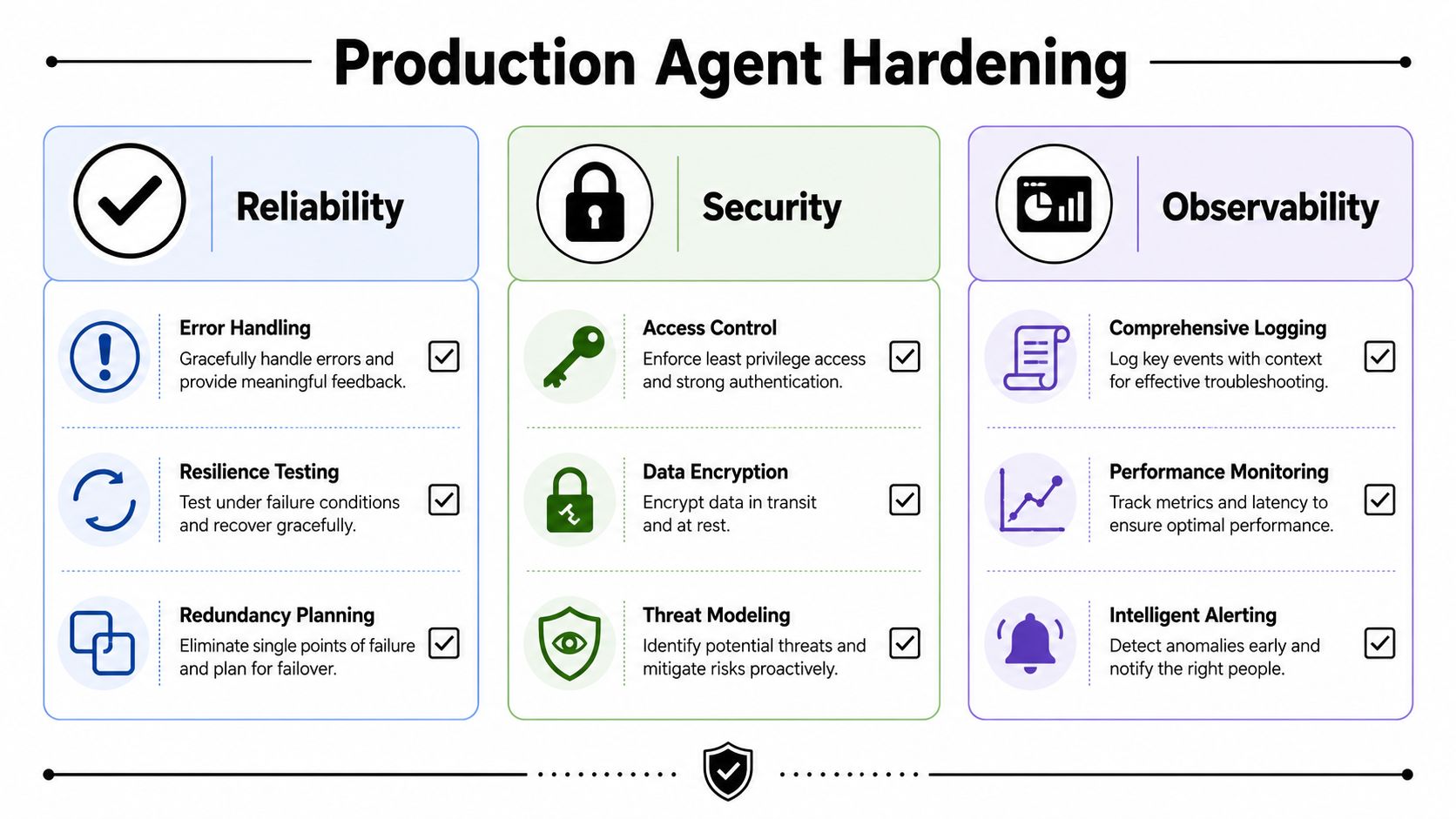
The hardening phase is where teams decide whether their agent is software or theater. If it can touch customer records, internal documents, ticket queues, or messaging channels, trust has to be engineered into the deployment itself.
Security, isolation, and evaluation aren't later-stage concerns. They're the features that determine whether anyone will let the agent near a real workflow.
Security is part of the runtime
Start with least privilege. The agent should only see the data and tools required for its assigned job.
That usually means:
- Scoped credentials: Separate identities for read-only and write-capable actions.
- RBAC enforcement: Permission checks at the tool boundary, not just in UI settings.
- Approval gates: High-risk actions require human confirmation.
- Audit logs: Every external action should be attributable to an agent run, a user, and a tenant.
- Secret management: Credentials live in a managed secret store, never in prompts or config checked into repos.
If your deployment handles sensitive business data, the privacy posture has to be legible to customers and internal stakeholders. A document like the Donely privacy manifesto is useful as a reference point for what teams increasingly expect around access boundaries, logging, and operational handling of AI workloads.
Isolation matters more in multi-tenant deployments
A single-user agent is one thing. A multi-tenant deployment for clients, departments, or business units is another.
The biggest operational mistake I see is soft isolation. Teams separate data in the app layer but share too much context in logs, caches, prompts, or tool credentials. That creates subtle cross-tenant risk. One bad retrieval filter or one mis-scoped connector can surface the wrong documents to the wrong agent.
Use hard boundaries where you can:
| Concern | Better production choice |
|---|---|
| Credentials | Tenant-scoped identities |
| Storage | Tenant-scoped state and file access |
| Execution | Isolated runtime or container boundaries |
| Logging | Per-tenant trace filtering and access controls |
| Billing | Usage attribution by instance or workspace |
This is especially important for agencies and consultancies. Client A and Client B shouldn't be separated by convention. They should be separated by architecture.
Testing has to include failure replay
Teams often test agents by trying a few prompts and watching the demo. That's not evaluation. It's rehearsal.
Practitioner guidance recommends structured evaluation before deployment, including golden sets, 30–100 labeled scenarios, replaying past failures, and A/B-style experiments to validate prompt, tool, or model changes, as covered in this practitioner guidance on robust agent evaluation.
That advice is practical because agent failures cluster in predictable places: ambiguous instructions, malformed tool arguments, missing context, and edge cases that never appear in happy-path demos.
A useful evaluation pack should include:
- Golden set cases: Representative inputs with expected outputs or actions
- Known failure replays: Sessions that previously broke in staging or production
- Policy edge cases: Inputs that tempt the model into unsafe or prohibited actions
- Tool degradation tests: Simulated timeouts, partial responses, and invalid payloads
- Regression checks: Fixed scenarios rerun after every prompt or model change
Reliability comes from replaying the messy cases your users actually generate, not from polishing the clean examples you wish they would generate.
If a change improves one benchmark but increases escalation mistakes or malformed writes, it's not an improvement. It's a trade that needs to be visible.
Deployment Monitoring and Cost Control
The first ugly production incident usually looks like this. Response times spike, support tickets rise, cloud spend jumps, and the agent still reports a healthy API status. The service is up. The workflow is failing.
That gap matters in production. AI agents create cost and risk through sequences of model calls, retrieval steps, tool invocations, retries, and writes into downstream systems. If you only watch pods, request counts, and uptime, you miss the failures that finance, security, and operations care about.
Observe the workflow, not just the container
Start with standard service metrics, then add agent-specific telemetry that maps to business outcomes and tenant impact. An SRE dashboard can tell you whether the process stayed alive. It cannot tell you whether the agent picked the wrong tool, wrote bad data to a shared system, or burned tokens retrying a call that should have failed fast.
Track the path of a task from intake to final action:
- Task completion rate: Whether the workflow reached a valid end state
- Latency by stage: Time spent in retrieval, planning, tool execution, approval, and final response
- Tool-selection accuracy: Whether the chosen action path matched the task
- Escalation rate: How often the agent handed work to a human
- Rework indicators: Reopened tickets, reverted updates, duplicate runs, and manual corrections
- Cost per successful outcome: Model, compute, and tool cost tied to completed work, not raw requests
- Tenant-level usage: Spend, error rates, and throughput split by customer or business unit
- Security events: Denied tool calls, policy violations, secret access failures, and unusual cross-tenant access attempts
Good monitoring also answers forensic questions without a long incident call. Which model version ran? Which prompt revision was active? What documents were retrieved? Which tenant context and policy set were loaded? Did the issue start in retrieval, routing, tool execution, or human approval?
For teams that do not want to run their own control plane, managed OpenClaw hosting for agent deployments is one example of a setup that centralizes instance status, logs, usage, and operational controls for OpenClaw-based agents.
Control costs at the orchestration layer
Cost overruns rarely come from a single expensive model call. They usually come from poor orchestration discipline.
I see the same failure pattern over and over. A workflow retries a slow dependency three times, expands context on each pass, calls a larger model because the smaller one timed out on malformed input, and logs a technical success because the request eventually returned something. Spend goes up. Quality does not.
The common leaks are predictable:
| Cost leak | What usually fixes it |
|---|---|
| Overlong context | Enforce context budgets, trim retrieval, summarize session state |
| Repeated tool retries | Add idempotency keys, retry caps, and dependency health checks |
| Large models on every step | Route simple classification, extraction, and formatting to cheaper models |
| Redundant retrieval | Cache stable lookups and memoize prior results for the same task |
| Unbounded planning loops | Set iteration limits and explicit stop conditions |
| Cross-tenant noisy neighbors | Apply per-tenant quotas, concurrency limits, and budget alerts |
Use expensive reasoning where it changes the outcome. Approval decisions, exception handling, and ambiguous routing often justify a stronger model. Templating, field extraction, and straightforward summarization often do not.
Budgets should live inside the runtime, not in a monthly finance spreadsheet. Set hard limits on per-task tokens, per-tenant daily spend, retry counts, and concurrency. If a tenant exceeds its budget or a workflow crosses its token cap, the agent should degrade gracefully. Return a partial result, request approval, switch to a cheaper path, or stop before it creates a bigger bill and a harder incident.
Pick a deployment model that matches your blast radius
Deployment shape affects reliability, security, and cost control.
Serverless works for short, event-driven jobs with limited state and predictable execution windows. Containers fit longer sessions, custom dependencies, and teams that need deeper observability or controlled networking. Separate instances are often the right choice for regulated workloads, agency environments, and multi-tenant products where one customer's prompt changes, data retention rules, or integration failures cannot be allowed to affect another customer.
Use this rule set:
- Serverless fits short-lived tasks, bursty traffic, and simple execution paths
- Containerized services fit agents with longer runtimes, custom libraries, private network access, or fine-grained tracing needs
- Isolated instances fit customers or business units that need separate runtime boundaries, billing views, secrets, and audit controls
The practical question is simple. If a prompt regression, secret leak, queue flood, or bad integration hits one workload, how much else does it take down?
Production teams should know that answer before launch, not after the first invoice spike or tenant incident.
Scaling From a Single Agent to an AI Workforce
A single agent can automate one lane of work. A scalable system usually looks more like a set of cooperating specialists.
Recent developer guidance points toward modular, multi-agent architectures that break monoliths into specialized sub-agents and use open standards for tool discovery, as described in Google's developer guidance on building better AI agents.
When to split one agent into several
Don't split early just because multi-agent diagrams look complicated. Split when one agent starts carrying incompatible responsibilities.
That usually happens when:
- The tool surface gets too broad: One role needs too many unrelated actions.
- The policies differ: Retrieval, write permissions, or approval rules vary by task.
- The context windows fight each other: Sales context, support context, and finance context don't belong in one always-on prompt.
- Debugging gets opaque: You can't tell whether failures come from planning, retrieval, or tool execution.
A healthier pattern is a coordinator plus specialists. One agent routes work. Another drafts support responses. Another validates policy compliance. Another writes updates to CRM or ticketing systems.
Use schemas and protocols to keep growth manageable
Multi-agent systems fail when they communicate in mushy natural language and call tools through ad hoc wrappers. As the system grows, you need stricter interfaces.
Use:
- Structured schemas for messages passed between agents
- Explicit handoff states so ownership is visible
- Open tool protocols where possible, including MCP-style patterns for dynamic tool discovery
- Deterministic routing before open-ended planning
- Shared observability so one incident trace spans all participating agents
That's how you scale from “one smart assistant” to an actual AI workforce without turning your platform into an untraceable chain of model calls.
If you're moving from prototype to operations, Donely is built for that layer of the problem. It gives teams a way to host, deploy, and manage AI employees from one dashboard, with isolated instances, RBAC, audit logs, centralized monitoring, and a path from a single agent to a larger multi-agent setup without building all of that infrastructure in-house.