
In 2024, 233 AI-related security incidents were recorded, a 56.4% year-over-year increase, and the breach economics were already punishing, with the global average cost of a data breach at USD 4.44 million in 2025 and the U.S. average at USD 10.22 million Mindgard's AI security statistics roundup. The part that should worry every security team is simpler than the headlines suggest, 97% of organizations reporting AI breaches lacked proper access controls, which means the failure mode was often not some exotic model exploit, but a basic control gap.
That's the reality this guide starts from. In enterprise environments, the biggest losses usually come from governance gaps, shadow AI, and over-broad agent permissions, not from a cinematic prompt injection demo. For teams that need a practical deployment lens, a useful companion resource is the enterprise AI strategy guide, especially if you're trying to connect security planning with business rollout decisions.
Table of Contents
- Introduction to Enterprise AI Security
- The Threat Landscape for Enterprise AI
- Core Architecture Patterns for Secure AI Deployments
- Compliance and Audit Readiness
- Operational Controls for Continuous Protection
- Real-World Deployment Patterns Across Organizations
- Enterprise AI Security Implementation Checklist
Introduction to Enterprise AI Security
A production AI deployment looks calm right up until the first trust boundary breaks. One team gives a model access to customer tickets, another wires an agent into Slack and Salesforce, and a third enables a SaaS “AI assistant” that no one in security approved. By the time anyone notices, the system has already touched sensitive data, and sometimes acted on it.
Why the risk changed so fast
The shift in 2024 and 2025 wasn't subtle. Security teams moved from debating theoretical attack paths to dealing with measurable incidents at scale, and the weak point kept showing up in the same place, access control. The key lesson is that enterprise AI security is no longer a niche model-hardening problem, it's an operational discipline that sits between identity, data governance, monitoring, and incident response.
That's also why many AI security programs stall. Teams spend time on model safety language, then discover their real exposure comes from who can connect an agent to a mailbox, what data that agent can retrieve, and whether anyone can see the action trail after deployment.
Practical rule: If an AI system can read, write, send, or trigger workflows, treat it like a privileged integration from day one.
The right mindset is blunt. Start with the question of what the system can touch, then decide how to constrain it, observe it, and turn it off if it behaves badly. That framing is much closer to how production failures happen than a narrow focus on prompts or model weights.
The Threat Landscape for Enterprise AI
The threat environment is messy because the biggest problems aren't always the most technical-looking ones. Governance gaps, shadow AI, and missing visibility routinely do more damage than headline-grabbing adversarial examples. A 2025 IBM-cited survey found 63% of breached organizations either had no AI governance policy or were still developing one, and only 34% of organizations with governance policies performed regular audits for unsanctioned AI use, which says a lot about the gap between paper policy and real control IBM newsroom coverage.
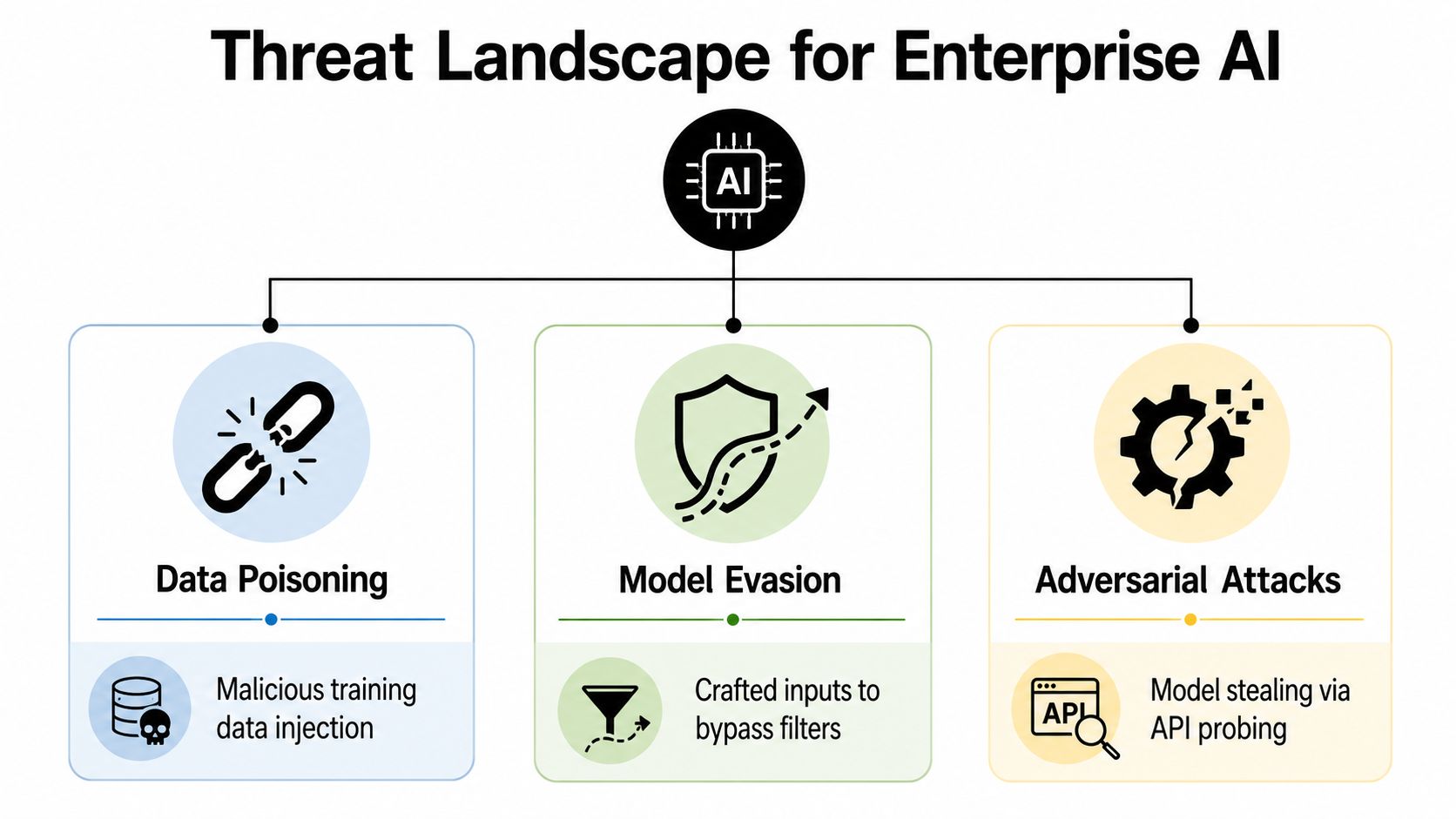
Governance gaps beat glamorous exploits
The Cloud Security Alliance's shadow AI research shows how pervasive the visibility problem has become, with 98% of organizations now having unsanctioned AI use and 86% lacking visibility into data flows to and from AI tools CSA shadow AI research. Those numbers matter because a security team can't govern what it can't inventory, and it can't protect what it can't trace.
Shadow AI creates a familiar pattern. A business user finds a fast answer tool, an engineer wires in a model feature from a SaaS app, or an agent starts pulling data from systems that security never reviewed. The risk isn't just unauthorized software. It's uncontrolled data movement, missing audit trails, and invisible permission creep.
The hardest part is that these failures feel productive right up until they aren't. A tool that removes friction for a team can also bypass review, sidestep retention rules, and expose data across systems that were never meant to meet.
Why access control keeps failing
Another report in the brief ties the breach pattern back to basic control design. One IBM-linked source says 13% of organizations reported breaches of AI models or AI applications, and 97% of those breaches happened where organizations lacked proper AI access controls Mindgard roundup citing IBM-linked reporting. That's a blunt signal that most enterprise AI failures are not coming from obscure new vulnerabilities, they're coming from weak identity and authorization boundaries.
The operational answer is not to stop AI adoption. It's to stop treating AI as a special category that deserves softer controls than everything else in the stack. In practice, the threats that keep recurring are unauthorized use, data leakage through uncontrolled interfaces, and permission sprawl that gives agents more reach than the business task justifies.
If the control plane doesn't know who the agent is, what it can access, and what data it can move, the deployment is already exposed.
That's why the rest of the checklist needs to focus on observability, scoped access, and lifecycle management. Those controls don't eliminate every AI risk, but they do address the failures that show up most often in real enterprise environments.
Core Architecture Patterns for Secure AI Deployments
Secure AI architecture works when you assume compromise is possible and design for containment. The mistake I see most often is teams layering one control on top of an already loose deployment, then calling it “secure” because the model sits behind a gateway. That's not architecture, that's wishful thinking with a login screen.
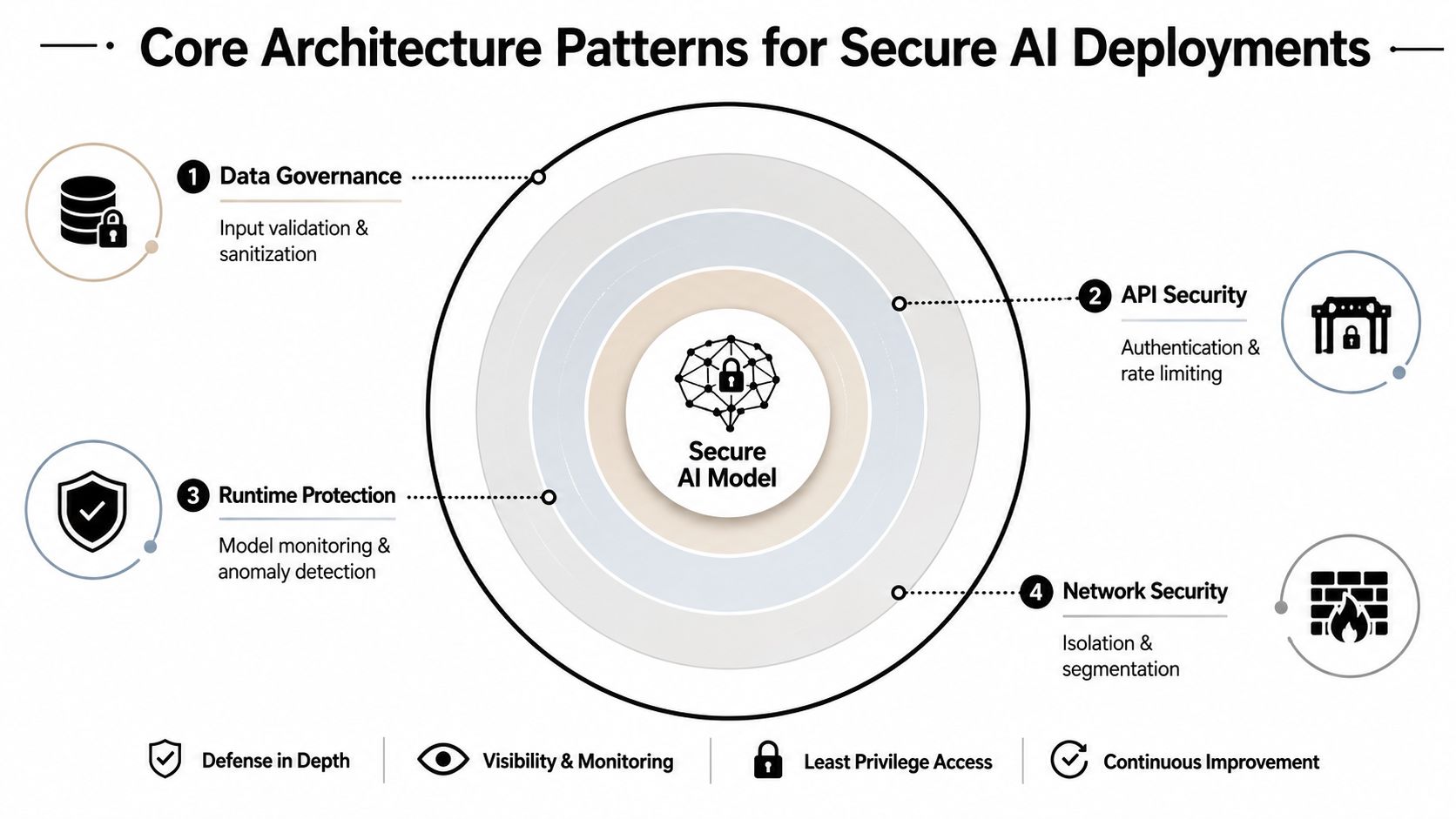
Build isolation first
Instance isolation is the cleanest way to keep one deployment from contaminating another. Separate environments, separate credentials, separate data boundaries. If one agent or tenant is compromised, the damage stays local instead of turning into a platform-wide incident.
That matters for agencies, multi-client platforms, and any business running parallel AI workloads. Even when the same underlying vendor stack is used, each instance should behave like its own security boundary. Anything less invites cross-tenant leakage and makes forensics painful later.
Give every actor a narrower lane
Role-based access control is the next constraint, and it should apply to both people and agents. If an AI employee only needs to create draft tickets, it should not have permission to close cases, export records, or access unrelated systems. If a workflow agent only needs a single project space, don't hand it the rest of the workspace because it's “more convenient.”
Scoped data access makes the principle real. Instead of letting a model query broad repositories, define which records, fields, and sources it can touch for a specific task. That's the control that keeps retrieval from becoming a backdoor into everything the business knows.
Use runtime and network boundaries as backstops
Secure containers and network segmentation are the final layer, not the first excuse. Containers isolate execution, while network controls reduce the chance that a compromised agent can roam across internal systems. They won't save a deployment with overly broad permissions, but they do reduce blast radius when something slips through.
For teams building agent-driven workflows, tool access should also be explicit and reviewable. A practical reference point is the OpenClaw API, which sits in the same broader design conversation around agent access and control boundaries. The important part isn't the brand, it's the pattern, isolated execution, narrow credentials, and a policy layer that can say no.
Operational takeaway: The safest AI systems are usually boring. They're segmented, scoped, logged, and hard to overreach.
Compliance and Audit Readiness
Compliance teams and security teams often sound like they're asking for different things, but in AI deployments they're usually asking for the same controls in different language. You need to know who accessed what, whether access was authorized, how data moved, and what happened after an incident. That's security evidence and compliance evidence at the same time.
A practical way to think about it is that auditability is not paperwork, it's infrastructure. If logs are unified across users, agents, and model actions, they support both investigations and control testing. If permissions are granular, they support both least-privilege enforcement and access review.
The retention and vendor management checklist is a useful complement here because vendor risk and retention discipline often decide whether an AI deployment stays manageable or turns into a data sprawl problem. The same logic applies to your internal controls, don't separate “security logging” from “audit logging” if the underlying event trail is the same.
Map controls once, satisfy more than one framework
SOC 2 access control expectations line up naturally with RBAC and approval workflows. HIPAA-ready designs lean on the same isolation and auditability that protect any sensitive workload. When AI systems are introduced, the extra requirement is usually not a whole new category of control, it's proving that existing control boundaries still hold when the system can act autonomously.
That's why unified logs matter so much. A reviewer wants evidence of access and response, while a defender wants detection and containment. One well-designed audit trail can serve both.
For teams formalizing policy language, the privacy manifesto is relevant as a model of how access boundaries and data handling expectations can be stated clearly enough to support enforcement. The content of the policy matters less than whether it can be translated into actual permissions, reviews, and logs.
Treat incident response as a compliance asset
Incident response is another place where teams overcomplicate things. In practice, the same playbooks that help a SOC contain a suspicious AI action also help a compliance team explain how the event was detected, escalated, and resolved. If you can't reconstruct the action chain, your response process is weak and your audit story is weak.
That's especially true when vendors and third parties are involved. You need retention rules, revocation paths, and a way to prove that the right system, not just the right team, handled the issue. Security and compliance converge most cleanly when the evidence trail is already built into the way the AI system operates.
Operational Controls for Continuous Protection
A secure AI deployment gets compromised in the gaps between good architecture and daily operations. The model was approved, the agent was deployed, the dashboard looked fine, then a permission changed, a token aged badly, or an unusual data pull went unnoticed. That's the point where logging, monitoring, and response decide whether you have an incident or a breach.
The advanced data security solutions conversation is relevant here because many teams need tooling that can observe data movement, identity events, and unusual access patterns together instead of as separate products. The technical challenge is less about collecting logs and more about making the logs useful before damage spreads.
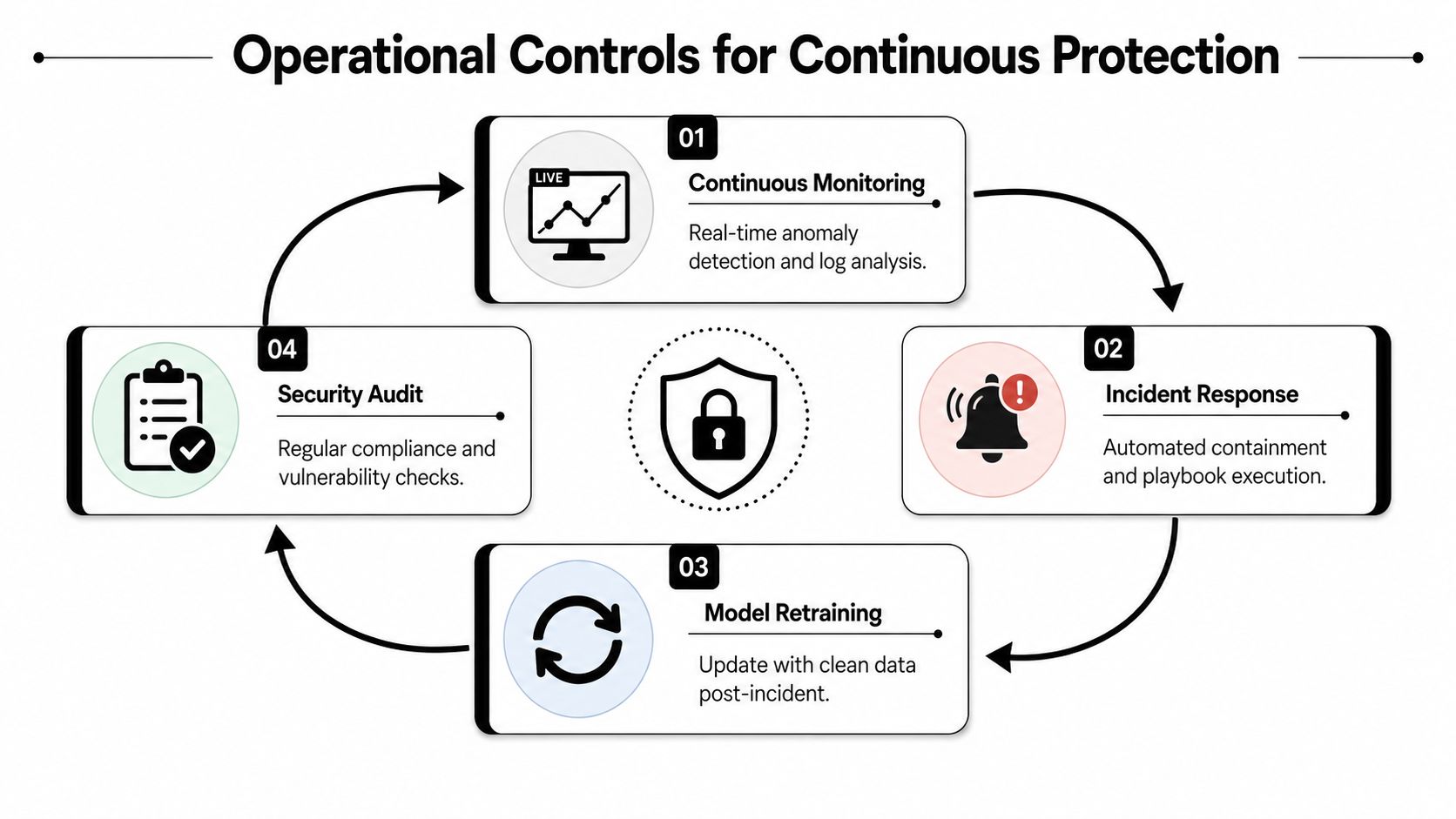
Use logs that answer real questions
A good audit trail should tell you who did what, when, and from where. That applies to API calls, data access events, agent actions, and privilege changes. If the answer is buried across five consoles, the trail isn't operationally useful.
Here's the kind of event chain that matters in production. An agent gets a new permission, starts reading more records than usual, and then triggers a downstream workflow it never used before. If monitoring catches the pattern early, you can freeze the token, review the config, and stop the spread before the action becomes irreversible.
Build response around containment
Incident response for AI needs to assume the system may keep acting while you investigate. That means predefining kill switches, approval gates for risky actions, and clear ownership for revoking access. Waiting to “figure it out” during an event is how small mistakes turn into big ones.
The YouTube walkthrough below is useful as a visual reminder that continuous protection is a loop, not a one-time hardening exercise.
Don't skip lifecycle management
Security doesn't end when the agent goes live. Permissions need review, integrations need revalidation, and retired models or workflows need removal, not just deactivation. Old access paths are one of the easiest ways for risk to linger after the business thinks a system is gone.
A useful internal control reference is the security policy, especially if it ties review cadence, incident handling, and permission ownership to specific operators. Policies only matter when they're attached to lifecycle actions, not when they sit in a folder no one opens.
What works in practice: Continuous monitoring only helps if the response path is just as fast. A silent alert queue is not a control.
Real-World Deployment Patterns Across Organizations
The same security principles look different depending on who's deploying the system. A client-facing agency, a large enterprise, and a solo builder all need boundaries, but the failure modes aren't identical. The right design is the one that matches the operational shape of the business.
Agencies need tenant separation that never blurs
For agencies, the first rule is simple. Client A data should never meet Client B agent activity, not in storage, not in logs, and not in a shared workspace shortcut. Instance isolation and scoped data access do more work here than elaborate model tuning ever will.
The pressure comes from convenience. Shared dashboards, reused prompts, and cross-client automation can make the business faster, but they also make accidental data exposure much easier. Agencies that keep separate instances and separate audit trails usually spend less time untangling client incidents later.
Enterprises need permission governance before scale
Enterprise teams usually have a different problem. Their AI agents are expected to act like employees, which means the security model has to act like HR, identity, and app governance all at once. RBAC, approval gates, and centralized logging are the controls that keep one helpful workflow from becoming a hidden admin path.
The challenge is political as much as technical. If every business unit can spin up an agent with broad access, the platform loses control before security ever sees it. Centralized governance helps, but only if it's enforced consistently across teams and tools.
Solo builders need simplicity without sacrificing boundaries
Solo builders and small teams rarely have the luxury of a full security staff. That doesn't mean they should skip the basics. The best approach is usually to keep the number of instances small, use least privilege from the start, and avoid connecting an agent to systems it doesn't need yet.
Managed platforms can help if they're built around clear boundaries and logs, because they remove a lot of the DevOps burden. Donely is one example in that category, with isolated instances, scoped access, and unified logs designed for multi-workload AI operations, though the important standard is still the control pattern, not the logo.
Enterprise AI Security Implementation Checklist
A workable checklist has to start with visibility, because you can't protect hidden AI systems or data paths. After that, the order matters. If you lock down model logic before you know where agents live, you'll still miss the exposure.
-
Inventory every AI system and data flow. Find sanctioned tools, shadow AI, embedded SaaS features, agent integrations, and any place sensitive data can enter or leave an AI workflow. If you can't map the path, you can't govern it.
-
Apply instance isolation and RBAC by default. Keep environments separate, narrow permissions by role, and avoid shared access that crosses client, department, or workload boundaries. This is the fastest way to reduce blast radius.
-
Restrict data access to the minimum useful scope. Limit what the model can retrieve, which fields it can see, and what external systems it can query. Broad retrieval is one of the easiest ways to create unintended exposure.
-
Turn on unified audit logging. Capture agent actions, user actions, permission changes, and data access in a format the SOC and compliance teams can both use. Logs that only satisfy one team usually fail the other.
-
Set incident response rules for AI events. Decide who can disable an agent, revoke a token, freeze a workflow, and notify stakeholders. If those decisions are improvised during an incident, you've already lost time.
-
Review permissions and retire stale systems on a schedule. AI deployments drift. Users change, integrations change, and old workflows linger long after they stop being useful. Regular review is part of security, not admin cleanup.
A good checklist should make the next step obvious. If you have to debate where to start, the deployment is probably still too exposed.
If you're building or cleaning up AI systems in production, use this checklist to pressure-test your current setup against real operational risk, not theory. For teams that want a managed way to run isolated AI instances with RBAC, audit logs, and scoped access, visit Donely and compare those controls against the workflows you're deploying.