
Most advice on enterprise AI deployment still starts in the wrong place. It starts with model choice, benchmark scores, prompt frameworks, or whether you should fine-tune at all. In practice, that's rarely the deciding factor.
The pattern that shows up in real deployments is much less glamorous. Successful AI implementations commonly follow a 10/20/70 resource split, with about 10% on algorithms, 20% on technology and data infrastructure, and 70% on people and process change according to Talyx's summary of RAND-backed implementation failure patterns. That tracks with what breaks in production. Not the model demo. The handoffs, permissions, approvals, integrations, auditability, and ownership model.
That's why enterprise AI deployment should be treated as an operating model decision, not a data science project. If the workflow is unclear, if the source systems are fragmented, if legal and security teams get involved only after launch, the initiative will stall no matter how good the model looks in a sandbox.
Teams working on practical automation use cases often discover the same thing. In customer-facing functions, for example, the hard part isn't generating text. It's routing leads, syncing CRM updates, preserving context, and keeping humans in control when needed. That's the same operational challenge you see in DialNexa Labs AI for sales, where the value comes from tying AI behavior to real revenue workflows rather than treating it like a standalone chatbot.
Table of Contents
- Introduction The Real Challenge of Enterprise AI
- Don't Start with a Pilot Start with a Plan
- Designing Your Enterprise AI Architecture
- Integrating and Securing Your AI Workforce
- Automating the AI Lifecycle for Zero DevOps
- Scaling From One Agent to a Company-Wide Army
- Conclusion Your Playbook for Deployment Excellence
Introduction The Real Challenge of Enterprise AI
The challenge of enterprise AI isn't getting a model to respond well. It's getting a business to trust, govern, and repeat the outcome.
A lot of teams still frame enterprise AI deployment as a search for the smartest model. That mindset creates a familiar failure pattern. The team ships a promising pilot, people clap at the demo, then deployment stops at legal review, system access, change management, or data ownership. The model was never the bottleneck.
Practical rule: If your AI initiative doesn't have named process owners, integration requirements, and approval paths before build starts, you don't have a deployment plan. You have a prototype plan.
Operational maturity is what separates isolated wins from durable systems. Governance determines who can do what. Integration determines whether the AI can act inside the business. Security determines whether the rollout survives scrutiny. Scaling determines whether one useful agent becomes a repeatable capability across teams.
That's why the strongest enterprise AI programs treat deployment like workforce design. They define responsibilities, escalation routes, data boundaries, and metrics first. Then they choose the model that fits those constraints.
Don't Start with a Pilot Start with a Plan
Teams love pilots because pilots feel safe. They're small, fast, and easy to approve. But a lot of failed enterprise AI work starts with a pilot that was never designed to become a production workflow.
Industry reports indicate that roughly 70 to 85% of enterprise AI implementations fail or stall, with some figures as high as 95% for pilots. Those same reports also note that successful deployments usually pick a narrow first use case, define success metrics upfront, and finish data quality work first according to Sol Harbor's synthesis on AI implementation failure patterns. That's the part many teams skip. They test the model before they test the operating conditions.
Pick a workflow people already understand
The best first deployment target is usually not the most impressive use case. It's the one with the clearest operational shape.
Look for a workflow that has these properties:
- It's painful enough to matter. People already complain about it, escalation volume is high, or cycle time is slow.
- It's repetitive enough to standardize. The work follows recognizable rules and not pure judgment.
- It already has some SOP structure. If no one can explain the current process, AI won't fix the ambiguity.
- The handoffs are visible. You can tell where the workflow starts, who approves exceptions, and where outputs land.
- The source data exists. Not perfect data. Usable, reachable, governed data.
- The result can be measured. You need a business outcome, not vague excitement.
A good first use case might be support ticket triage in Zendesk, quote preparation from CRM data in Salesforce, internal knowledge retrieval for account teams, or lead qualification with mandatory escalation rules. A bad first use case is usually something broad like “make our sales team smarter” or “build an AI analyst.”
For teams mapping larger organizational change, it helps to borrow a broader transformation lens instead of treating AI as a side experiment. This practical framework for digital transformation with AI is useful because it forces the business case, workflow change, and technology decision to stay connected.
A simple planning artifact makes this concrete:
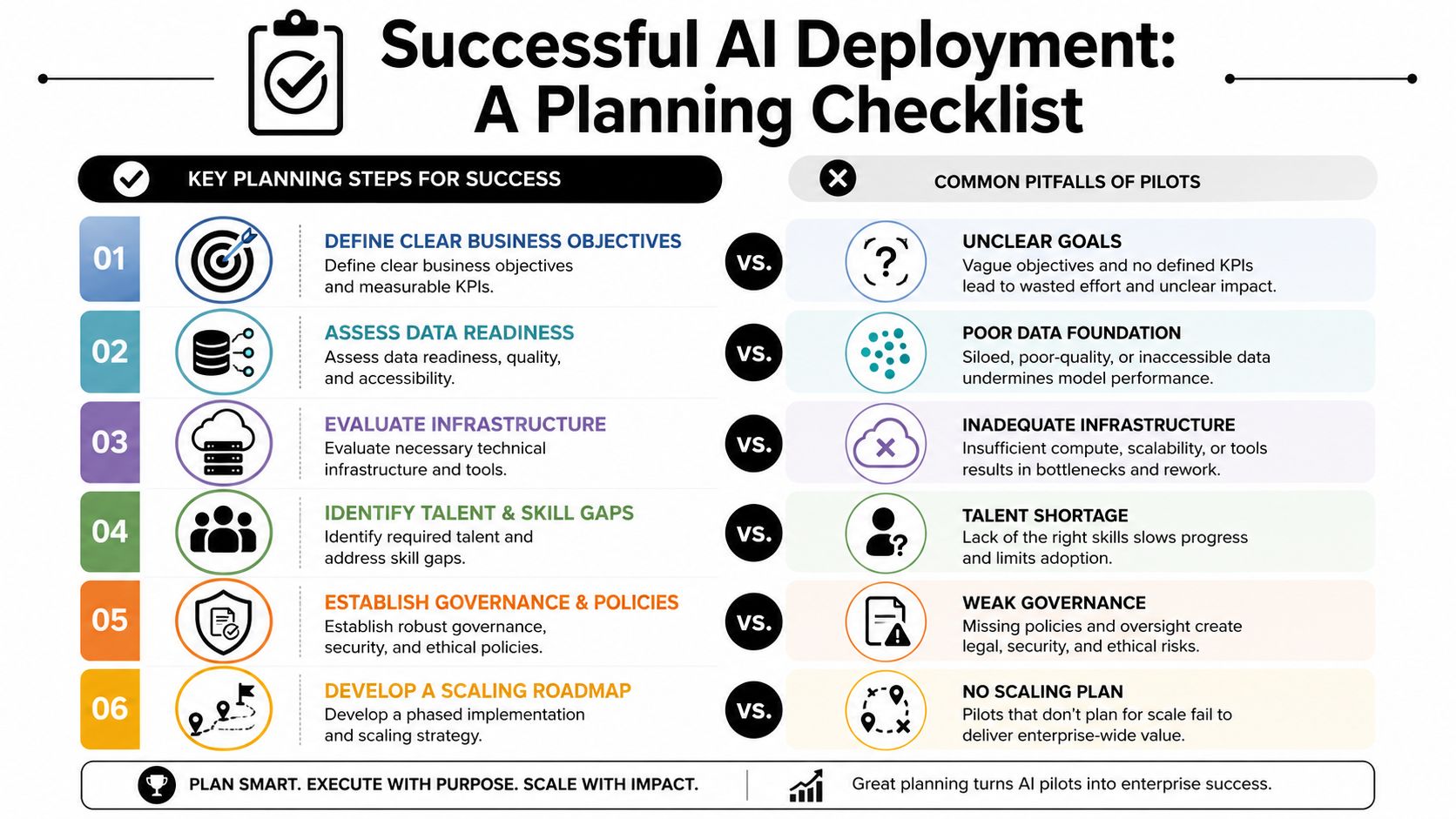
Use a pre-build readiness test
Before anyone writes prompts, provisions infrastructure, or debates model vendors, ask six questions.
What exact business outcome should improve?
Name the operational outcome in plain language. Faster response handling, fewer manual routing steps, better document preparation, cleaner CRM updates.What input data will the system need?
List systems of record, data owners, access boundaries, and known quality issues.What action is the AI allowed to take?
Read-only summarization is different from writing back to ERP or sending customer communications.What does human oversight look like?
Define where review is mandatory, where escalation is automatic, and who is accountable for overrides.What would count as failure?
Not just technical failure. Also adoption failure, governance failure, and workflow mismatch.Who owns the process after launch?
If ownership disappears after implementation, the deployment will decay quickly.
The first production-worthy AI workflow is usually boring on paper. That's a good sign. Boring workflows scale because they already have clear rules, known stakeholders, and measurable outputs.
After the planning checklist is done, the video below is a useful companion for teams socializing the rollout internally and aligning non-technical stakeholders on what deployment requires.
Put the rollout path in writing
A real deployment plan needs a production path, not just a test scope. At minimum, document:
- Scope boundaries. What the AI does, what it doesn't do, and what systems it can touch.
- Success criteria. Define decision gates before launch so the team isn't rewriting goals halfway through.
- Approval model. Include security, compliance, operations, and process owners early.
- Fallback procedures. If the workflow breaks, people need a safe manual path.
- Expansion logic. Decide what has to be true before the use case expands to another department or geography.
Most pilot programs gain credibility. Not when they get more features, but when they get constraints.
Designing Your Enterprise AI Architecture
Architecture decisions in enterprise AI deployment are less about elegance and more about blast radius, isolation, and operational control. Teams usually start by asking which model to host. The better question is how the system will be deployed, separated, updated, and governed over time.
Grand View Research estimated the global enterprise artificial intelligence market at USD 23.95 billion in 2024 and projected it to reach USD 155.21 billion by 2030, with cloud deployment accounting for 65.8% of the market in 2024 according to its enterprise AI market report. That matters because the default architectural center of gravity is now cloud-based infrastructure, not custom local stacks for every use case.
Cloud is the default starting point
Cloud isn't automatically correct for every workload. Some teams have residency, latency, or internal policy reasons to keep parts of the stack elsewhere. But for most organizations, cloud wins the first deployment decision because it reduces provisioning friction and gives platform teams more flexible control over scaling, access, and service composition.
The trade-offs are easier to evaluate when they're visible:
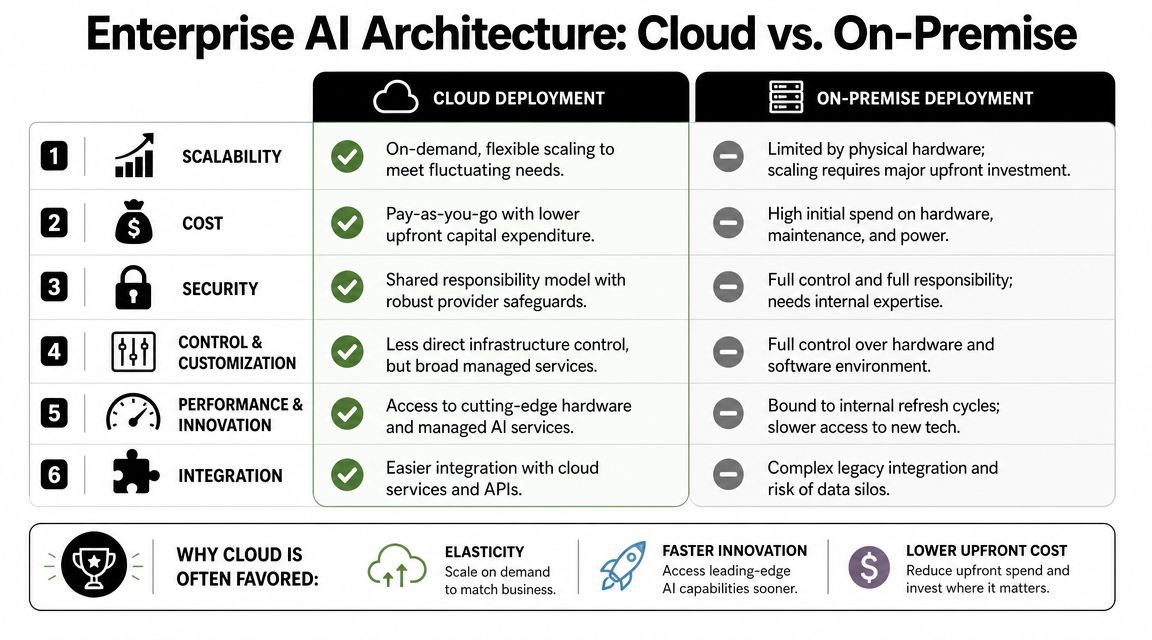
What usually matters in practice:
- Elastic provisioning helps when workloads are uneven across departments.
- Managed services reduce the burden on internal ops teams.
- API-friendly connectivity makes cloud environments easier to pair with modern software stacks.
- Security posture becomes a shared-responsibility problem rather than a fully bespoke one.
Monoliths create governance debt
A common mistake is building a single shared AI environment for every team, data source, and use case. It seems efficient at first. Then exceptions pile up. Permissions get messy. One department needs a different connector set. Another needs stricter approval rules. A client-facing use case can't share runtime or logs with internal experimentation.
That's where multi-instance architecture usually beats a monolith. Separate instances for departments, business units, clients, or high-risk workflows make governance more practical. Isolation reduces the chance that one change, one bad connector, or one prompt policy breaks unrelated workloads.
A multi-instance approach also makes lifecycle management easier:
- Security boundaries stay explicit
- RBAC policies remain understandable
- Audit scope is narrower
- Testing can happen without touching live business-critical agents
- New workloads can be launched without redesigning the entire stack
If you're evaluating how institutional knowledge should be separated and reused across teams, the idea behind a centralized yet controlled company brain is useful. The key is not just access to knowledge. It's knowing which instance, role, and workflow can use which part of that knowledge.
Build versus buy versus platform
The architecture decision often turns into a procurement decision. Should the team build internally, buy a narrow point solution, or use a deployment platform?
| Criteria | Build (In-House) | Buy (Point Solution) | Platform (e.g., Donely) |
|---|---|---|---|
| Deployment speed | Slowest. Internal teams handle setup, orchestration, and runtime decisions | Fast for one use case | Fast across multiple use cases |
| Control | Highest technical control | Limited to vendor feature set | Strong operational control with managed abstraction |
| Integration flexibility | Potentially high, but expensive to maintain | Often narrow and app-specific | Broad if the platform supports common systems and channels |
| Governance model | Fully custom. Also fully your burden | Usually basic and fixed | Centralized controls with reusable policies |
| Maintenance load | Highest | Lower for the app itself, but fragmentation grows | Lower ongoing burden if lifecycle tooling is built in |
| Scalability across teams | Possible, but slow to standardize | Usually poor beyond the original function | Better fit for repeatable rollouts |
| Vendor lock-in risk | Lower at the software layer, higher in internal complexity | Medium to high | Depends on architecture and exportability |
Architecture should lower operational friction, not move it to another team. If every new agent requires infra tickets, custom IAM review, and one-off connector work, the architecture won't scale even if the model does.
In most enterprises, the useful middle ground is a platform model. You keep governance and deployment consistency while avoiding the cost of rebuilding the same DevOps and runtime machinery for each AI workflow.
Integrating and Securing Your AI Workforce
Most enterprise AI deployment trouble shows up the moment the AI has to do something useful. Reading a prompt in isolation is easy. Reading the right customer record, checking current ticket status, applying business rules, writing the update to the right system, and preserving an audit trail is where the job starts.
That's why integration and security sit at the center of production readiness. Geodesic notes that many enterprise AI deployments fail not because of the model, but because organizations lack a usable integration layer that can connect legacy ERP, CRM, and financial systems to the workflows where work happens in its analysis of enterprise AI adoption pain points.
Integration is where most deployment plans get real
The operational mess is familiar. Salesforce contains account context. Jira holds implementation tickets. Gmail contains customer threads. SharePoint or Notion holds internal documentation. ERP stores order or billing state. None of those systems were designed with your new AI workflow in mind.
If the team handles those connections one by one, the project becomes an integration program disguised as an AI initiative.
A better pattern is to establish a unified control layer that can:
- Connect to the systems where people already work
- Scope access per workflow and per role
- Normalize data movement across apps
- Trigger actions with explicit rules
- Record who did what, and why
This is the operational reason many teams move toward managed agent platforms rather than stitching together isolated tools. For example, AI employees on a platform model can be deployed with prebuilt connectors, isolated runtime boundaries, and channel-level access controls so the workflow can plug into Slack, Salesforce, Jira, Gmail, or support systems without a custom integration rebuild for each rollout.
The workflow below captures the sequence necessary for operationalization.
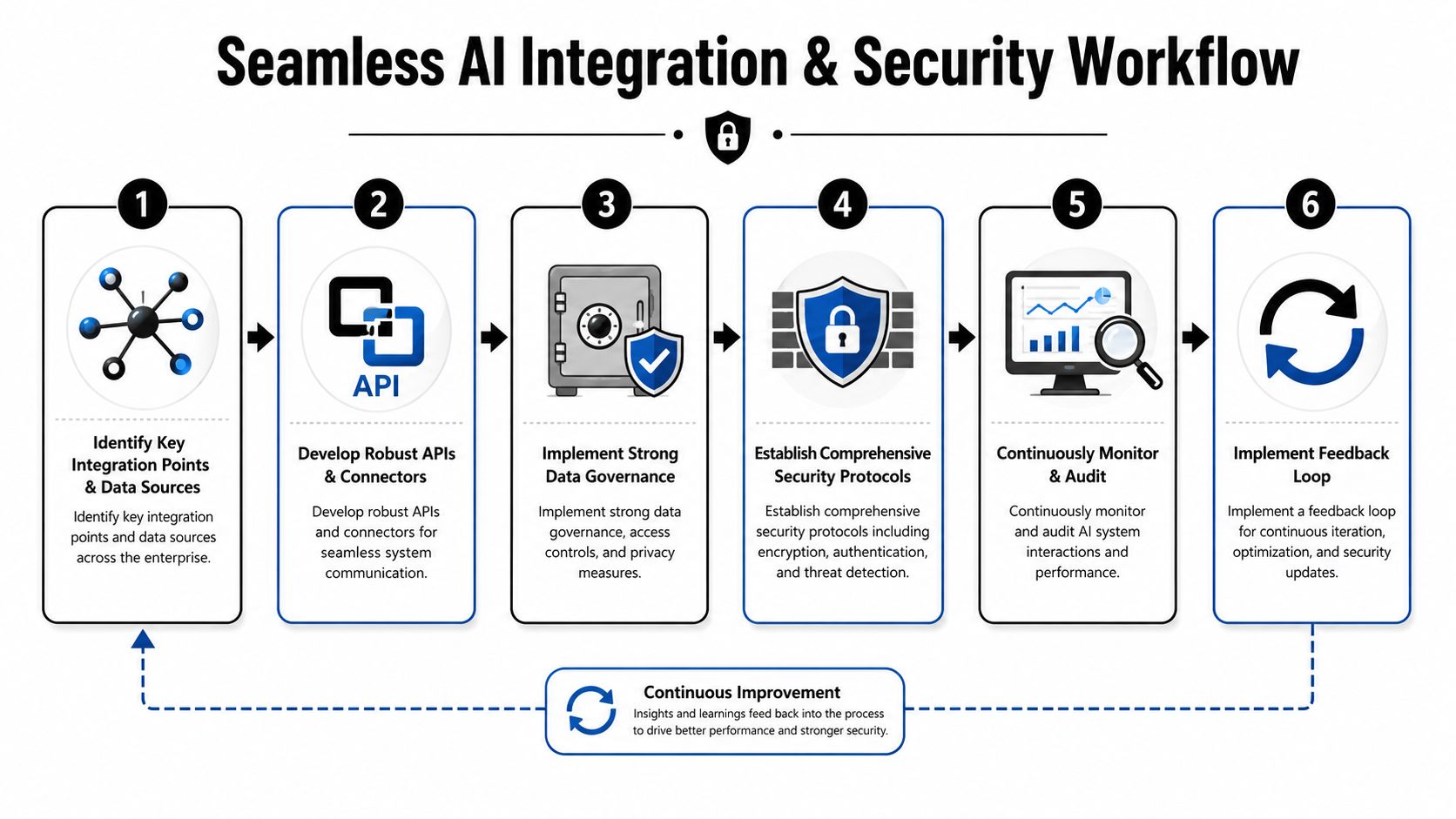
Security has to be built into the runtime
Security review often happens too late. By then, the AI has already been designed around broad access assumptions that won't survive production.
The controls that matter most are usually straightforward:
- Role-based access control. The agent shouldn't inherit full user privileges by default.
- Scoped data access. Give each workflow access only to the records and systems it needs.
- Runtime isolation. Separate workloads so a problem in one environment doesn't leak into another.
- Unified audit logs. Record actions, approvals, failures, and write-backs in one place.
- Human approval points. High-risk actions need explicit review paths.
If an agent can read everything and write everywhere, it isn't flexible. It's ungovernable.
This isn't just about compliance language. It affects architecture choices every day. Security boundaries determine whether business units can adopt the system confidently. They determine whether legal teams block expansion. They determine whether operations can debug incidents without opening up unrelated data.
What a usable enterprise control layer looks like
In practice, a secure deployment layer should make common tasks easier, not harder. Teams should be able to assign access by instance, department, or client. They should be able to rotate ownership without manually rebuilding each workflow. They should be able to review action history without pulling logs from three systems and a notebook.
The most effective setups usually have these qualities:
- Connectors are available early. Integration can't be an afterthought.
- Security policy follows the workload. New agents inherit guardrails instead of starting from zero.
- Observability is centralized. Ops teams shouldn't hunt across disconnected dashboards.
- Isolation is native. Separate workloads stay separate without heroics from infrastructure teams.
If those conditions aren't present, enterprise AI deployment becomes fragile fast.
Automating the AI Lifecycle for Zero DevOps
A deployed agent that can't be updated safely is a liability. A deployed agent fleet without logs, status visibility, or rollback discipline becomes an operations tax on everyone involved.
That's where AI lifecycle automation matters. Not as buzzword-heavy MLOps theater, but as a practical set of controls that keep production stable while workflows evolve.
Treat agents like production software
AI agents change more often than traditional internal automations. Prompts evolve. Retrieval sources change. Approval logic gets tightened. Connectors break when upstream systems change. If updates depend on manual edits, ad hoc shell access, or one engineer who “knows how it works,” the deployment won't last.
Teams need the same operational habits they expect from software delivery:
- Versioned changes so behavior updates are traceable
- Repeatable deployment paths so a tested configuration reaches production predictably
- Rollback options when a change degrades outcomes
- Environment separation for testing and live operation
- Monitoring after release rather than confidence before release
The underlying infrastructure burden is exactly what slows down many AI teams.

Centralized operations matter once agents multiply
One agent can be managed informally. Five agents create coordination overhead. Twenty agents force standardization.
The operational control plane needs to answer simple questions quickly:
- Which agents are healthy right now
- Which integrations are degraded
- What changed since yesterday
- Where are failures clustering
- Which teams own each workflow
- What usage is expanding and where
Without centralized operations, teams end up with scattered logs, manual billing checks, and support tickets routed through whichever engineer deployed the first version.
A practical zero-DevOps model removes those chores from the application team. Instead of maintaining infra glue, teams use a managed layer with deployment controls, status views, and reusable connectors already in place. Access to a broad catalog of integrations matters here because connectors are part of lifecycle management too. Every unsupported system turns into custom code, and custom code becomes hidden DevOps.
Zero DevOps changes who can own deployment
This is one of the most important shifts in enterprise AI deployment. When runtime setup, SSL, monitoring, environment provisioning, and connector management are abstracted away, ownership can move closer to the business process.
That doesn't mean engineering disappears. It means engineering stops spending its best time on repetitive platform plumbing.
A healthy operating model often looks like this:
| Role | What they should own |
|---|---|
| Business operations | Workflow definition, exception rules, acceptance criteria |
| Security and compliance | Access policy, review gates, audit expectations |
| IT or platform team | Guardrails, approved systems, identity standards |
| AI builders | Agent behavior, retrieval quality, test coverage |
| Functional leaders | Adoption, performance accountability, process fit |
A zero-DevOps deployment model doesn't remove discipline. It removes the repetitive infrastructure work that prevents discipline from scaling.
That's the difference between AI as a recurring business capability and AI as a permanent side project.
Scaling From One Agent to a Company-Wide Army
The hardest part of enterprise AI deployment often begins after the first win. A single useful agent proves the concept. It doesn't prove the organization can absorb ten more.
McKinsey's 2025 survey found that 88% of respondents say their organizations use AI in at least one business function, yet nearly two-thirds say they have not begun scaling AI across the enterprise in The State of AI. That gap is familiar. Teams can launch one workflow. They struggle to replicate the controls, ownership, and operating discipline needed for broad rollout.
Scale by boundary not by enthusiasm
The cleanest scale pattern is phased expansion with clear boundaries. Start with one department, one geography, or one process family. Get the workflow stable. Then duplicate the operating model, not just the prompt logic.
A workable sequence often looks like this:
- Prove one constrained workflow
- Lock the governance pattern
- Replicate to adjacent teams with similar data and approval needs
- Add new channels or systems only after the previous layer is stable
- Separate higher-risk workloads into their own instances
Multi-instance deployment earns its keep by enabling new workloads to be created with isolation built in, instead of forcing every expansion into one shared runtime.
Adoption fails when ownership is fuzzy
Scaling problems are often described as technical, but many are social. One team assumes IT owns the agent because it touches systems. IT assumes the business owns it because it automates business work. Security wants approval gates. Operations wants fewer manual steps. Nobody owns retraining users or updating SOPs.
That ambiguity kills momentum.
The fix is operationally simple and politically hard. Every deployed agent needs:
- A business owner responsible for outcome quality
- A technical owner responsible for behavior and configuration
- An access owner responsible for permission changes
- A support path for failures and exceptions
- A user training model that explains when to trust the system and when to escalate
People adopt AI faster when the workflow is explicit. They resist it when the system feels magical, inconsistent, or unaccountable.
Cost control has to scale with usage
Scaling without cost structure is another common trap. A pilot can hide inefficient architecture because usage is small. Company-wide rollout exposes every extra connector, redundant environment, and manual monitoring task.
The practical cost questions are not complicated:
- Can usage, billing, and logs be viewed centrally
- Can teams separate client or department workloads cleanly
- Can new instances be launched without custom setup work
- Can finance understand who is consuming what
- Can growth happen without rebuilding governance every time
This is why enterprise AI deployment maturity has more to do with operational repeatability than raw technical ambition. The organizations that scale aren't the ones with the most impressive demo. They're the ones that can launch the next controlled workload in days instead of starting a new internal platform project every time.
Conclusion Your Playbook for Deployment Excellence
Enterprise AI deployment succeeds when the organization stops treating AI like a model selection exercise and starts treating it like production operations.
The durable playbook is straightforward. Start with a workflow plan instead of a pilot rush. Choose architecture that preserves isolation and governance. Build on an integration layer that connects to the systems where work already happens. Put security controls into the runtime, not just the policy deck. Automate the lifecycle so updates, monitoring, and ownership don't depend on heroics. Scale in phases with clear boundaries and named accountability.
The common thread is operational framework. That's where deployments survive contact with procurement, security review, legacy systems, and everyday users. It's also where many programs fail long before model quality becomes the main issue.
For teams that want to avoid rebuilding low-level deployment and operations machinery, a unified platform can reduce a lot of the friction. Donely fits that model by abstracting infrastructure, supporting isolated instances, centralizing monitoring and billing, and letting teams focus on workflow value rather than DevOps overhead.
If you're evaluating how to move from isolated AI experiments to governed production rollouts, Donely is worth a look. It gives teams a managed way to deploy and operate AI employees with isolated instances, built-in integrations, centralized monitoring, and access controls, so the work stays focused on business processes instead of platform plumbing.