
You probably started with one login and one workload.
Then the business got real. A founder launches a personal AI agent, adds a customer-facing dashboard, hires a contractor, spins up a second client environment, and suddenly access lives in five places. One person signs in with Google. Another uses a shared password in a notes app. A bot token sits in a chat thread. Nobody can answer a simple question like, “Who had access to what last Tuesday?”
That's the moment identity stops being an IT side quest and becomes operating infrastructure. Good identity management systems fade into the background. Bad ones tax every hire, every offboarding, every audit request, and every new product instance you launch.
Table of Contents
- When Three Workloads Become Thirty
- The Core Vocabulary of Identity Management Systems
- Deployment Models from Cloud to Multi-Instance
- An Evaluation Checklist for Choosing the Right System
- Implementation Best Practices and a Real Migration Story
- Identity Management for AI Agents and Multi-Instance Platforms
- Common Myths and Pitfalls to Avoid Before You Sign
When Three Workloads Become Thirty
Maya runs a small software company. At first, she had one AI agent helping with sales replies and one admin dashboard for her own team. That setup felt manageable because all the moving parts still fit inside her head.
A year later, the shape of the business changed. She now has multiple business lines, a contractor bench, client-specific agent deployments, and separate environments for testing and production. Each one carries different data, different users, and different risk.
The cracks show up in ordinary moments.
A contractor needs access for two weeks, but only to one customer environment. A client asks for an audit trail of who changed an automation. A departing employee still has access to a shared folder because nobody remembers every system where that account exists. Her setup still “works,” but it only works because no one has forced it to answer hard questions yet.
The breaking point is usually operational, not theoretical
Founders often think identity is about login screens. It isn't. It's about control during change.
When a business grows from a few workloads to dozens, access decisions multiply faster than expected.
- More people: employees, agencies, contractors, support staff
- More identities: users, service accounts, APIs, bots, and agents
- More boundaries: personal work, internal operations, client data, regulated environments
- More consequences: offboarding mistakes, role drift, and failed audits
One major market estimate places the global IAM market at USD 26.8 billion in 2025, with a projection to reach USD 62.9 billion by 2033, while the same source says cloud deployment already held 65.2% of the identity management and authentication software market according to this IAM market overview. That matters because it shows identity management systems are now a core software layer, not a niche add-on.
Identity done right scales quietly. Identity done wrong shows up in every onboarding ticket, every late-night lockout, and every compliance review.
Maya doesn't need more buzzwords. She needs a system that can separate environments, grant the right access, remove it cleanly, and leave a reliable audit trail behind.
The Core Vocabulary of Identity Management Systems
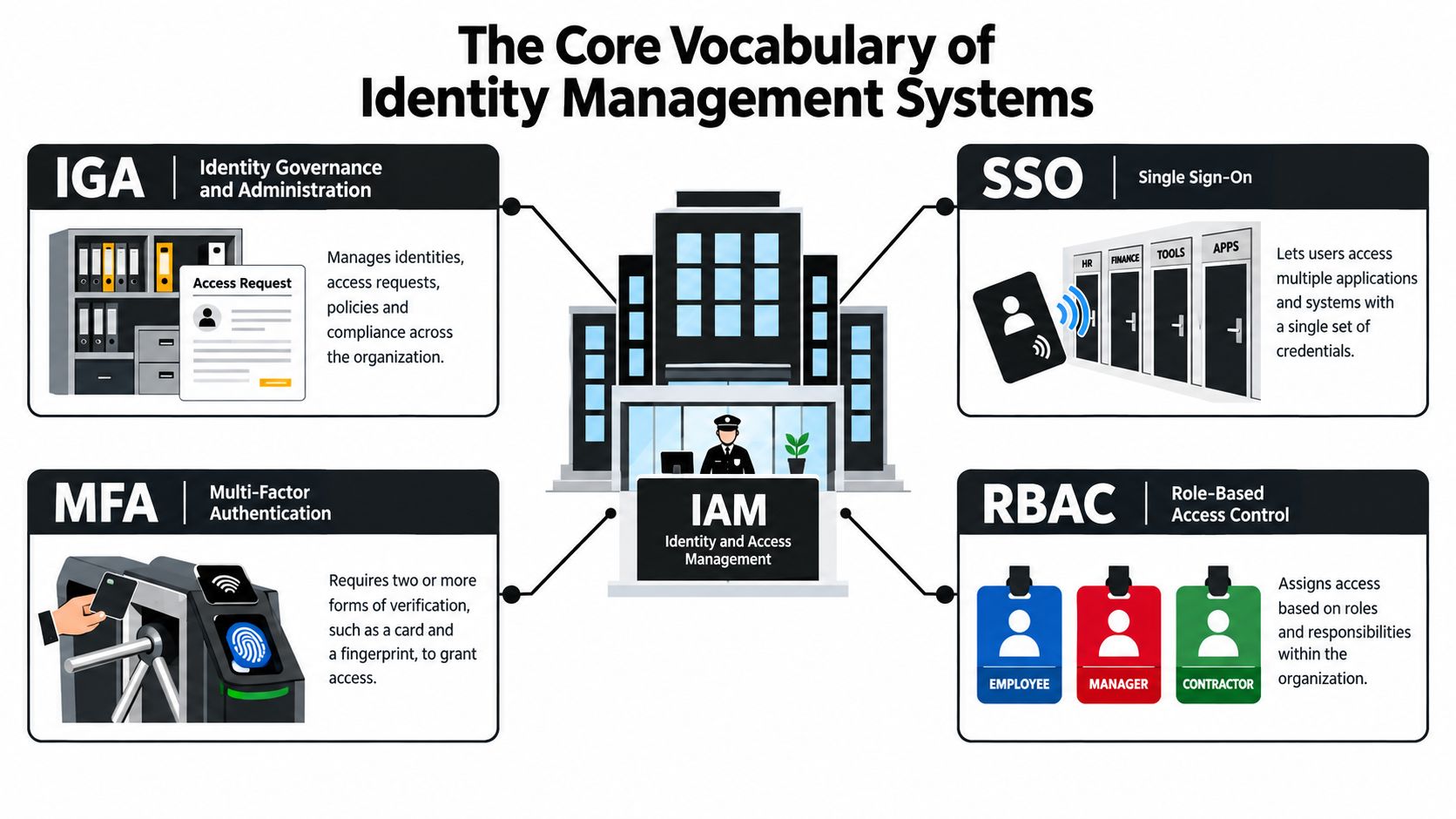
Most buyers get confused because vendors present IAM, IGA, SSO, MFA, and RBAC like separate product categories. In practice, they're layers of one operating model.
Use an office building as the mental model.
Start with the badge desk
Identity and Access Management (IAM) is the front desk and badge system for the whole building. It stores identities, checks who someone is, and decides whether they can enter a system.
If your startup uses Okta, Microsoft Entra ID, Google Workspace, or Keycloak as the central login layer, that's IAM in action. It's the umbrella function tying identity records, authentication, and access decisions together.
Single Sign-On (SSO) is the turnstile in the lobby. You authenticate once, then move between approved applications without logging in again at every door. SSO reduces password sprawl and gives admins one place to disable access when someone leaves.
Multi-Factor Authentication (MFA) is the second lock where the requirements are higher. A badge alone might get you into the building, but the server room also asks for a second proof. The operational point is simple: one stolen password shouldn't become a full compromise.
Current guidance from CISA recommends implementing MFA as part of an enterprise SSO solution while maintaining an inventory of authenticators and routinely testing the MFA infrastructure in its IAM guidance sheet. That's a useful corrective because teams often treat MFA as a checkbox instead of part of the health of the identity perimeter.
Then define who gets which doors
Role-Based Access Control (RBAC) is the color stripe on the badge. Engineers can access source control and staging. Finance can reach billing systems. Contractors might see only one project workspace. RBAC turns job function into enforceable permissions.
Identity Governance and Administration (IGA) is the policy and audit function behind the scenes. It answers tougher questions: Who approved this access? Should this user still have it? Was this role ever reviewed? If IAM is the badge system, IGA is the team making sure badges follow policy over time.
That distinction matters in real businesses. A founder dealing with cross-border billing or account registration workflows may already use reference material like EU VIES glossary terms to understand compliance language. Identity has the same challenge. The terms sound abstract until they affect a real approval path or audit request.
Practical rule: If a tool helps people log in, it isn't automatically governing identity. Authentication and governance are related, but they aren't the same job.
A good identity stack composes these layers cleanly. IAM ties the records together. SSO makes access usable. MFA raises assurance. RBAC enforces scope. IGA keeps the whole system honest.
Deployment Models from Cloud to Multi-Instance
Vendors usually present deployment as a technical preference. It's really an operating trade-off among control, staffing, integration work, and auditability.
The four models that matter most are cloud SaaS identity, on-premises deployment, hybrid federation, and multi-instance architecture.
The model changes who carries the burden
Cloud-hosted identity is the fastest path forward. Setup is usually quicker, updates arrive without local maintenance, and remote users can authenticate without a maze of VPN dependencies. This is one reason cloud identity has become dominant in modern stacks, especially for companies that move fast and don't want to run identity infrastructure themselves.
On-premises identity gives you tighter infrastructure sovereignty. Some organizations need that because of sector-specific rules, data handling requirements, or internal policy. The trade-off is that your team owns patching, availability, connectors, certificate handling, and incident response for the identity layer itself.
Hybrid identity sounds flexible because it bridges old and new systems. It often is. It also creates more moving parts. You inherit sync issues between directories, policy mismatches between environments, and federation troubleshooting that can consume senior engineering time.
Multi-instance is different from ordinary multi-tenant SaaS
Multi-instance architecture matters when one business operates several cleanly separated contexts. That might mean separate client environments, separate regional operations, or separate AI-agent fleets.
In those environments, one global identity directory isn't enough. You need isolation that prevents role bleed across instances. A support lead for Client A shouldn't accidentally inherit privileges in Client B because both users share the same broad group mapping.
| Model | Control | Cost Profile | Operational Burden | Best Fit |
|---|---|---|---|---|
| Cloud SaaS identity | Lower infrastructure control, strong admin control | Recurring subscription | Lower day-to-day platform management | Startups, distributed teams, SaaS-first organizations |
| On-premises | Highest infrastructure control | Higher internal staffing and maintenance cost | High | Regulated environments with strict sovereignty needs |
| Hybrid | Mixed control across old and new systems | Combined vendor and internal cost | High, especially around federation and sync | Organizations modernizing gradually |
| Multi-instance | High control over separation boundaries | Varies by platform design | Moderate to high, depending on automation | Agencies, AI platforms, multi-client or multi-business operations |
North America accounted for over 38.3% of global IAM revenue in 2023, equal to about USD 7.0 billion, according to the same market summary linked earlier in the article. That concentration reflects where digital operations have grown complex enough that identity architecture becomes a board-level operational concern rather than a simple admin tool decision.
Choose the deployment model that matches your separation problem, not the one with the nicest demo. Most teams regret identity decisions when real-world boundaries arrive.
An Evaluation Checklist for Choosing the Right System
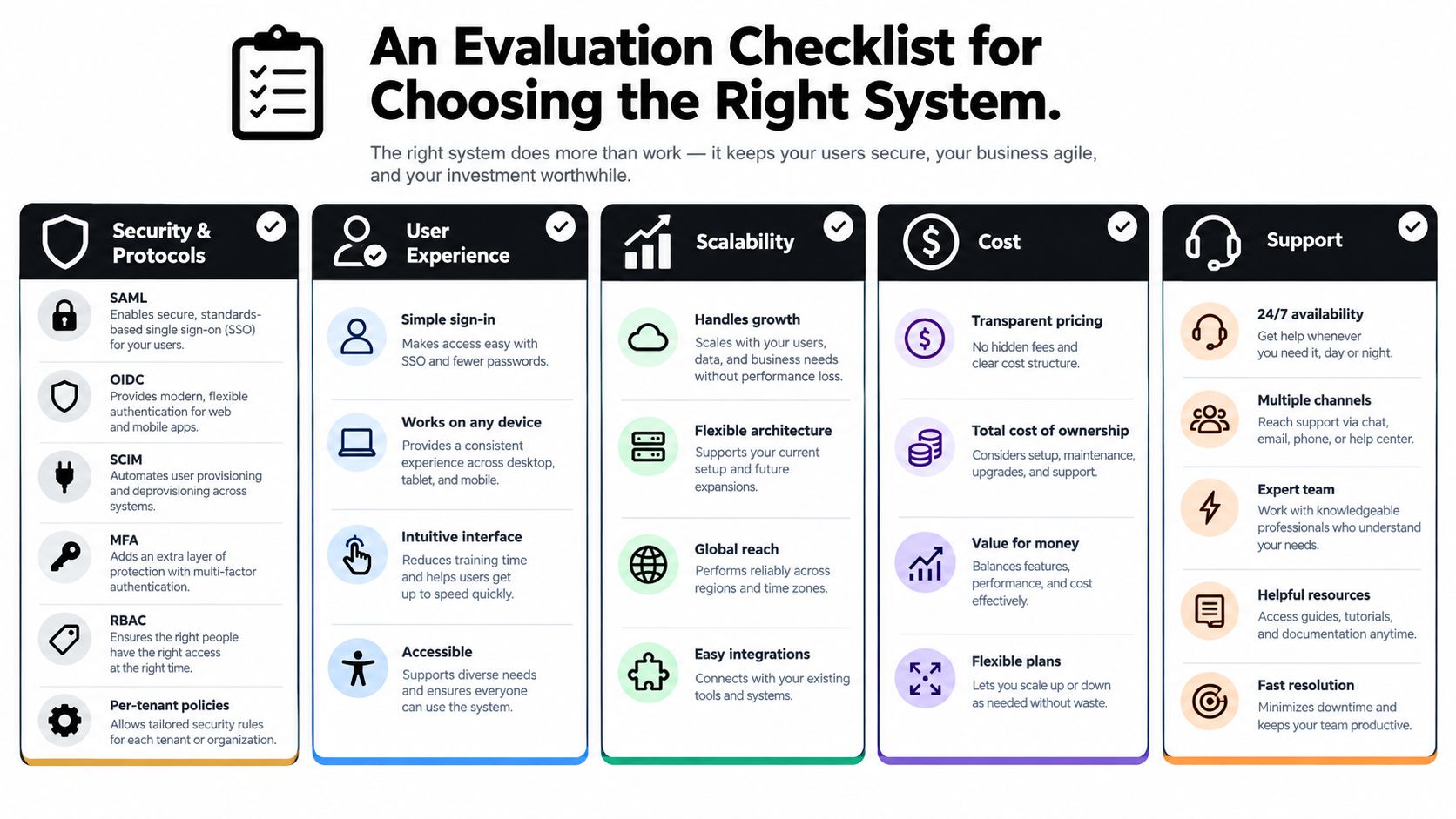
Identity buying goes sideways when teams compare feature lists without tying them to operating needs. A better approach is to score each vendor in five buckets and force every “yes” answer to connect to a real workflow.
For non-specialists, this is the difference between “the sales engineer said it supports enterprise access” and “we verified the controls we need.”
Bucket one through three
Security and protocol support
Confirm support for SAML, OIDC, SCIM, MFA, and RBAC. Don't accept “planned” or “available through a partner” if those functions are required for launch. If you need per-tenant policy controls, ask to see them configured live.
Integration fit
Your identity layer has to connect to the systems that create and consume access. That usually includes a directory, HR source, ticketing platform, SIEM, collaboration tools, and any internal APIs or agent control planes. If your team likes practical evaluation frameworks, this piece is similar to the way buyers assess gate access system evaluation criteria by checking entry methods, management overhead, and reliability against the actual site.
Scalability under real load
Ask what happens during a hiring burst, a customer onboarding wave, or a failed policy push. You're looking for operational behavior, not just architecture diagrams. How fast do permissions propagate? What happens when one region is degraded? How does the platform handle many simultaneous sessions?
Bucket four and five
Legacy complexity is one of the most under-discussed buying risks. In a 2025 survey, nearly 60% of respondents identified restrictive total cost of ownership as a deficiency in their current IGA solution, 58.8% cited time-consuming upgrades and complex customization as major barriers, and 45.8% said they struggled to automate access control and compare rights against the desired state in the Omada State of IGA report. That's why the last two buckets matter so much.
- Audit and logging: Look for immutable, exportable event streams with retention controls. You should be able to answer who granted access, who used it, and what changed.
- Multi-tenancy and isolation: Verify namespace strategy, role separation, and whether per-instance RBAC can be enforced without custom work.
One platform that fits this evaluation style is Donely integrations, because the product is built around isolated instances, centralized administration, and broad connector coverage. That doesn't replace due diligence. It shows what “identity-aware architecture” looks like when integrations and separation are treated as first-class concerns rather than add-ons.
A scorecard founders can defend
Use weighted scoring instead of gut feel:
- Critical requirements: hard fail if missing
- Important requirements: scored by implementation quality
- Nice-to-have items: scored lightly
- Migration friction: subtract points for custom glue or manual workarounds
- Operating clarity: add points if your team can explain the model in plain terms
If your shortlist still feels close, ask each vendor to walk through one offboarding flow, one contractor access request, and one client-isolated deployment. Identity management systems reveal their strengths during edge cases, not homepage tours.
Implementation Best Practices and a Real Migration Story
A small SaaS team I've seen looked organized from the outside. Inside, access was held together with shared credentials, spreadsheet approvals, and memory. The founder knew who had access only because the team was still small enough to ask around.
That stopped working once contractors, customer support staff, and automation accounts entered the picture.
How the rollout actually happened
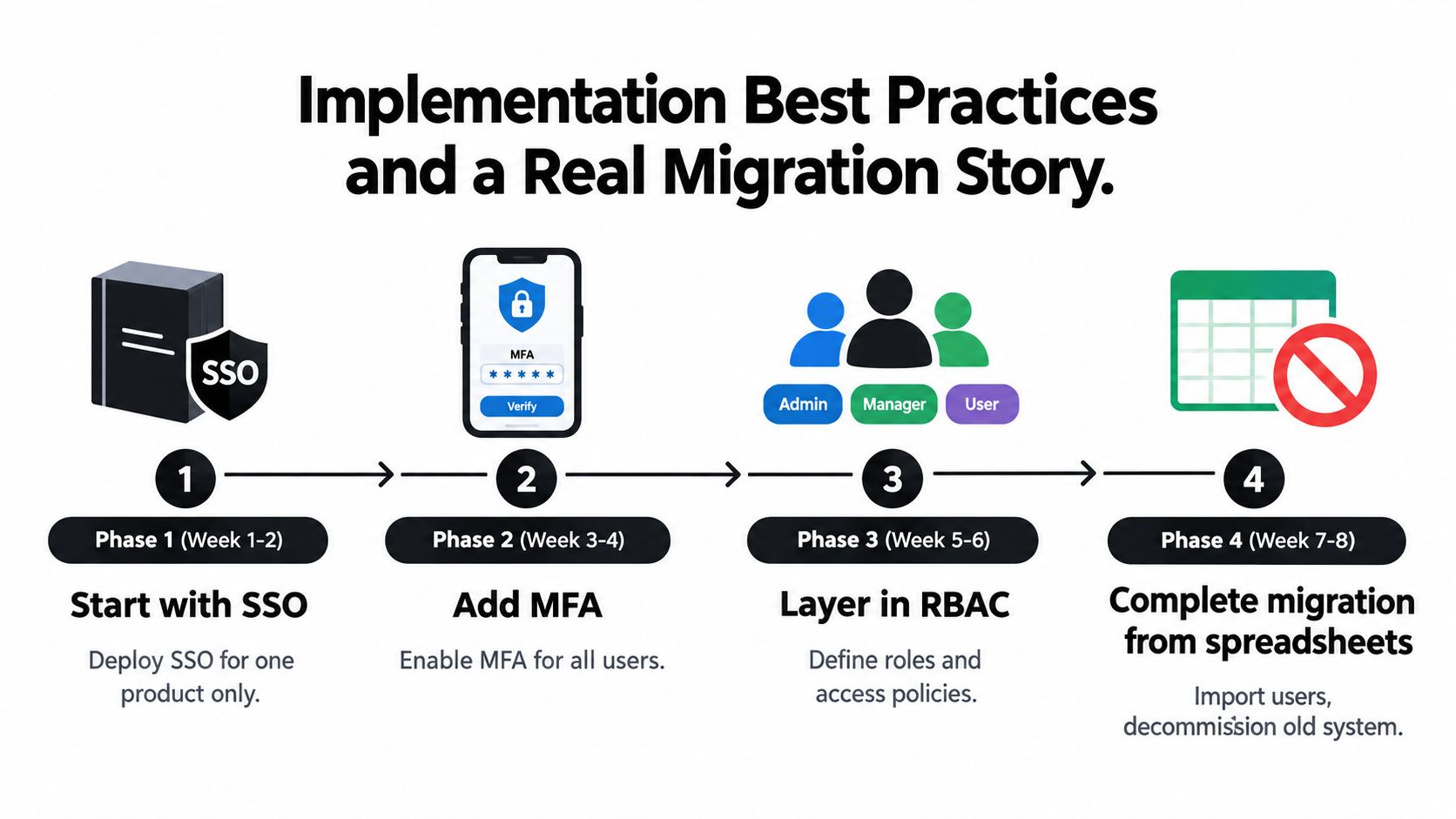
They didn't start with a giant transformation program. They picked one product and put SSO in front of it. That gave them one place to disable access and one login path to observe.
Next came MFA for every interactive user. Then they defined a handful of usable roles rather than trying to model the entire company in week one. Only after those basics were stable did they route identity events into their logging stack for incident review and audit support.
The sequence mattered. If they had tried to design every role, every workflow, and every automation upfront, the migration would have stalled.
Where they nearly failed
The first problem was role drift. Early roles were too broad, so temporary access became permanent access. The second was orphaned service accounts that nobody owned but several processes depended on. The third was a broken provisioning sync that looked successful in the dashboard but left some users half-created.
The worst mistake came during cutover. The founder's old admin path was disabled before the new path had been fully tested. For a short window, the team locked out the one person who could approve emergency changes.
Run the new identity path in parallel before you trust it. Authentication failures are survivable. Founder lockouts during production hours are expensive.
What saved the project
A few habits made the migration durable:
- Pilot before broad rollout: They started with a small user group that included one technical admin, one manager, and one contractor.
- Define owners for non-human identities: Every bot, integration, and service account got a named owner.
- Automate joiner, mover, leaver flows: Access changes followed role changes instead of help-desk memory.
- Treat identity as code where possible: Group mappings, policies, and environment settings were tracked and reviewed like production config.
- Keep a break-glass path: Emergency admin access existed, but it was tightly controlled and documented.
The team learned that identity projects fail less from missing features than from poor sequencing. Start narrow. Test cutovers. Keep rollback options. Clean up service accounts early.
Identity Management for AI Agents and Multi-Instance Platforms
Traditional SSO solves the operator login problem. It does not solve the AI-agent governance problem.
In an AI platform, you don't just have people signing in. You have agents invoking tools, service accounts reaching APIs, containers processing tenant-specific data, and support staff managing multiple customer environments. Those are different identity planes, and they need different controls.
Human identity and workload identity are not the same thing
A human operator should authenticate through a central identity provider. An agent instance should authenticate as a workload with tightly scoped permissions.
That distinction matters because one login can launch many actions. If the agent inherits broad human-level permissions, every prompt becomes a possible path to overreach. If the agent has its own workload identity, you can limit it to specific tools, datasets, or tenants.
Recent coverage compiled by Veritis says that by 2026 non-human identities are projected to outnumber human users by more than 3:1, while 62% of breaches involved third-party credentials and 45% of enterprises lacked visibility into IoT device identities in this IAM trends summary. The practical takeaway isn't just “machines matter.” It's that identity programs built only for employees are already incomplete.
Per-instance RBAC is the control most teams miss
A multi-instance AI platform needs RBAC bound to the instance boundary, not just to the user account. That means an operations lead can be an admin in one environment and a viewer in another. It also means a contractor can support one customer deployment without seeing another customer's prompts, logs, or connectors.
| Identity Concept | Role in Multi-Instance AI Platforms | Operational Outcome |
|---|---|---|
| Human SSO | Authenticates operators through one control plane | Cleaner onboarding and offboarding |
| Workload identity | Authenticates each agent or service independently | Limits token reuse and broad inherited access |
| Per-instance RBAC | Applies roles at the environment level | Prevents cross-tenant role bleed |
| Isolated containers | Runs each instance in a separated execution boundary | Reduces accidental data crossover |
| Scoped data access | Restricts prompts, files, and connectors by tenant or task | Keeps customer context separated |
| Unified audit logs | Records actions across users and agents in one timeline | Speeds investigations and compliance review |
Application-level assessments cited in the same source found 44% of cases had at least one access path bypassing the enterprise IdP, nearly half relied on hardcoded or improperly stored credentials, and 40% lacked protections such as rate limits or account lockouts. That's exactly why AI-agent systems need a coherent model where operators use SSO, workloads use dedicated identities, and every instance preserves its own scope.
A platform such as Hermes agent makes sense in this discussion because challenge isn't just launching agents. It's running many of them with separate boundaries, controlled permissions, and one audit surface.
In AI operations, “who did this” is no longer enough. You also need to know which instance did it, under which workload identity, against which data scope.
Common Myths and Pitfalls to Avoid Before You Sign
Identity vendors love simplification. Buyers pay for oversimplification later.
The fastest way to make a bad identity decision is to assume one visible feature stands in for the whole operating model.
Seven myths that create real problems
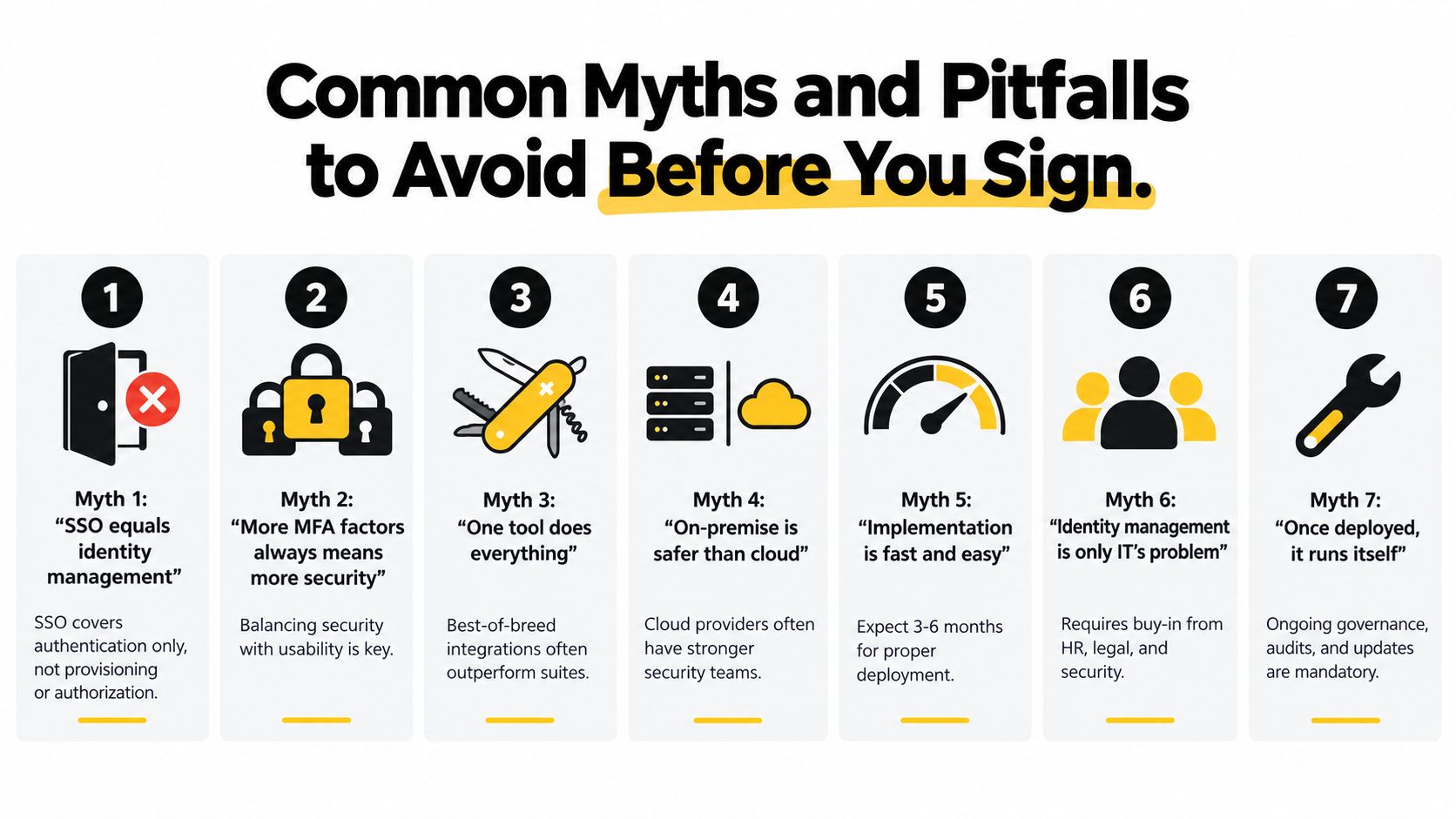
SSO equals identity management: It doesn't. SSO authenticates users. It does not automatically provision accounts, enforce least privilege, or review stale access. Teams that confuse the two often accumulate orphaned accounts.
More MFA factors always means more security: Factor count matters less than factor quality and deployment discipline. A messy MFA rollout with weak recovery paths can create lockouts and bypass pressure.
RBAC scales to every situation: It scales well for stable job functions. It struggles when access depends on client, region, project phase, or instance state. Dynamic environments often need attributes or policy conditions in addition to roles.
Audit logs slow everything down: Poorly designed logging pipelines do. Structured event streams usually help operations because they make failures visible before they become disputes.
On-premises is always safer: Security comes from disciplined operation. An unpatched self-hosted identity stack is not safer than a well-run cloud service.
Any SSO provider will fit: Federation details vary. Metadata refresh, protocol support, session behavior, and provisioning design can all create painful surprises.
AI-agent permissions can be improvised: They can't. Unscoped tokens and shared service credentials create lateral movement paths that are hard to detect.
The pre-signature filter
Before signing, ask the vendor to answer these plainly:
- Does it support the federation standards your customers and workforce already use?
- Can it provision and deprovision through APIs without custom hacks?
- Can roles be scoped per tenant, per instance, or per environment?
- Can logs be exported in a form your security team can use?
- Is there a documented model for non-human identities?
- What happens when a sync fails halfway through?
- How is emergency access handled?
For a practical benchmark, a published security policy from Donely is useful because it frames identity in terms of isolation, access control, and operational responsibility rather than only login convenience. That's the right lens for any buyer evaluating identity management systems in AI-heavy environments.
The common thread in failed identity projects is simple. Buyers shop for a login experience and inherit an access-governance problem.
Donely gives teams a unified way to run AI employees across separate personal, business, and client environments without flattening them into one shared identity context. Its multi-instance architecture, per-instance RBAC, isolated containers, and unified audit logs map directly to the controls that matter when you're governing agents as seriously as human users. If that's the problem you're solving, visit Donely.