
You’ve probably already proven that a single AI agent can work.
It triages inbox messages, drafts replies, qualifies leads, summarizes support tickets, or updates a CRM. The demo looks good. The first live workflow saves time. Then the core operational questions show up. Who can edit the agent? Which client data can it access? How do you separate five customer environments without opening five separate accounts and rebuilding everything? What happens when an agent takes the wrong action and you need a clear audit trail?
That’s where most no-code AI agent builder advice falls short. It treats deployment like a one-agent experiment, not an operational system. In practice, the hard part isn’t getting one agent to run. It’s building an AI workforce you can govern, secure, monitor, and scale across business units or client accounts without creating a mess.
Table of Contents
- The Rise of the No-Code AI Agent Builder
- How No-Code AI Agent Builders Actually Work
- Key Capabilities for a Scalable AI Workforce
- Use Cases for Founders and Enterprise Teams
- How to Evaluate a No-Code AI Agent Builder
- Launch a Production Agent in 2 Minutes on Donely
- Common Pitfalls and Future-Proofing Your Strategy
The Rise of the No-Code AI Agent Builder
A founder starts with one obvious pain point. Leads come in through Gmail, web forms, and LinkedIn. Someone copies details into HubSpot, someone else sends the first reply, and by the time the handoff reaches sales, the lead is cold. Agencies hit a similar wall. A client asks for an AI support assistant, then a second client wants one too, and suddenly the team is juggling prompts, API keys, channels, and permissions across disconnected tools.
A no-code ai agent builder exists because the prevailing requirement is not for another prototype. Instead, the demand is for a way to turn business logic into repeatable execution without waiting on a full engineering sprint. The category has moved quickly because the pain is widespread. The global No-Code AI Agent Builder market reached USD 1.92 billion in 2024 and is projected to grow at a 29.4% CAGR to USD 17.68 billion by 2033, according to Dataintelo’s no-code AI agent builder market report.
That growth says something important. Teams no longer see AI agents as novelty interfaces. They’re using them for customer service automation, marketing workflows, operational tasks, and internal process execution.
Most teams don’t fail because they can’t design a prompt. They fail because the surrounding system isn’t ready for production.
For readers still sorting out the terminology, this background on what are AI content agents is useful because it clarifies the difference between a simple content generator and an agent that can take action across tools.
Why the market matters less than the operating model
The market story is interesting, but the operational shift matters more. No-code platforms put AI deployment in the hands of product, ops, support, revenue, and agency teams. That’s good for speed. It also changes the control surface. Instead of one engineering team shipping automation, many teams can now launch agents directly.
That’s why governance can’t be an afterthought.
A personal productivity bot can survive loose permissions and messy setup. A client-facing agent can’t. Once an agent can read CRM data, post to Slack, create Jira issues, or send messages in WhatsApp or Telegram, it becomes part of your operating model. At that point, security boundaries, instance separation, and change tracking matter as much as prompts and integrations.
How No-Code AI Agent Builders Actually Work
The simplest way to conceptualize a no-code AI agent builder is through the analogy of an orchestra conductor. The user states the outcome. The conductor coordinates the musicians. In this case, the musicians are the LLM, your connected apps, your business rules, and the data sources the agent needs to do useful work.
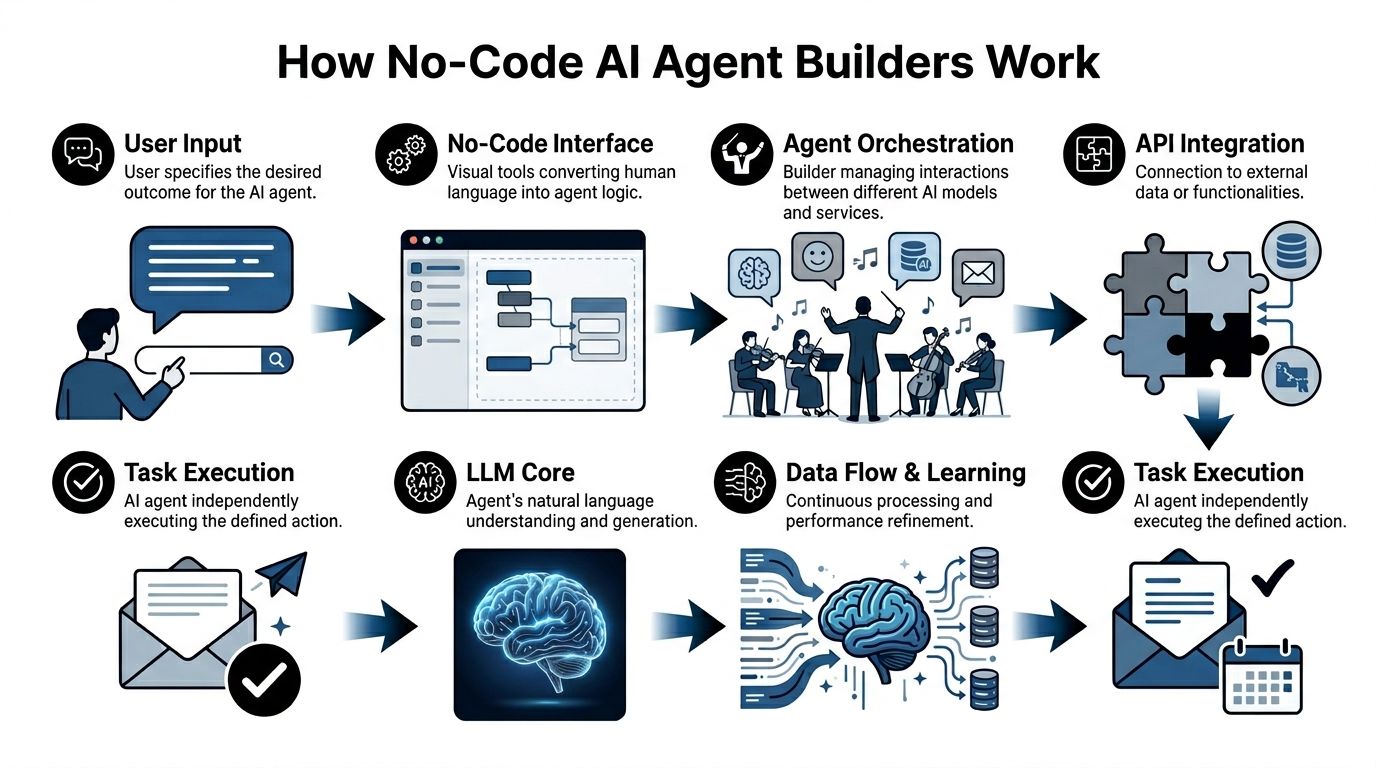
The builder gives you a visual canvas instead of raw code. You define triggers, conditions, actions, and fallback logic. The platform handles the plumbing that usually slows custom projects down. According to Arahi AI’s breakdown of AI agent building, no-code builders use visual workflow orchestration to enable production-ready agents in 5 to 60 minutes, while reducing integration time by 90%+.
The three layers that matter
The logic layer is where you define behavior. This is the drag-and-drop workflow, branching, retries, approvals, and routing. If a lead matches your ICP, update HubSpot. If a support request contains billing language, fetch account context first. If confidence is low, escalate to a human.
The integration layer connects the agent to the rest of the stack. Gmail, Slack, Salesforce, Jira, HubSpot, Notion, Zendesk, Stripe. Without this layer, you don’t have an agent. You have a chatbot with good manners.
The model layer abstracts the LLM itself. The platform handles prompts, context passing, tool calls, and often deployment concerns that teams would otherwise solve with frameworks and custom infrastructure.
A lot of confusion comes from treating all conversational AI as the same category. This comparison of AI agents vs chatbots is useful because it shows why an agent’s value comes from actions and orchestration, not just responses.
What works in practice
The best builders remove backend friction so teams can focus on business rules. That means:
- Fast edits: You can change routing logic or prompt instructions without a full deploy cycle.
- Reusable connectors: You aren’t building API clients every time you add a tool.
- Managed operations: The platform handles scale, retries, and routine maintenance behind the scenes.
What doesn’t work is assuming the visual builder replaces architecture thinking.
Practical rule: If your workflow touches customer data, billing data, or internal systems, design permissions and escalation paths before you polish the prompt.
Teams also underestimate state and memory. A useful agent needs context. It needs to know what happened earlier in the workflow, what system of record to trust, and when to stop acting. The visual interface may look simple, but under the hood, the platform is coordinating prompts, tool use, API responses, and error handling in sequence. That’s why a good builder feels fast. It hides complexity without removing control.
Key Capabilities for a Scalable AI Workforce
A single working agent proves the concept. A scalable AI workforce depends on different features entirely. A no-code ai agent builder, therefore, either graduates into an operating platform or stays stuck as a demo tool.

Integrations turn agents into operators
The first capability is breadth and depth of integration. An agent should be able to read from one system, reason across context, and act in another. That means more than a webhook or a basic notification. It means the agent can fetch account details from Salesforce, post the right summary into Slack, open a Jira ticket, and update status in HubSpot or Zendesk.
A lot of vendor pages focus on surface-level automation. If you want a quick feature comparison, this overview of AI Agents features is helpful because it shows how platforms package workflows, channels, and actions. The real test, though, is whether the agent can execute cleanly across your existing system boundaries.
Isolation protects clients and teams
Multi-instance isolation is the feature buyers often ignore until it becomes painful. Agencies feel this first. One client wants a support agent, another wants a sales assistant, and a third needs internal operations automation. If all of that lives in one shared workspace, mistakes become likely. Data can bleed across projects. Permissions become fuzzy. Billing becomes hard to untangle.
The same issue appears inside enterprises. HR shouldn’t share the same runtime and permissions model as IT helpdesk or revenue operations. Separate environments are cleaner to govern, easier to audit, and safer to delegate.
Here’s the practical difference:
| Capability | If you have it | If you don’t |
|---|---|---|
| Isolated instances | Separate clients, departments, and experiments cleanly | Shared sprawl, risk of cross-contamination |
| Scoped data access | Agents only see the records they should | Agents pull broad context they were never meant to use |
| Separate billing and monitoring | You can attribute usage and manage growth | Finance and ops fight over blended costs |
For enterprise buyers, that architecture matters as much as the builder UI. Teams evaluating secure deployment patterns can also review enterprise AI agent deployment considerations.
RBAC and audit logs reduce avoidable risk
Permissions aren’t just for IT checklists. They directly affect output quality. According to Pipefy’s analysis of no-code agent development, enterprise-grade data grounding and permissions enforcement can reduce action errors by 50 to 70% by using live connectors that automatically apply RBAC.
That lines up with what teams see in production. When an agent has access to the wrong tools, the wrong data, or too many actions, it doesn’t become more capable. It becomes less reliable.
Use this lens when reviewing security features:
- Granular RBAC: Different users should have different rights to build, approve, edit, deploy, and monitor agents.
- Unified audit logs: You need a record of who changed prompts, tools, permissions, and workflows.
- Action scoping: Not every agent should be able to send messages, modify records, or trigger external systems.
- Channel control: A support agent on Slack should not automatically inherit permissions for Telegram or WhatsApp.
A lot of governance problems are really change-management problems. Someone tweaks a workflow, a connector permission changes, or a new channel goes live without review. Audit logs shorten root-cause analysis. RBAC prevents the wrong person from pushing risky edits in the first place.
Use Cases for Founders and Enterprise Teams
The difference between a toy agent and a production system becomes obvious when you map it to real operators. Founders, agencies, and enterprise teams don’t need the same workflows, but they all need the same discipline around scope, permissions, and observability.

Founder workflow without a sales ops hire
A founder can build a sales development agent that watches Gmail or inbound forms, qualifies intent, drafts a response, and updates HubSpot. This is the kind of workflow that often gets delayed because nobody wants to write custom automation for an early-stage process.
The attraction isn’t only convenience. It’s speed to iteration. Teams can test qualification logic, routing rules, and follow-up structure quickly, then refine based on real conversations. MindStudio’s success metrics for AI agents reports that no-code AI agent builders deliver 3x to 6x ROI within the first year, while compressing deployment cycles from months to days and reducing manual work by up to 35% in processes such as lead conversion.
Agency model with separate client environments
Agencies usually get into trouble when they scale a working pattern without isolating the operating environment. Client A wants an FAQ agent tied to Slack and Zendesk. Client B wants a lead capture flow with Gmail and Salesforce. Client C wants a branded Telegram assistant using a private knowledge base.
The right setup gives each client its own isolated instance, data boundary, permissions model, and billing view. That lets the agency reuse operating patterns without reusing risk. It also makes offboarding easier. When a client relationship ends, the environment can be retired cleanly instead of surgically untangling workflows from a shared workspace.
Build shared playbooks, not shared runtime environments.
Internal IT helpdesk with controlled actions
Enterprise teams often start with internal support because the ROI is visible and the workflows are repetitive. An IT helpdesk agent can answer common questions in Slack, pull policy context from a knowledge source, and create or update Jira issues when human follow-up is needed.
This only works well when action boundaries are explicit. The agent can retrieve guidance, summarize tickets, and route requests. It shouldn’t have broad authority to take irreversible actions unless approvals are built into the flow. The teams that get value fastest are usually the ones that let agents handle the repetitive front half of work while preserving human control for edge cases.
How to Evaluate a No-Code AI Agent Builder
Most buyers overrate the first ten minutes of the demo. The visual builder looks polished, the template gallery is appealing, and the test agent answers a prompt correctly. None of that tells you whether the platform will hold up when multiple teams, clients, or business-critical workflows start using it every day.
A serious evaluation needs to test for operating fit, not just build speed.
What to test in the product itself
Start with a live workflow, not a canned demo. Pick one process that crosses systems. For example, an inbound lead that arrives through Gmail, gets summarized, enriched with CRM context, then routed to Slack and logged in HubSpot. Watch what happens when the agent is uncertain, when a connector fails, and when a user without admin rights tries to edit the workflow.
Use a checklist like this:
- Agent reasoning and orchestration: Can the platform handle multi-step tasks with conditions, retries, and human handoff?
- Connector quality: Are integrations deep enough to do useful work, or are they mostly read-only and notification-based?
- Observability: Can you see execution logs, failed steps, tool calls, and version history without involving engineering?
- Channel deployment: Can the same agent be deployed where users already work, such as Slack, WhatsApp, Telegram, or Discord?
Then test scale in the ways that matter operationally.
| Evaluation area | Good sign | Warning sign |
|---|---|---|
| Operations | Clear monitoring, usage visibility, predictable deployment flow | Hard to trace failures or compare versions |
| Security | Per-role permissions, scoped access, auditability | Everyone is effectively an admin |
| Multi-tenancy | Separate instances or strong environment boundaries | Shared workspace with workarounds |
| Commercial fit | Pricing matches growth path | Early plan looks cheap, expansion looks painful |
What to ask before procurement
A polished product can still become expensive or risky if the commercial and governance model is weak. Ask direct questions.
- How are environments separated? If you’re an agency or multi-team business, this matters immediately.
- What happens to logs and history when workflows change? You need traceability.
- Can permissions be scoped by instance, role, or team? Broad admin models don’t scale.
- How does the platform handle monitoring, uptime expectations, and support response? Production systems need operating commitments, not just documentation.
- What happens when you need more agents, more channels, or more client accounts? Hidden operational complexity often shows up here.
Buy for the second year of usage, not the first week of excitement.
The right no-code ai agent builder should make it easier to expand safely. If growth requires migrations, account sprawl, or manual governance workarounds, the platform will slow you down at the point where adoption should become an advantage.
Launch a Production Agent in 2 Minutes on Donely
A fast launch matters because it changes who can ship. When a platform removes setup friction, the product manager, operator, founder, or solutions lead can move from idea to live workflow without waiting on infrastructure work.

A simple production setup
A clean way to start is with one bounded workflow. Create a new isolated instance for the job you want done. That could be a sales assistant, internal helpdesk, or client-facing support agent. Keeping the instance separate from the beginning makes permissions, monitoring, and later expansion much easier.
Then define the goal in natural language. Be specific about outcomes. “Qualify inbound leads from Gmail, summarize the conversation, update HubSpot, and notify Slack when a lead matches our criteria” is better than “help with sales.”
Next, connect the tools the agent needs. For most production setups, that means communication plus system of record. Gmail and Slack are common. HubSpot, Salesforce, Jira, Notion, and Zendesk often follow. The point isn’t to connect everything. It’s to connect only what the workflow needs.
If you want to see the basic flow in a compact walkthrough, this guide on how to deploy an AI agent in 60 seconds gives the simplest version of the setup path.
What to verify before going live
Before deployment, check four things:
Access boundaries
Confirm the instance only has the integrations and data scope it needs.Action scope
Decide what the agent can do automatically and what should require review.Fallback behavior
Make sure uncertain cases escalate instead of forcing a confident-sounding answer.Monitoring visibility
Verify you can inspect logs, usage, and failures from one dashboard.
A short product demo helps here because you can see the operating model, not just the builder.
The important thing about a two-minute launch isn’t the stopwatch. It’s that zero-DevOps deployment lowers the cost of testing real workflows while keeping the production controls in place. That’s the difference between a fast prototype and a fast rollout.
Common Pitfalls and Future-Proofing Your Strategy
The most common mistake is picking a no-code ai agent builder as if you’re buying a prompt playground. You’re not. You’re choosing an operating layer that will sit between people, systems, and business actions.
That’s why governance features matter early. Aisera’s review of no-code AI agents points out an underserved gap in the market: enterprise-grade security and governance for multi-tenant deployments, even as many top builders still prioritize integrations over isolated containers, unified audit logs, and granular RBAC.
The three traps to avoid
- Cheap entry, expensive scale: Some platforms look simple until you need separate client environments, shared oversight, and clean billing.
- Shared workspaces as a shortcut: They’re usually the fastest way to create permission drift and data boundary problems.
- Pilot purgatory: Teams prove the concept with one agent, then stall because monitoring, approvals, and operational ownership were never designed.
The future-proof move is straightforward. Choose a platform that can handle one agent cleanly today and many agents safely later. That means isolation, RBAC, auditability, channel flexibility, and centralized operations. If those pieces aren’t native to the platform, you’ll end up rebuilding your operating model around the tool instead of the other way around.
If you want to run AI employees as a real operating system instead of a pile of one-off experiments, Donely is built for that path. You can launch production-ready agents quickly, connect them to hundreds of tools and channels, and manage separate personal, business, or client workloads from one dashboard with isolated instances, granular RBAC, unified logs, and centralized billing.
Generated with Outrank app